Every AI project that fails quietly fails for the same reason, and it is almost never the AI.
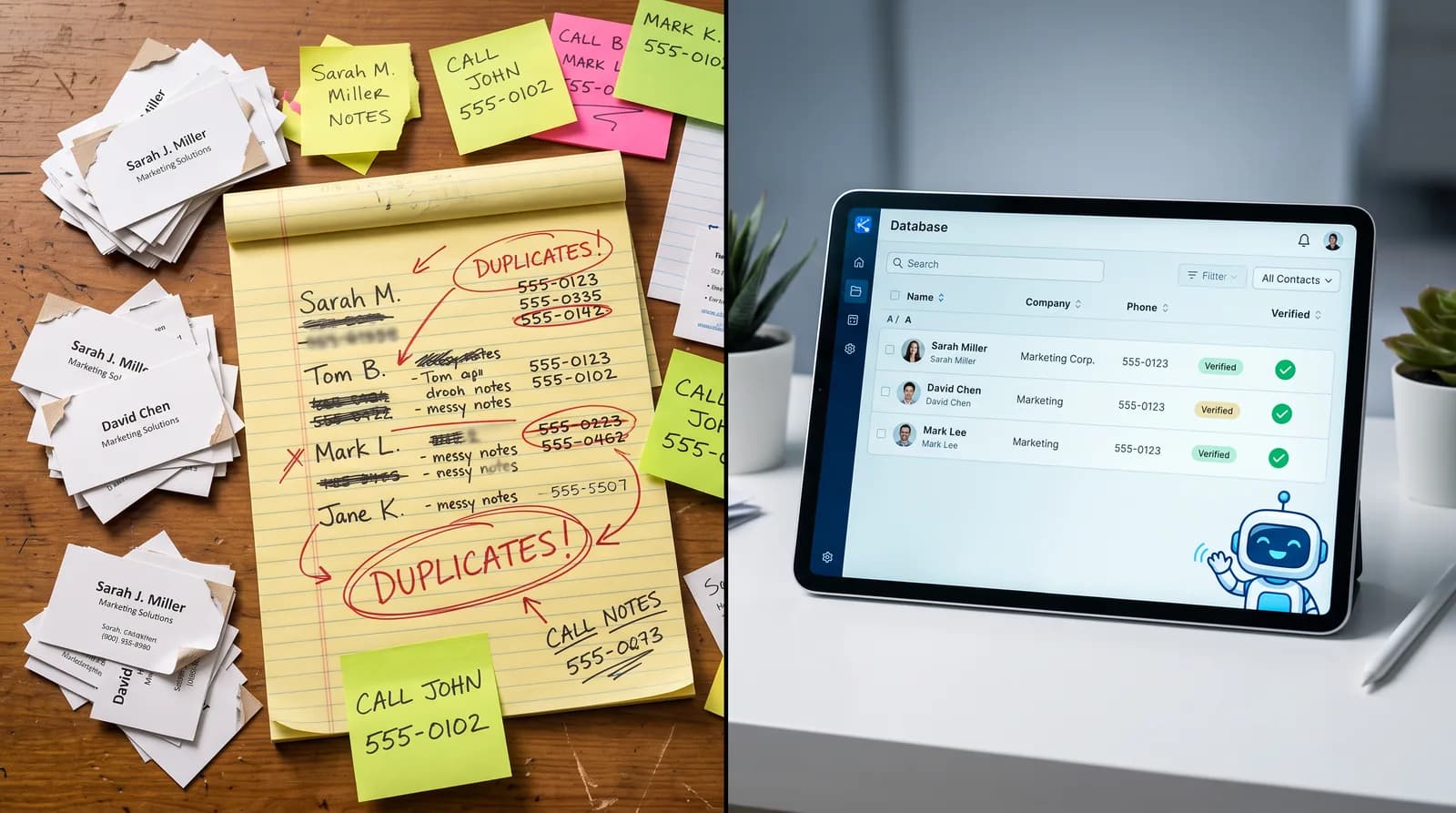
The system was pointed at your customer records and asked to do something useful. It found the same customer entered four times under three spellings. It found phone numbers in six formats. It found a "notes" field containing everything anyone ever thought was important, in no particular structure. It found 900 contacts with no indication of whether they are current customers, old leads, or vendors.
So it did what it could with what it had, and produced results that were confidently wrong. The follow-up went to the wrong person. The report counted one customer as four. The reminder went to a number that has been disconnected since 2021.
Roughly half of businesses now name data quality as their biggest obstacle to using AI, and it is the obstacle nobody wants to work on, because cleaning data is invisible, unglamorous work that produces no demo. It is also the difference between automation that compounds and automation that embarrasses you.
Why Your Data Got Messy in the First Place
This is not a sign of a badly run business. It is the natural result of running one for several years.
Many hands, no rules
Over the years, a dozen people have entered records. Each had their own conventions for capitalization, abbreviations, phone formatting, and what belongs in the notes field. Without enforced standards, entropy is guaranteed.
Migrations that carried the mess forward
Every time you changed CRMs or scheduling systems, records came across imperfectly. Fields that did not map got dumped into notes. Duplicates were created rather than merged. Nobody had time to clean it afterward, because the priority was getting back to work.
No single owner of the customer record
When the same customer exists in your CRM, your scheduler, your invoicing, and your email platform, each copy drifts independently. Update an address in one place and three others are now wrong. This is the same underlying condition described in our guide to systems that do not talk to each other, viewed from the data side.
Nothing was ever retired
Leads that went nowhere in 2019 sit alongside your best customers, indistinguishable. Employees who left are still assigned to accounts. Services you no longer offer are still attached to records. Data accumulates, and without a retirement process it becomes noise that drowns the signal.
What Bad Data Costs Once You Add AI
Messy data was tolerable when humans were the only ones reading it, because people compensate automatically. A receptionist looking at four versions of the same customer knows they are the same person. Automation does not, and that is what changes the economics.
Automation multiplies errors instead of absorbing them
A human sending 20 emails catches the duplicate. A system sending 2,000 sends four copies to the same customer, and does it again next month. Automation does not reduce error rates, it removes the human buffer that used to hide them.
AI answers become unreliable
If your AI receptionist looks up a customer and finds three conflicting records, it will pick one. It may greet a long-standing customer as a new lead, reference the wrong appointment, or miss that they already have a booking. Customers experience this as a business that does not know them, which is worse than a business that never claimed to.
Reporting becomes fiction
Duplicates inflate customer counts, deflate repeat rates, and distort every average you calculate. Decisions built on those numbers are wrong in ways that are hard to detect, because the reports look perfectly reasonable. It also makes honest AI ROI measurement and marketing attribution impossible, since both depend on counting each customer exactly once.
Staff quietly stop trusting the system
This one kills projects. When the CRM is unreliable, people start keeping their own notes, their own spreadsheets, their own lists. Now the real data lives outside the system entirely, and every automation you build operates on an incomplete picture.
How to Tell If Your Data Is Holding You Back
- Searching a common last name returns several records you suspect are the same person.
- Phone numbers appear in multiple formats, some with extensions typed into the number field.
- Critical information lives in free-text notes rather than structured fields.
- You cannot filter to "active customers in the last 12 months" in one click.
- Email campaigns bounce at a rate above a few percent.
- Staff maintain personal spreadsheets that duplicate what the CRM should hold.
- Two systems disagree about a customer's address or phone number.
- Nobody can say how many customers you actually have without qualifying the answer.
Three or more of these means a cleanup should precede your next automation project, not follow it.
Why the Usual Approaches Fail
"We will clean it as we go"
This never happens, because there is always something more urgent. Meanwhile every day adds new records to the pile in the same inconsistent way, so the problem grows faster than incidental cleanup can address it.
Assigning it to whoever has spare capacity
Deduplication requires judgment: are these two records the same person, or a parent and child at one address? Are these two companies the same, or genuinely different entities? Done without domain knowledge, a merge pass can destroy history in ways that are painful to reverse.
Running a bulk deduplication tool and hoping
Automated matching handles the obvious cases well and the ambiguous ones badly. Without a review step and a backup, an aggressive merge will combine records that should have stayed separate, and you will not discover it until a customer notices.
Starting fresh with a new system
Tempting, but you either abandon your history, which is one of your most valuable assets, or import the mess into a clean system and recreate the same problem with a new interface. The mess follows the data, not the software.
What a Proper Data Cleanup Looks Like
Step 1: audit before changing anything
Measure the current state: record counts by system, estimated duplicate rate, completeness by field, format inconsistencies, and staleness. You need this both to size the work and to prove afterwards that it worked. Take a full backup before any change, without exception.
Step 2: define the standard you are cleaning toward
Decide what a good record looks like: which fields are required, the format for phone numbers and addresses, the naming convention, the picklist of valid statuses, and which system owns each field. Cleaning without a target standard just produces a differently shaped mess.
This is also where you decide what belongs in structured fields rather than notes, which is what makes the data usable by automation later.
Step 3: normalize first, then deduplicate
Order matters. Standardize formats before matching, because duplicates are far easier to detect once phone numbers, addresses, and names follow one convention. Then match conservatively: auto-merge only exact, high-confidence matches, and route ambiguous pairs to human review.
Step 4: fill the gaps and retire the dead weight
Complete missing critical fields where they can be recovered from other systems, validate emails and phone numbers, and archive records that are genuinely inactive. Archiving rather than deleting preserves history while removing noise from working views and automations.
Step 5: prevent it from happening again
This is the step that determines whether the cleanup lasts. Required fields at entry, format validation, duplicate detection at creation time, picklists instead of free text where possible, and a single system designated as the owner of each record. Add a quarterly hygiene review with a named owner.
A cleanup without prevention buys you about eighteen months. Prevention is what makes it permanent.
Where AI Helps With the Cleanup Itself
There is a pleasing symmetry here: the technology that demands clean data is also good at producing it. Used carefully, automation handles the parts of cleanup that are tedious for people:
- Fuzzy matching to surface likely duplicates that exact-match rules miss, presented for human confirmation.
- Format normalization across phone numbers, addresses, and names at scale.
- Extraction from free text, pulling structured facts out of years of accumulated notes into proper fields.
- Anomaly detection, flagging records that look wrong such as impossible dates or mismatched area codes.
- Ongoing monitoring, catching quality drift within days rather than years.
The rule throughout is that automation proposes and a human disposes on anything ambiguous. Fully automated merging without review is how businesses lose data they cannot get back.
What Changes After the Cleanup
- Automations start working as designed, because they can identify customers reliably.
- Reporting becomes trustworthy, since each customer is counted once.
- Marketing improves immediately, with lower bounce rates, no duplicate sends, and accurate segmentation.
- Customer experience gets noticeably better, because your systems recognize people correctly.
- Staff use the system again, and the shadow spreadsheets disappear.
- Future projects get faster, since every subsequent automation starts from a solid foundation.
That last benefit is the reason to do this first. Data cleanup is not a project with a single payoff. It is the multiplier on every automation you build afterward, which is why it belongs at the front of any plan for getting started with automation.
Why Businesses Bring This to PA Digital Growth
We do this work because we have seen what happens when it is skipped. An automation program built on unreliable records produces exactly the kind of visible failure that makes a business swear off automation for two years, and the cause is almost always traceable to the data underneath.
Our approach is audit, standard, normalize, review-assisted deduplication, and prevention rules, with your team making the judgment calls on ambiguous records because they know the customers. Then we put ongoing hygiene monitoring in place so it stays clean rather than decaying back over the next two years.
It is unglamorous work, and it is the reason the automation we build afterward actually holds up in production.
The Foundation Nobody Brags About
Nobody has ever been excited about a data cleanup project. There is no demo, no impressive screen to show the team, and the result is that things simply work rather than something new appearing.
But every AI system you deploy will be exactly as good as the data it reads. You can spend the money on cleanup now, or spend considerably more later on automation that produces confident, well-formatted, wrong answers at scale.
Book a free AI Business Efficiency Assessment and we will assess the state of your customer data, show you exactly what would break if you automated on top of it today, and give you a prioritized cleanup plan.
Frequently Asked Questions
Why does data quality matter so much for AI?
Because automation cannot compensate the way people do. A human reading four versions of the same customer knows they are one person. A system treats them as four, and then acts on that four times over. Poor data does not slow automation down, it makes automation actively wrong at scale.
How long does a CRM data cleanup take?
For a typical small or mid-sized business with tens of thousands of records, expect four to eight weeks including audit, standard setting, normalization, reviewed deduplication, and prevention rules. Volume matters less than how many systems hold customer data and how much critical information is buried in free-text notes.
Should we clean our data before or after implementing AI?
Before, in almost every case. Deploying automation on unreliable records produces visible customer-facing errors that damage trust in the whole program. If timing forces overlap, start with a narrowly scoped automation that does not depend on customer history while the cleanup runs in parallel.
Can we just delete old records instead of cleaning them?
Archive rather than delete. Historical records support reporting, retention analysis, and reactivation campaigns, and some industries have retention obligations. Archiving removes noise from daily views and automations while keeping the history available when you need it.
How do we stop the data from getting messy again?
Prevention at the point of entry: required fields, format validation, duplicate checks when records are created, picklists in place of free text, and one designated owner system per field. Add a quarterly review with a named owner. Without these, a cleanup typically degrades noticeably within about eighteen months.
Is it safe to let software merge duplicate records automatically?
Only for exact, high-confidence matches, and only with a verified backup in place. Ambiguous matches such as family members sharing an address or similarly named companies should always go to human review. Aggressive automatic merging is the most common way businesses permanently lose customer history.
What if our important information is all in notes fields?
That is extremely common and it is now solvable. Language models are good at reading unstructured notes and extracting structured facts such as equipment installed, service history, preferences, and key dates into proper fields, with human spot-checking on a sample. This is often the single highest-value part of a cleanup.
How much data do we need before AI is worthwhile?
Less than most owners assume. Operational automation such as answering calls, booking appointments, and following up needs accurate current information, not large historical volumes. Predictive uses benefit from more history, but the practical constraint for most businesses is accuracy and structure rather than quantity.
Want results like these for your brand?
Book a free 30-minute revenue audit with PA Digital Growthand we'll map your fastest path to growth.
Book a free audit