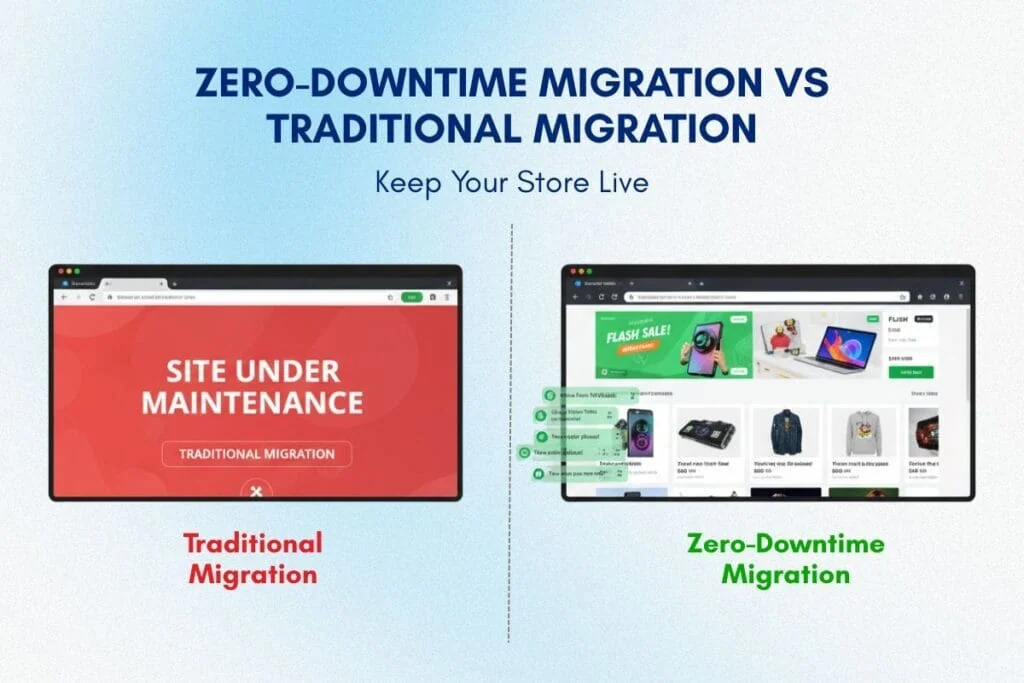
The "site under maintenance" message is revenue death. Every minute your store shows that screen, you're losing sales. Customers abandon. Competitors gain. Trust erodes. For a $5M annual store, even 4 hours of downtime during peak traffic can cost $10K-$20K in lost revenue.
Most platform migrations accept this loss as inevitable. They schedule maintenance windows, notify customers, and cross their fingers that the cutover happens smoothly. But elite ecommerce brands don't accept downtime; they execute a zero-downtime migration strategy that keeps stores live, orders flowing, and revenue protected throughout the entire transition.
This guide reveals the technical framework behind a zero-downtime migration strategy: read-only mode deployment, DNS switching without service interruption, final delta synchronization, and staged rehearsal testing that eliminates launch-day surprises. If you're migrating to Shopify Plus and downtime isn't an option, this is your blueprint.
What Is Zero-Downtime Migration, And Why Most Migrations Fail to Achieve It?
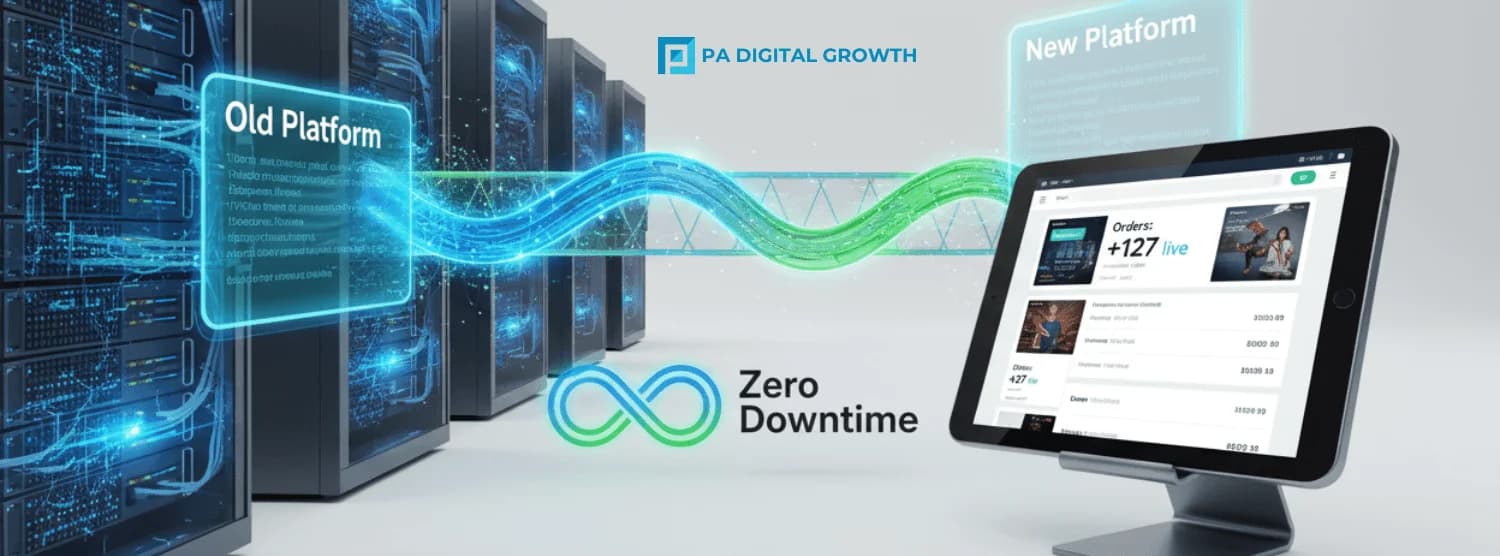
Zero-downtime migration strategy is a technical approach that keeps your e-commerce store operational and accepting orders during the entire platform transition. Customers browse, add to cart, and complete purchases without interruption, even while your backend infrastructure switches from the old platform to the new one.
Traditional migrations force a binary choice: old platform OR new platform. You flip a switch. During that flip, the store goes dark. Seamless cutover eliminates the binary. It orchestrates a seamless handoff where both platforms coexist briefly, traffic routes intelligently, and customers never see a maintenance page.
Why Most Migrations Accept Downtime And Why You Shouldn't.
Teams accept downtime for three reasons:
1. They believe it's technically unavoidable
Legacy thinking assumes data can't sync while customers are active. This was true 10 years ago. Modern zero-downtime deployment techniques (read-only mode, delta sync, DNS cutover) make it unnecessary.
2. They underestimate the cost
"4 hours at 2 AM" sounds minimal. But peak traffic patterns vary. International customers shop during your "off hours." Flash sales happen. Traffic surges unpredictably. Even planned downtime carries hidden revenue risk.
3. They lack technical expertise
Executing downtime-free go-live requires deeper technical planning: staging environment validation, rollback procedures, real-time monitoring, and contingency workflows. Many agencies take the easier path and schedule maintenance windows.
For enterprise brands where revenue continuity is critical, zero-downtime deployment isn't optional; it's the standard.
How Does Zero-Downtime Migration Work? The Technical Architecture Explained
Understanding seamless cutover requires breaking down the technical components that make downtime-free transitions possible.
Read-Only Mode: The Bridge Between Platforms
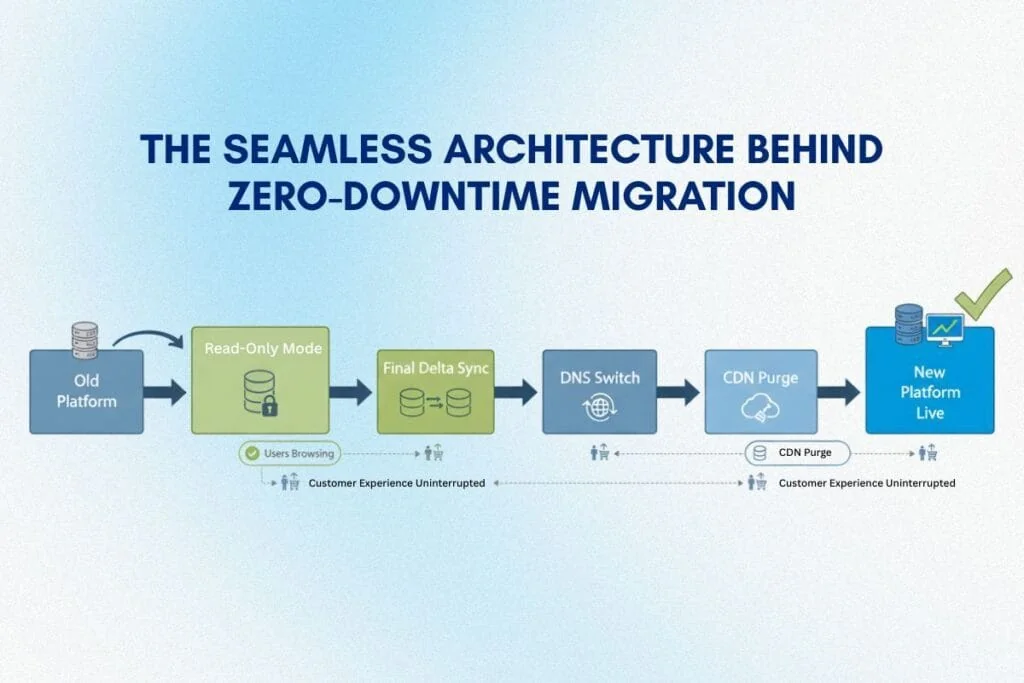
During the critical cutover window, your old platform enters read-only mode. Customers can browse products, view their cart, and navigate, but some may temporarily be unable to complete checkout.
Why this matters: Your team completes the final data sync (orders, inventory, customer updates from the past 24-48 hours) without new transactions creating conflicts. Once sync completes and validation passes, you switch DNS to the new platform. Total customer-facing disruption: often within minutes, typically 10-15 minutes, where checkout is unavailable.
Technical implementation: For Magento, WooCommerce, or BigCommerce, read-only mode requires custom code or plugins that disable checkout while keeping the site browsable. For Shopify Plus migrations, PA Digital Growth implements password-protected collections or custom checkout blocks during the sync window.
Cart and session preservation: During read-only windows, we capture active carts and trigger "your cart is ready" emails or SMS post-cutover to recover purchase intent. This minimizes abandoned cart impact during the brief transition.
How Do You Switch DNS With Zero Downtime?
DNS (Domain Name System) determines where traffic goes when someone types your URL. During migration, you're changing the DNS pointer from Old Server → New Server.
The challenge: DNS propagation isn't instant. Changes take 5 minutes to 24 hours to reach all global DNS servers. During propagation, some customers hit the old site, others hit the new site.
Zero-downtime DNS strategy:
Lower your DNS TTL (Time to Live) to 300 seconds (5 minutes) 48 hours before migration. This tells DNS servers to refresh your site's location every 5 minutes instead of every 24 hours. When you switch DNS on go-live day, propagation completes in 5-10 minutes globally instead of hours.
Cloudflare's DNS TTL documentation provides technical depth on optimizing DNS propagation for migrations.
What Is a Delta Sync in E-commerce Migration?
Your bulk data migration happens days before go-live (products, customers, historical orders). But between bulk migration and go-live, your old store remains active, and new orders, inventory changes, and customer signups accumulate.
Final delta sync captures only the changes since the bulk migration. This is a targeted, fast sync (typically 10-30 minutes) that runs during the read-only window. You're not moving 10 years of data, you're moving 24-48 hours of incremental changes.
Technical requirements: Delta sync requires identifying changed records (via timestamps, database logs, or API change tracking). For Shopify Plus migrations, PA Digital Growth uses Shopify APIs to push only new/updated records, minimizing sync time and error risk.
Staging Environment Rehearsal: The Dress Rehearsal That Prevents Disasters
You don't launch a Broadway show without dress rehearsals. You don't execute a zero-downtime migration strategy without staging rehearsals.
A staging environment is an exact replica of your new platform where you test the entire cutover process multiple times before going live. You simulate:
- Read-only mode activation on the old site
- Final delta sync execution
- DNS switch and traffic routing
- New site performance under load
- Rollback procedure if something fails
Teams that skip staging rehearsals discover problems on launch day, when fixing them causes downtime. Teams that rehearse 2-3 times in staging catch edge cases early and launch confidently.
The 6-Phase Zero-Downtime Migration Strategy (Step-by-Step)
Here's the exact framework PA Digital Growth uses to execute a zero-downtime migration strategy for enterprise e-commerce brands.
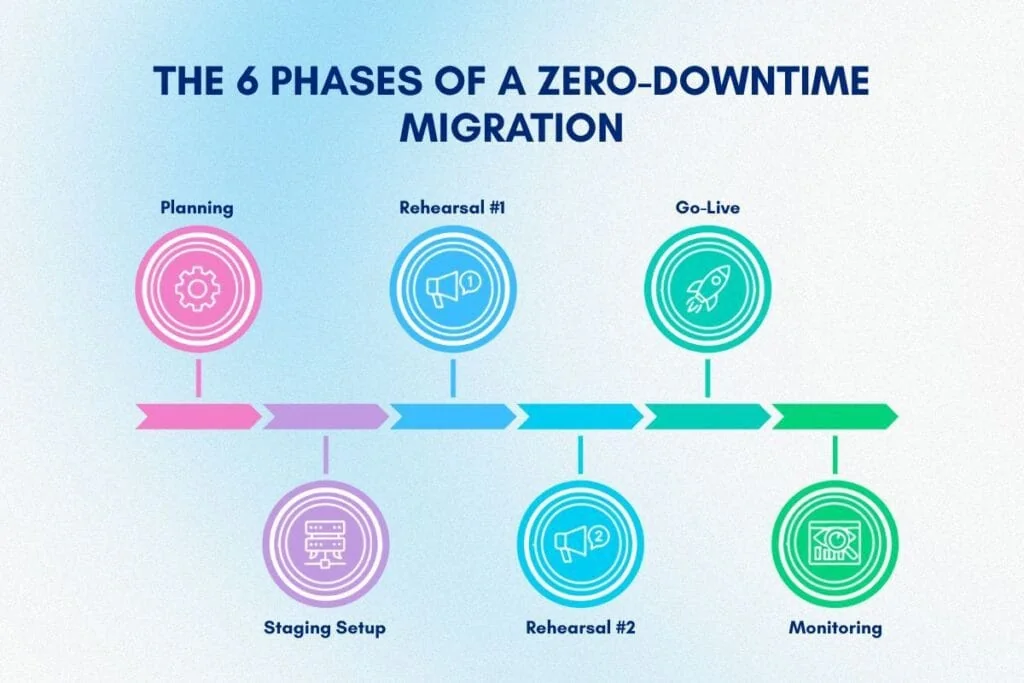
Phase 1: Pre-Migration Planning & Risk Assessment (Weeks 1-2)
Goal: Identify downtime risks and design mitigation strategies.
Key activities:
- Audit current platform architecture (hosting, database, integrations)
- Map peak traffic patterns (identify lowest-risk cutover windows)
- Document all third-party integrations that must remain live (payment gateways, shipping APIs, ERP systems)
- Validate payment gateway tokens and 3DS flows in rehearsal; confirm fraud/risk settings mirror production
- Define rollback criteria (what triggers a go/no-go decision)
- Establish success metrics (uptime %, transaction continuity, zero order loss)
Deliverable: A detailed e-commerce migration plan with cutover timeline, risk mitigation steps, and rollback procedures.
Phase 2: Staging Environment Setup & Testing (Weeks 3-4)
Goal: Build and validate the new platform in isolation before touching production.
Key activities:
- Deploy new platform in staging environment
- Perform bulk data migration (products, customers, historical orders)
- Configure integrations (payment, shipping, ERP) in staging
- Test checkout flows end-to-end (50+ test orders across payment methods, countries, edge cases)
- Validate performance under simulated load (traffic spikes, large catalogs)
Deliverable: A fully functional staging site that mirrors production exactly.
Phase 3: Cutover Rehearsal #1 (Week 5)
Goal: Practice the entire cutover process in staging to identify gaps.
Key activities:
- Simulate read-only mode on old platform (staging replica)
- Execute delta sync script (capture data changes since bulk migration)
- Switch staging DNS to new platform
- Test new platform under traffic (load testing)
- Time each step (total cutover: target under 30 minutes)
- Document issues and refine process
Deliverable: Rehearsal report with identified issues and fixes.
Phase 4: Cutover Rehearsal #2 (Week 6)
Goal: Re-run cutover with refined process; aim for zero issues.
Key activities:
- Repeat Phase 3 with fixes applied
- Test rollback procedure (can we revert to the old platform if needed?)
- Validate data parity post-sync (orders, inventory, customer data match)
- Confirm monitoring tools are tracking uptime and transaction success
Deliverable: Final cutover runbook with exact steps, timings, and owner assignments.
Phase 5: Production Go-Live (Week 7, Planned Low-Traffic Window)
Goal: Execute the cutover in production with zero customer-facing downtime.
Go-live timeline (typical 2-hour window):
T-48 hours: Lower DNS TTL to 300 seconds
T-2 hours: Team assembles; final go/no-go check
T-60 min: Enable read-only mode on old platform (customers can browse, not checkout)
T-55 min: Begin final delta sync (orders, inventory, customer updates from past 48 hours)
T-30 min: Validate delta sync (data parity checks)
T-15 min: Switch DNS to new platform
T-10 min: Monitor traffic routing (80% on new platform)
T-5 min: Disable read-only mode; new platform fully live
T-0 min: 100% traffic on new platform; old platform decommissioned
Real-time monitoring: Order completion rates, checkout errors, page load times, and payment gateway connectivity.
Rollback trigger: If order success rate drops below 95% or critical integration fails, revert DNS to the old platform within 5 minutes.
Phase 6: Post-Launch Monitoring & Optimization (First 48 Hours)
Goal: Ensure stability and catch edge cases immediately.
Key activities:
- Monitor transaction volume and success rates hourly
- Check for integration failures (payment gateway, shipping API, ERP sync)
- Validate inventory accuracy (no oversells, stock levels correct)
- Test checkout across devices, browsers, and regions
- Review server logs for errors
- Compare revenue to the same day previous week (baseline check)
Deliverable: Post-launch report confirming zero revenue disruption and successful cutover.
Common Zero-Downtime Migration Mistakes And How to Avoid Them
Even a well-planned zero-downtime deployment can fail if teams make these mistakes.
Mistake 1: Skipping Staging Rehearsals
Some teams build staging environments but never rehearse the actual cutover. They assume "if staging works, production will work."
Reality: Production has variables, staging doesn't have real customer traffic, third-party API latency, and unexpected data edge cases. Rehearsals surface these issues before they cause downtime.
Solution: Run at least 2 full cutover rehearsals in staging, timing every step and fixing every issue before production go-live.
Mistake 2: No Rollback Plan
Teams focus on making the migration work, but don't plan for failure. What if the new platform's payment gateway fails? What if the delta sync corrupts data?
Reality: Without a rollback plan, you're stuck fixing problems in production while customers can't buy. Revenue bleeds.
Solution: Define rollback criteria before go-live. Practice reverting DNS back to the old platform in under 5 minutes. Keep the old platform operational for 24-48 hours post-launch as a fallback.
Mistake 3: Ignoring CDN and Cache Management
Content Delivery Networks (CDNs) cache your site's pages globally. When you switch platforms, cached pages may still show the old site even after DNS updates.
Reality: Customers see stale pages. Check out breaks. Confusion spreads.
Solution: Purge CDN cache immediately after DNS switch. Cloudflare's cache purge documentation explains how to clear cached content globally within seconds.
Mistake 4: Poor Communication with Customers
Even with seamless cutover, customers may experience brief checkout interruptions during read-only mode (typically 10-15 minutes).
Reality: Customers see "checkout unavailable" and assume the site is broken. They email support. Frustration builds.
Solution: Display a banner during read-only mode: "We're upgrading! Checkout will be available in 10 minutes. Browse now, buy soon." Transparency prevents panic.
How Long Should You Monitor After a Zero-Downtime Launch?
Even with perfect execution, edge cases emerge post-launch. Customers discover unique scenarios. Integrations behave differently under real traffic.
Solution: Monitor actively for at least 48-72 hours post-launch. Check order success rates hourly. Watch for integration failures. Review server logs. Compare revenue to historical baselines. The first 48 hours reveal issues, the first 2 hours don't.
How to Implement Zero-Downtime Database Migration for E-commerce
Database migration is the most technically complex part of a zero-downtime migration strategy. E-commerce databases contain millions of records of products, orders, customers, and inventory. Moving this data without downtime requires careful orchestration.
Database Replication: Keeping Data in Sync
Database replication creates a real-time or near-real-time copy of your old database on the new platform. Changes made on the old platform (new orders, inventory updates) replicate to the new database within seconds or minutes.
How it works:
- Old database (master) remains live and writable
- New database (replica) receives continuous updates
- When cutover happens, you stop writes to the old database, wait for replication lag to clear (usually under 1 minute), then switch traffic to the new database
Technical considerations:
Replication requires compatible database engines or custom replication scripts. For Shopify Plus migrations, PA Digital Growth uses Shopify APIs for incremental data sync, effectively replicating order and inventory changes without database-level access.
Failover Strategy: What If the New Database Fails?
Failover is your Plan B. If the new database encounters errors during cutover (corrupted data, connection failures, performance issues), you need instant failover to the old database.
Failover design:
- Keep the old database operational for 24-48 hours post-launch
- Monitor new database health metrics (query response time, error rates, connection pool usage)
- If the error rate exceeds 5% or the query time degrades, trigger automatic failover to the old database via DNS revert
This ensures customers never experience failed transactions, even if the new platform has unexpected issues.
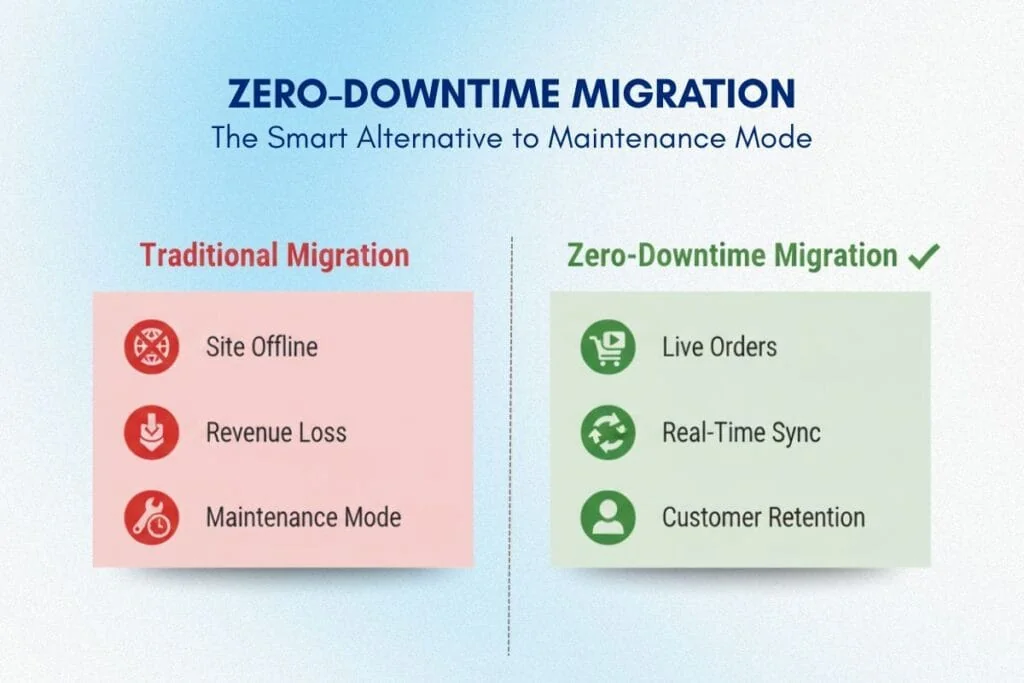
Zero-Downtime Migration vs. Traditional Migration: A Comparison
| Criteria | Traditional Migration | Zero-Downtime Migration |
| Downtime | 4-12 hours | 0-15 minutes (brief read-only) |
| Revenue Impact | $10K-$50K lost (for $5M annual store) | Near-zero revenue loss |
| Customer Experience | "Site under maintenance" message | Seamless (minor checkout pause) |
| Technical Complexity | Moderate | High (requires rehearsals, delta sync, rollback plans) |
| Risk | High (all-or-nothing cutover) | Low (staged, rehearsed, rollback-ready) |
| Staging Rehearsals | Optional (rarely done) | Mandatory (2-3 rehearsals) |
| DNS Optimization | No TTL adjustments | TTL lowered 48 hours pre-launch |
| Rollback Plan | Often absent | Required and tested |
| Post-Launch Monitoring | Basic (reactive) | Real-time (proactive) |
| Ideal For | Small stores, low traffic | Enterprise brands, high revenue, 24/7 operations |
For brands where revenue continuity is non-negotiable, a zero-downtime migration strategy eliminates the trade-off between upgrading platforms and maintaining operations.
Why Zero-Downtime Approach Matters for Shopify Plus Migrations
Shopify Plus migrations uniquely benefit from zero-downtime deployment because Shopify's infrastructure is designed for high availability and seamless DNS switching.
Shopify Plus Advantages for Zero-Downtime Migration
1. API-first architecture
Shopify's APIs support real-time data sync without database-level access. PA Digital Growth uses these APIs for delta sync, pushing only changed records (orders, inventory, customers) in minutes.
2. Global edge network with instant cache purging
Shopify's global edge network allows instant cache invalidation. When you switch DNS, cached pages clear globally within seconds, ensuring customers see the new platform immediately.
3. 99.99% uptime SLA
Shopify's infrastructure handles traffic spikes automatically. Your new platform is stable and performant from minute one, reducing rollback risk.
4. Safe previews via development stores and sandbox environments
Shopify Plus supports safe previews via development stores, theme previews, and sandbox environments that emulate production for rehearsals. This infrastructure is built in, not a custom setup.
These capabilities make Shopify Plus migration services particularly well-suited for zero-downtime execution when handled by certified partners who understand the technical nuances.
For strategic context on why Shopify Plus is the preferred destination for enterprise migrations, review our comprehensive e-commerce replatforming guide.
PA Digital Growth's Zero-Downtime Migration Process
At PA Digital Growth, a zero-downtime migration strategy isn't a nice-to-have; it's our standard operating procedure for enterprise Shopify Plus migrations.
Our Proven Process
1. Pre-migration risk assessment
We audit your current platform, traffic patterns, and integrations to identify downtime risks and design mitigation strategies specific to your business.
2. Staging environment setup
We build a complete replica of your new Shopify Plus store in staging, migrate bulk data, and validate all integrations before touching production.
3. Two cutover rehearsals
We practice the entire go-live process twice in staging, timing every step, testing rollback procedures, and refining the runbook until execution is flawless.
4. Planned cutover window
We execute go-live during your lowest-traffic window (typically late night or early morning in your primary market). Read-only mode lasts 10-15 minutes. Total cutover: typically under 30 minutes.
5. Real-time launch monitoring
Our team monitors order success rates, payment gateway connectivity, and site performance in real-time during cutover. If any metric falls below the threshold, we trigger rollback within 5 minutes.
6. 48-hour post-launch support
We don't disappear after launch. Our team monitors your store for 48 hours, catching edge cases and optimizing performance before transitioning to standard support.
Why This Matters for Your Business
Zero-downtime deployment protects your revenue, customer trust, and competitive advantage. While competitors schedule maintenance windows and cross their fingers, you upgrade seamlessly, gaining Shopify Plus's automation, performance, and scalability without losing a single sale.
If you're evaluating migration options and downtime isn't acceptable, PA Digital Growth's proven downtime-free go-live framework eliminates the risk. We've executed dozens of seamless migrations for enterprise brands, protecting millions in revenue continuity.
For a deeper understanding of how SEO equity transfers during migration without traffic loss, explore our comprehensive SEO migration checklist.
Ready to Migrate Without Downtime? PA Digital Growth Has You Covered
Traditional platform migrations force a choice: maintain operations OR upgrade infrastructure. Zero-downtime migration strategy eliminates that trade-off. Your store stays live. Orders keep flowing. Revenue continues uninterrupted, while your backend infrastructure seamlessly transitions to Shopify Plus.
PA Digital Growth specializes in zero-downtime deployment for enterprise ecommerce brands. Our process, staging rehearsals, delta sync, DNS optimization, and real-time monitoring, has protected millions in revenue continuity across dozens of migrations.
If you're migrating to Shopify Plus and downtime isn't an option, let's talk. Book a free migration strategy call, and we'll show you exactly how we'll keep your store live and your revenue protected throughout the entire transition.
READY TO MIGRATE WITHOUT DOWNTIME?
PA Digital Growth's zero-downtime migration strategy keeps your store live and your revenue flowing during platform migration. No maintenance pages. No lost sales. Just a seamless transition to Shopify Plus. Book Your Free Migration Strategy Call Today.
Frequently Asked Questions
What is a zero-downtime migration strategy and how does it work?
A zero-downtime migration strategy is a planned approach to moving your e-commerce store to a new platform while keeping your site operational and accepting orders throughout the entire transition. It works by running your old and new systems in parallel during final testing, scheduling the DNS cutover during low-traffic windows, implementing real-time data synchronization for inventory and orders, and having rollback procedures ready if issues arise. Most zero-downtime migrations execute the final switchover in 15-30 minutes during pre-planned maintenance windows, minimizing customer-facing disruption to near-zero.
How long does a zero-downtime migration take from start to finish?
A complete zero-downtime migration strategy typically takes 8-12 weeks from initial audit to go-live for mid-market ecommerce stores, including planning (2 weeks), data migration and platform setup (4-6 weeks), testing and rehearsal (2-3 weeks), and the final cutover execution (1-2 hours). Complex enterprise migrations with heavy customization, multiple integrations, or large product catalogs may extend to 12-16 weeks. The actual "downtime" during cutover is typically 15-30 minutes of read-only mode, which customers rarely notice if timed correctly.
What are the biggest risks during e-commerce platform migration?
The biggest risks during ecommerce platform migration include lost orders during cutover (if checkout breaks), inventory sync failures causing oversells, broken payment gateway integrations preventing transactions, SEO ranking drops from improper 301 redirects, and customer data corruption affecting order history or saved payment methods. Additionally, integration failures with ERP, OMS, or 3PL systems can cause fulfillment disruptions that persist for days post-launch. A proper zero-downtime migration strategy mitigates these risks through
Can I migrate my e-commerce store without any downtime at all?
Yes, you can migrate your e-commerce store with zero customer-facing downtime using a zero-downtime migration strategy that involves parallel system operation, scheduled DNS switching during low-traffic windows, and real-time data synchronization between old and new platforms. While achieving literally zero seconds of disruption is challenging, best practices limit customer impact to 15-30 minutes of read-only mode (browsing works, checkout temporarily paused) during the final cutover. Most customers never notice the transition when executed during 2-5 AM local time in your primary market.
What is the best time to schedule a platform migration cutover?
The best time to schedule a platform migration cutover is during your lowest-traffic window-typically between 2 AM and 5 AM in your primary market's timezone on a Tuesday, Wednesday, or Thursday (avoid Mondays and Fridays when technical support availability may be limited). Analyze your Google Analytics traffic patterns over 90 days to identify the precise lowest-traffic 3-hour window, and avoid peak shopping periods like Black Friday, Cyber Monday, holiday seasons, or major product launches. A zero-downtime migration strategy executed during these optimal windows minimizes revenue risk and customer disruption.
How do I ensure orders don't get lost during migration?
Ensure orders don't get lost during migration by implementing a read-only mode on your old platform during final data sync, running parallel order processing systems temporarily, using order queue systems to hold and process orders immediately after cutover, and maintaining real-time database synchronization until DNS fully propagates. Your zero-downtime migration strategy should include order reconciliation checks comparing orders received on both platforms, automated alerts for any missing order IDs, and manual review of the 24-hour window around cutover. Most professional migrations implement order "freeze" periods of 15-30 minutes where browsing continues but checkout is temporarily disabled.
What is a migration rehearsal and why is it critical?
A migration rehearsal is a full dry-run of your cutover process in a staging environment, where your team executes every step of the final switchover-data sync, DNS changes, integration testing, order processing-exactly as planned for launch day, identifying issues before they affect customers. It's critical because rehearsals reveal hidden problems like slow data sync times, broken integration endpoints, incorrect DNS propagation sequences, or team communication gaps that would otherwise cause downtime or data loss during the real launch. Zero-downtime migration strategies typically require 2-3 rehearsals to achieve confidence and sub-30-minute execution times.
How do I handle inventory synchronization during platform migration?
Handle inventory synchronization during platform migration by implementing real-time inventory sync between your old and new platforms during the transition period, setting conservative safety stock buffers to prevent oversells, using your OMS or ERP as the single source of truth, and running inventory reconciliation reports hourly during the 48-hour cutover window. Your zero-downtime migration strategy should include automated inventory locks for products with discrepancies, manual verification of high-velocity SKUs, and immediate rollback procedures if sync failures occur. Post-cutover, monitor inventory accuracy for 7 days to catch any delayed sync issues.
What tools do I need for a successful zero-downtime migration?
Essential tools for a successful zero-downtime migration strategy include database migration tools (for secure data transfer), DNS management platforms (for quick cutover and rollback), uptime monitoring services (to track site availability in real-time), staging environments (for rehearsals), load testing tools (to validate performance under traffic), and real-time communication platforms like Slack for team coordination during launch. Additional tools include order queue systems, inventory sync middleware, automated testing suites for critical workflows (checkout, payment processing), and rollback scripts pre-written and tested. Professional migrations also use runbook documentation that sequences every action with assigned owners and time estimates.
What should I monitor immediately after migration goes live?
Immediately after migration goes live, monitor checkout completion rates (to catch payment gateway failures), order submission success rates (to identify lost orders), site uptime and response times (to detect performance issues), error logs for 404s or 500 errors (indicating broken pages or integrations), payment processor connections (to ensure transactions are processing), and inventory sync accuracy (to prevent oversells). Your zero-downtime migration strategy should include a 24-hour "war room" where technical leads watch real-time dashboards, respond to alerts within minutes, and have rollback authority if critical issues emerge. Set automated alerts for traffic drops exceeding 10%, checkout abandonment spikes, or payment processing failures.
Want results like these for your brand?
Book a free 30-minute revenue audit with PA Digital Growthand we'll map your fastest path to growth.
Book a free audit