Shopify Plus SEO Strategy: How Enterprise Stores Rank Faster in 2025
For fast-scaling enterprise brands, organic search isn’t just a traffic channel; it’s the engine that drives predictable long-term revenue growth. Paid ads fluctuate, algorithms change, and ROAS becomes unreliable. But SEO, when executed correctly at scale, produces consistent conversions, lower acquisition costs, and long-term authority. To achieve this in 2025, enterprise brands need a precise Shopify Plus SEO Strategy: leveraging the platform's technical foundation and SEO-ready architecture to rank faster, maintain stronger visibility, and dominate competitive keywords.
However, the SEO game has changed. Google’s Helpful Content evolution, AI-powered search experiences, mobile-first indexing, and ecommerce SERP competition mean that executing a successful Shopify Plus SEO Strategy requires a far more strategic and technical playbook than ever before. Shopify Plus stores cannot rely on traditional product-page SEO, basic keyword optimization, or outdated tactics. They need a deep, scalable SEO infrastructure that handles large catalogs, multi-store architectures, high crawl demand, and international variations, all while providing the speed and user experience Google rewards.
This guide explores exactly how enterprise stores can use Shopify Plus to rank faster in 2025, the strategies that matter most, and the technical frameworks required to build a future-proof organic growth system.
Table of Contents
Why Enterprise SEO on Shopify Plus Needs a Different Approach
Enterprise stores face challenges that small Shopify shops never experience. Massive product catalogs, variant-heavy collections, complex filtering structures, multiple URLs, international storefronts, and deep internal linking requirements all create SEO hurdles. Search engines need clean architecture, fast performance, proper canonicalization, and optimized crawl paths to understand enterprise-scale Shopify stores.
Shopify Plus provides the technical foundation to solve these challenges, but only when combined with an enterprise SEO strategy built around speed, structure, and intent. Without this, large stores risk duplicate content issues, crawl inefficiencies, slow mobile performance, and fragmented ranking signals.
Enterprise SEO isn't about simply optimizing product titles or descriptions. It’s about creating a scalable architecture that Google can crawl, index, and trust. And in 2025, enterprise teams must think about SEO through the lens of technical performance, content depth, structured data, automation, and global consistency, all supported by the unique capabilities of Shopify Plus.
Technical SEO on Shopify Plus: The Foundation of Fast Rankings
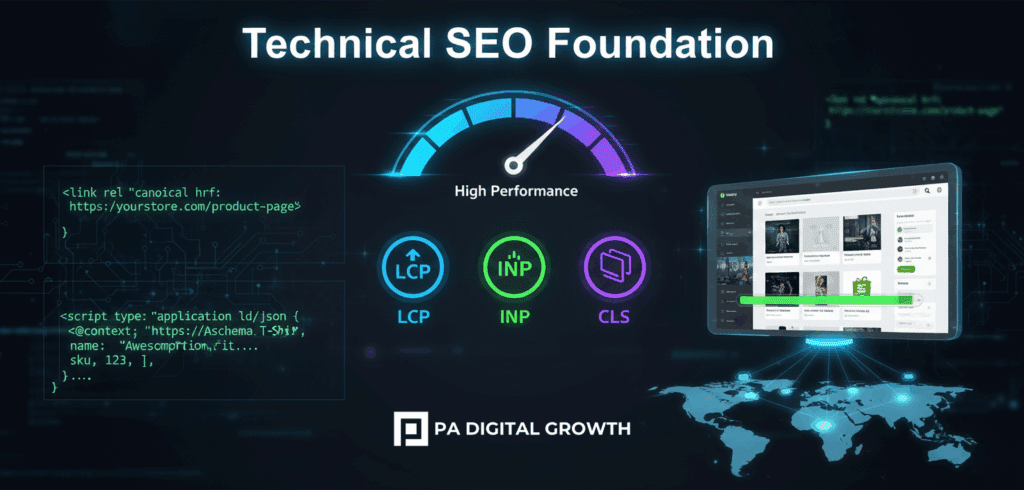
The first step toward ranking faster in 2025 is establishing a strong technical foundation. Shopify Plus stores benefit from high-speed hosting, secure infrastructure, and mobile-ready themes, but enterprise websites must go further to remove friction and improve crawlability.
Site Performance and Core Web Vitals
Site performance is one of the strongest ranking factors. Shopify Plus helps by providing robust CDN coverage, optimized checkout architecture, and fast server response times, but the real improvements come from minimizing theme bloat, reducing JavaScript dependencies, optimizing image delivery, and removing redundant apps that slow down page rendering. Enterprise brands should ensure their stores align with Core Web Vitals benchmarks, particularly in areas like Largest Contentful Paint and Interaction to Next Paint, where high SKU volume can impact load times.
Controlling Duplicate Content at Scale
Another essential element is controlling duplicate content. Shopify’s URL patterns can create multiple paths for the same product or collection, which dilutes SEO value. Shopify Plus merchants must implement a clean canonical strategy, ensure filtering and faceted navigation do not create infinite crawl paths, and use Shopify’s updated theme architecture to avoid multiple URLs for the same content.
Scalable Structured Data
Structured data also plays a major role in ranking faster. Shopify Plus allows brands to embed advanced schema markup, including product, review, FAQ, breadcrumb, and offer data. These enhancements help search engines better understand content while increasing click-through rates (CTR) from SERPs.
Finally, enterprise brands must integrate scalable SEO automation using Shopify Functions and custom logic to ensure ongoing SEO consistency across thousands of pages.
Powerful Site Architecture & Internal Linking for Enterprise SEO
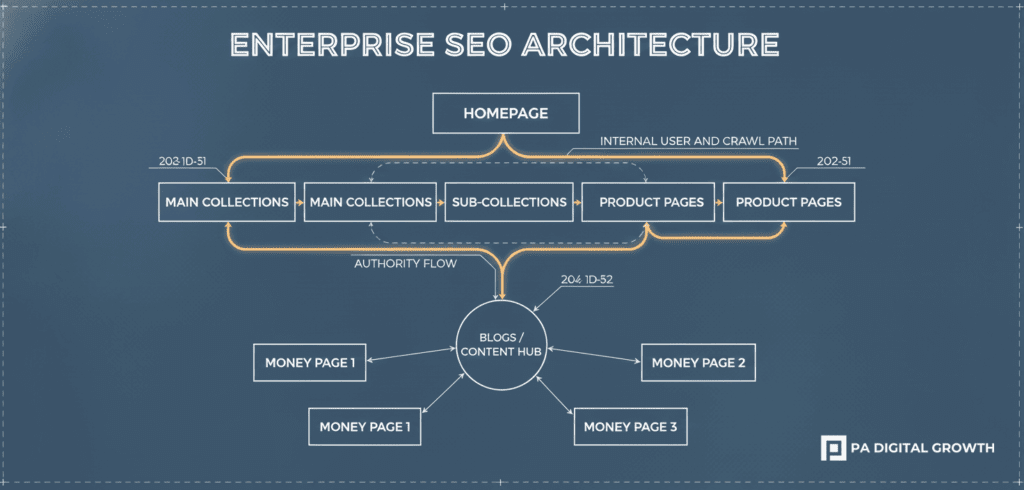
Successful enterprise SEO depends on scalable, logical, and Google-friendly site architecture. Shopify Plus enables brands to reorganize collections, sub-collections, product relationships, and content hubs in a way that improves both user experience and crawl efficiency.
Category Hierarchies and Collection Pages
Enterprise brands should create clear category hierarchies that guide both users and search engines toward high-intent commercial pages. Collection pages must be treated as major ranking assets, not simple product listings. These pages need rich content, internal linking strategies, FAQ sections, and contextual navigation that reinforces relevance.
Internal Linking Strategy
Internal linking is especially important for enterprise-scale Shopify stores. With thousands of URLs, internal links distribute authority, connect related products, and help Google understand topical relevance. Shopify Plus makes this easier by supporting automated linking frameworks, custom metafields, and the ability to create hub-and-spoke content systems that tie blog posts into commercial pages seamlessly.
A strong architecture reduces orphaned pages, improves crawl paths, and ensures that every high-value page receives the authority it needs to rank.
Content Strategy for Shopify Plus: Depth, Intent & Value
For enterprise stores, content is more than blog posts; it’s the fuel that builds topical authority. Shopify Plus brands must map their content against search intent categories: informational, commercial, transactional, and navigational. With AI-driven search becoming more prominent, brands must create deeper, more helpful content that answers real customer needs and connects directly to product discovery paths.
High-performing Shopify Plus content includes:
In-depth buying guides, comparison pages, and product education pages.
Collection page enhancements and long-form keyword-focused blogs.
Localized content for global audiences.
Enterprise brands should build topic clusters around their main collections, supporting each "money page" with optimized content hubs that drive authority into the category. Shopify Plus allows these clusters to scale smoothly, especially with metafields and customizable templates that maintain consistency across hundreds of pages.
Another advantage is the ability to embed rich content elements like videos, reviews, UGC, and dynamic product data. These enhance both SEO and conversion performance, which creates a compound ranking advantage.
Off-Page SEO & Brand Authority for Enterprise Growth
Off-page SEO remains essential for enterprise brands aiming to dominate competitive keywords. Shopify Plus stores benefit from strong domain authority when supported by strategic backlink acquisition, PR exposure, influencer collaborations, and digital partnerships.
Enterprise stores must build backlinks to category pages, product hubs, and educational content, not just homepages and blogs. This deep-linking approach improves overall commercial ranking performance and strengthens the SEO value of high-impact pages.
Additionally, Shopify Plus brands should maintain consistent online citations, optimize for Google Business Profiles, and leverage user-generated content as a trust-building asset. Authority signals like reviews, social proof, and press coverage play an increasingly important role in SEO algorithms in 2025, especially as search engines reward brands with strong reputational value.
Why Shopify Plus Stores Rank Faster: The Strategic Advantage
Shopify Plus gives enterprise brands a measurable SEO advantage for several reasons.
Infrastructure Excellence: It’s built for speed, one of Google's top ranking factors.
Automation & Integration: It integrates seamlessly with advanced SEO tools, schema frameworks, and automation workflows (Flow/Functions).
Superior UX Signals:Shopify Plus stores gain stronger user experience metrics due to improved checkout performance and faster load times, which reduces bounce rates and boosts engagement.
Scalability: It provides cleaner architecture, better indexing, stable server performance during high-traffic periods, and the ability to manage multi-store and multi-market SEO strategies under one ecosystem.
The combination of speed, structure, automation, and global scalability makes Shopify Plus the most SEO-friendly enterprise platform available in 2025.
A 2025-Ready Shopify Plus SEO Roadmap
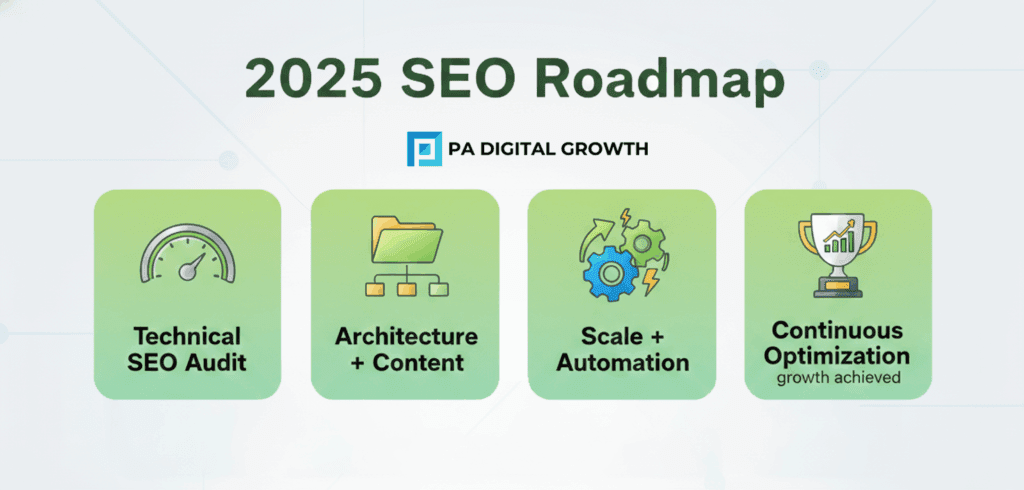
Enterprise SEO requires clear phases to unlock full ranking potential.
Phase 1: Technical Foundation (Months 1-2): Complete technical SEO audit focused on site speed, duplicate content resolution, structured data improvements, and architecture cleanup.
Phase 2: Architecture and Content (Months 3-4): Build out content hubs, optimize collection pages, integrate internal linking systems, and align product pages with high-intent keyword clusters.
Phase 3: Scale and Automation (Months 5-6): Focus on scaling SEO with automation, improving global SEO signals, refining templated content, and enhancing UX signals.
Phase 4: Optimization and Growth (Ongoing): Strengthen backlink profile, build digital PR assets, and continuously optimize conversion signals to maintain authority in competitive SERPs.
Conclusion: Shopify Plus Is the SEO Growth Engine for Enterprise Commerce
In 2025, Shopify Plus stands as the most powerful platform for enterprise SEO. With unmatched performance, deep customization, global scalability, and automation capabilities, Shopify Plus enables enterprise brands to build a strong, future-ready SEO foundation that accelerates rankings and strengthens long-term visibility.
When paired with a strategic technical framework, scalable architecture, deep content ecosystems, and authority-building initiatives, Shopify Plus becomes far more than an ecommerce platform; it becomes the engine behind sustainable organic growth and high-intent conversions. This is exactly where PA Digital Growth helps enterprise brands gain a competitive edge, ensuring every part of your Shopify Plus ecosystem is optimized for performance, speed, and search dominance.
Enterprise stores that invest in SEO now will be the ones leading their markets in the years ahead, achieving lower acquisition costs, stronger brand authority, and more predictable revenue. And if you're ready to transform your Shopify Plus store into a high-ranking, high-converting growth machine, PA Digital Growth can guide you with a tailored SEO roadmap built for enterprise-level scale.
What makes Shopify Plus SEO different from regular Shopify SEO?
While the core SEO principles remain the same, Shopify Plus provides enterprise-grade infrastructure, API access, and advanced features that enable more sophisticated optimization strategies. Enterprise stores benefit from better performance at scale, multi-store management capabilities, and the technical flexibility needed to implement complex international SEO and headless commerce architectures.
How long does it take to see results from a Shopify Plus SEO strategy?
Most enterprise stores see initial ranking improvements within 3-4 months, with significant traffic growth by months 6-9. However, SEO is a long-term investment that compounds over time. Stores that maintain consistent optimization efforts typically see continuous growth for years, with increasing returns as domain authority builds.
What are the most important technical SEO factors for Shopify Plus stores?
Core Web Vitals performance, proper canonicalization, structured data implementation, mobile optimization, and clean site architecture are critical. Enterprise stores must also manage crawl budget efficiently, implement proper international SEO signals with hreflang tags, and maintain fast page speeds across thousands of products.
How do I handle SEO during a Shopify Plus migration?
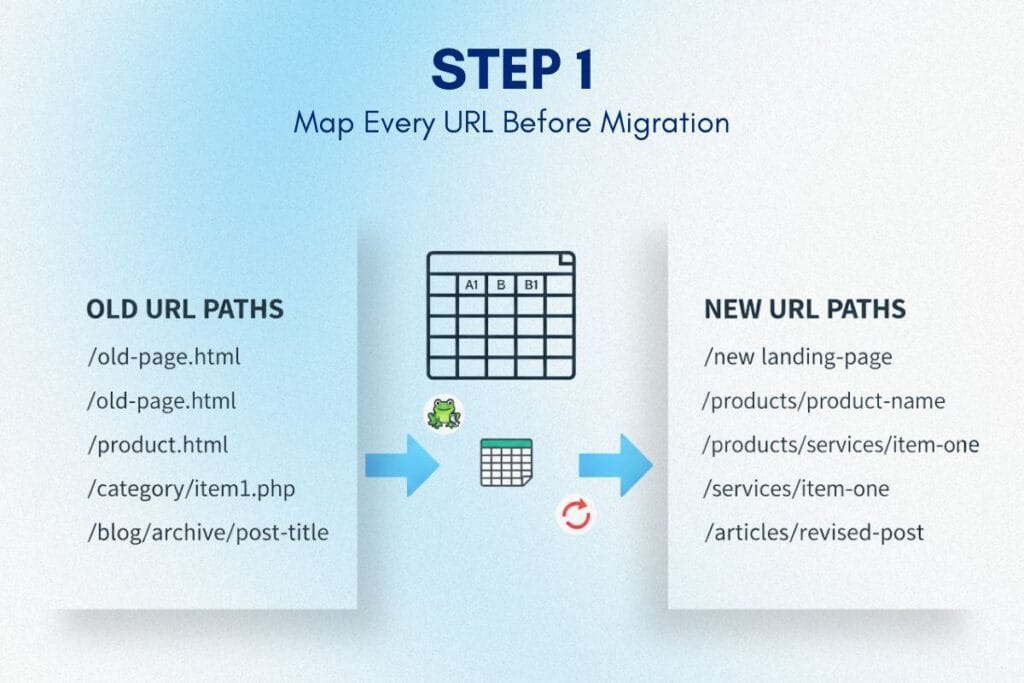
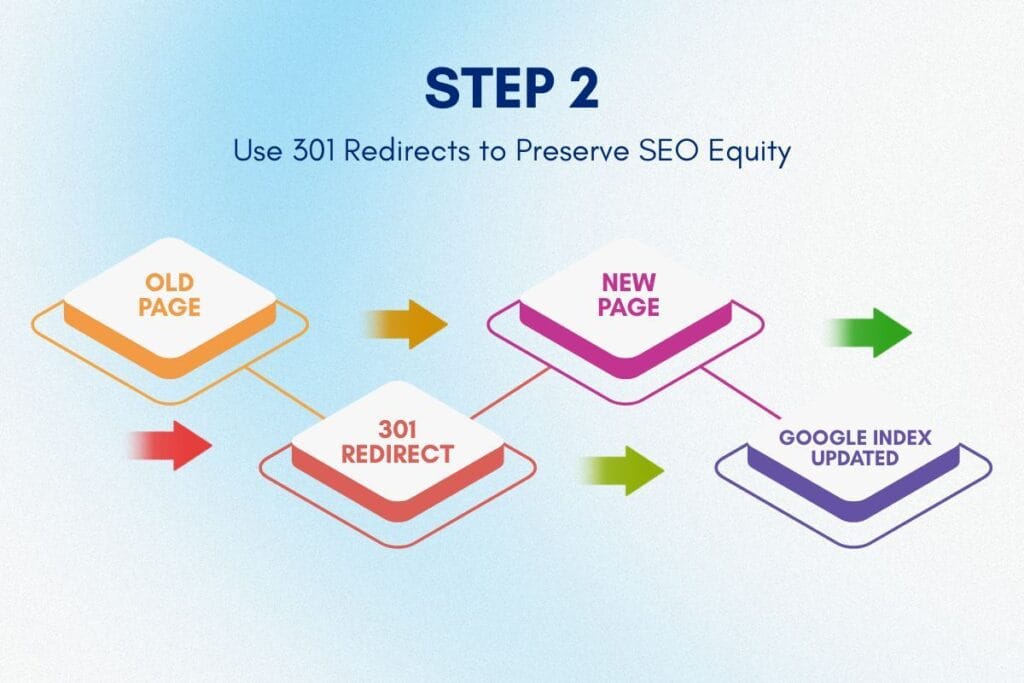
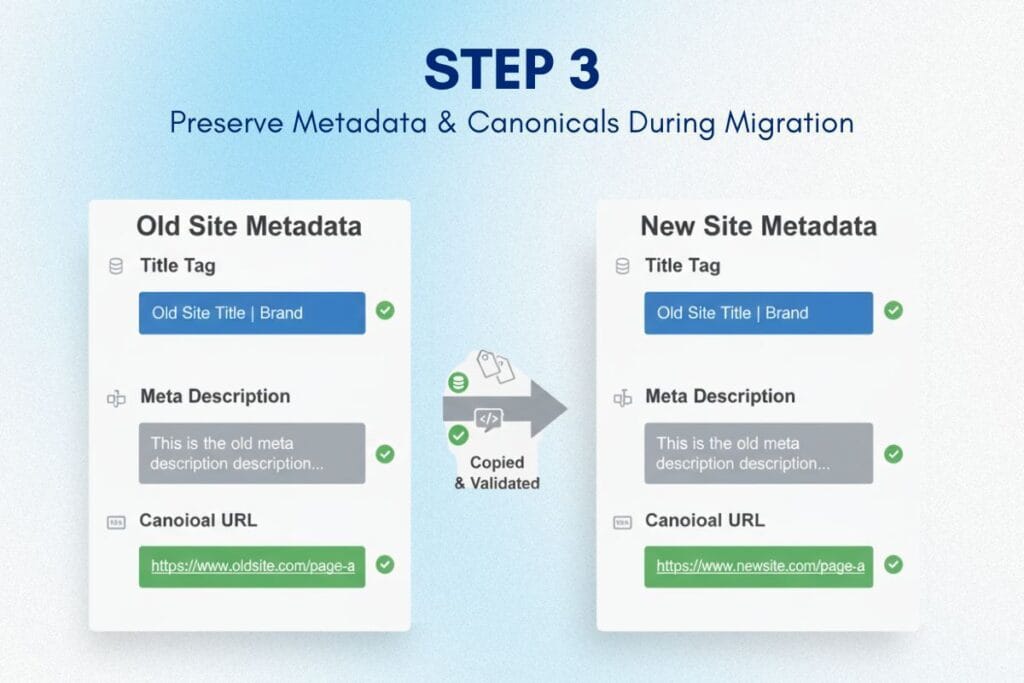
Successful migrations require comprehensive URL mapping, implementing 301 redirects for all changed URLs, preserving structured data, maintaining internal linking patterns, and submitting updated sitemaps immediately after launch. Work with an experienced agency to avoid traffic loss during transition.
Should I use a headless commerce approach for better SEO?
Headless commerce SEO offers benefits like faster page loads and greater customization, but requires significant technical resources. Most enterprise stores see excellent results with optimized Shopify Plus themes. Consider headless if you need extensive customization, have development resources available, or require advanced personalization features.
How many backlinks does an enterprise store need to rank competitively?
Quality matters more than quantity. Focus on earning authoritative links to commercial pages and collection categories, not just blog content. A well-executed strategy targeting 50-100 high-quality, relevant backlinks annually typically outperforms thousands of low-quality links.
What role does content marketing play in enterprise ecommerce SEO?
Content builds topical authority, attracts backlinks, and supports commercial pages with helpful resources that answer user questions. Enterprise stores should develop comprehensive topic clusters around main product categories, creating buying guides, comparison content, and educational resources that naturally drive organic traffic.
How do I optimize for international SEO across multiple markets?
Implement proper hreflang tags, create localized content beyond simple translation, conduct regional keyword research, optimize for local search patterns, and use appropriate URL structures (subdirectories, subdomains, or ccTLDs). Each market requires customized optimization based on competitive landscape and user behavior.
What Schema markup should Shopify Plus stores implement?
At minimum, implement Product, Review, Breadcrumb, Organization, and FAQ schema. Enterprise stores benefit from advanced implementations including Offer schema, Video schema for product demonstrations, HowTo schema for guides, and Article schema for blog content. Proper structured data increases SERP visibility and click-through rates.
How do I measure ROI from my Shopify Plus SEO investment?
Track organic traffic growth, keyword rankings for target terms, revenue from organic channels, customer acquisition cost compared to paid channels, and assisted conversions. Enterprise stores should monitor both short-term metrics (rankings, traffic) and long-term value (domain authority, brand search volume, returning customer rate from organic sources).
Shopify Flow Best Practices: 17 Power Automations That Eliminate 40+ Hours of Manual Work
Running a Shopify Plus store means juggling thousands of orders, managing inventory across multiple locations, handling VIP customers, and constantly fighting fraud attempts. Your operational team is drowning in repetitive tasks that eat up 40+ hours every week, time that should be spent on strategic growth, not manual order tagging or refund approvals.
That's where Shopify Flow best practices become your competitive advantage. Shopify Flow isn't just another automation tool; it's a visual workflow builder exclusively for Shopify Plus merchants that transforms how your team operates. When configured correctly, Flow eliminates human error, routes orders intelligently to the right 3PL, detects fraud patterns before chargebacks hit, and creates personalized customer experiences at scale.
This guide delivers advanced Shopify Flow automation examples that go far beyond basic email triggers. You'll discover workflows that operational teams at high-growth brands use daily to automate complex B2B pricing logic, manage inventory routing across multiple fulfillment centers, and create VIP customer workflows that drive retention. If you've recently completed your e-commerce replatforming orShopify migration from Magento, these automation strategies will help you maximize your new platform's capabilities immediately.
Table of Contents
What Makes Shopify Flow Different From Basic Automation Tools
Shopify Flow isn't competing with Zapier or Make.com. It's purpose-built for ecommerce operations, with native access to every data point in your Shopify Plus store, order risk levels, customer lifetime value calculations, inventory locations, metafield data, and B2B customer segments.
The real power comes from Flow's conditional logic. You're not limited to simple "if this, then that" rules. You can stack multiple conditions with AND/OR logic, create nested decision trees, and trigger simultaneous actions across different systems. This lets you build sophisticated automations that would require custom development on other platforms.
Flow also integrates with 300+ Shopify apps through connectors, meaning your workflows can span your entire tech stack. When an order hits certain criteria in your store, Flow can update your 3PL, notify your team in Slack, adjust customer tags in Klaviyo, create tasks in Asana, and update Google Sheets—all from one trigger.
According to Shopify's official documentation, the Winter Edition 2025 updates brought game-changing capabilities. The new "Send Admin API" feature lets you execute almost any Admin API action directly from workflows, without writing custom HTTP calls. You can now trigger automations when customers join or leave segments, automate returns and exchanges with specialized templates, and trigger workflows on new metaobject entries.
The Architecture Behind High-Performance Workflows
Before diving into specific Shopify Flow workflows, you need to understand how elite automation is structured. Amateur workflows break because they use the wrong triggers or pile on too many conditions. Professional workflows are lean, specific, and maintainable.
Choose the Right Trigger
Your trigger determines when workflows run. The most common mistake is using "Order created" for fraud workflows instead of "Order risk analyzed." Fraud analysis takes 15-30 seconds to process. If your workflow fires immediately on order creation, it's making decisions without fraud data.
For inventory workflows, use "Product variant inventory quantity changed" instead of checking inventory levels on a schedule. Event-based triggers are faster and more reliable than polling-based triggers. Customer segment triggers are goldmines for retention workflows. When someone joins your "High LTV" segment or drops into "At Risk," that's the moment to act, not days later when you remember to check.
Master Conditional Logic
Conditions filter that orders or customers get actioned. Stack them strategically. If you're building an automation to flag high-value wholesale orders, you might check: Customer is tagged "B2B" AND Order total is greater than $5,000 AND Billing address matches shipping address is FALSE.
That third condition catches a fraud pattern common in B2B orders, when someone uses a corporate credit card but ships to a residential address. Single-condition workflows are rarely sophisticated enough for enterprise operations. Use "Otherwise" branches to handle edge cases. Instead of building separate workflows for every scenario, create decision trees within one workflow. This keeps your Flow dashboard clean and makes troubleshooting easier.
17 Advanced Shopify Flow Workflows That Eliminate Manual Work
Let's dive into production-ready workflows that solve real operational challenges. These aren't theoretical; they're battle-tested automations from high-growth brands processing millions in GMV.
1. Intelligent Fraud Detection With Multi-Layer Risk Assessment
Basic fraud workflows just tag or cancel high-risk orders. That's crude and costly. You'll block legitimate orders from corporate buyers on VPNs or international customers with mismatched billing addresses. Build a nuanced system instead. When "Order risk analyzed" triggers and the risk level equals HIGH, check additional conditions before acting. If the customer has placed 3+ previous orders, their account is 30+ days old, and previous orders were fulfilled without chargebacks, tag as "Risk: High - Verified Customer" instead of auto-canceling.
For truly high-risk scenarios (new customer + high-risk score + expensive order + billing/shipping mismatch), don't cancel automatically. Tag the order as "Risk: Manual Review Required" and send an internal email with all order details to your fraud team. Include the customer's full order history, the specific risk factors flagged by Shopify, and a direct link to the order admin page. This approach cut false declines by 67% for one merchant while still catching 94% of actual fraud attempts.
2. Dynamic VIP Customer Identification and Perks
Most brands manually tag VIP customers or use static rules like "3+ orders." That's outdated. Build a dynamic VIP workflow that evaluates customer value in real-time. Trigger on "Order paid" and create conditions based on cumulative metrics. If the customer's total spent is greater than or equal to $2,500, AND the total orders are greater than or equal to 5, AND the average order value is greater than $250, tag the customer as "VIP - Gold Tier."
Immediately send a personalized email congratulating them on Gold status. Add a metafield "VIP_Tier" with value "Gold" for future segmentation. Create a Slack message to your customer success team with customer details. For B2B accounts, add another layer, if the customer is tagged "Wholesale" AND total spent exceeds $10,000 in the last 90 days, assign them to a dedicated account manager. One fashion brand saw 34% higher repeat purchase rates from customers who received VIP recognition within 24 hours of qualifying.
3. Automated 3PL Routing Based on Product Type and Customer Location
Manual order routing kills efficiency when you're scaling across multiple fulfillment centers. Automate it with geographic and product-based logic. Use "Order paid" as your trigger. Create nested conditions: IF order contains product tagged "Fragile" THEN check customer shipping state. IF shipping state is in [CA, OR, WA, NV, AZ] THEN add order tag "Route: West Coast 3PL". IF shipping state is in [NY, NJ, CT, MA, PA] THEN add order tag "Route: East Coast 3PL."
Your 3PL integration or fulfillment app watches for these tags and routes accordingly. This prevents cross-country shipments for fragile items, cutting transit time by 2-3 days and reducing damage rates. Advanced version: Check inventory locations before routing using Shopify Flow's Admin API actions to query inventory at each location, then route to the facility with stock AND closest proximity.
4. Automated Refund Approval for Low-Risk Returns
Refund approvals bog down customer service teams. Automate the obvious approvals and free your team for complex cases. Trigger on "Refund requested" (requires a returns app with Flow connector). Create conditions: IF refund amount is less than $150 AND customer total orders is greater than 3 AND customer has zero previous refunds in the past 180 days AND order was delivered more than 7 days ago, THEN automatically approve refund and send customer email confirming approval with return shipping label.
For refunds that don't meet automation criteria, tag the refund request "Manual Review Required" and create a support ticket in your helpdesk. Include the customer's full refund history and flag any patterns. This workflow approved 68% of refunds automatically at one electronics retailer, cutting customer service workload by 22 hours per week.
5. Proactive Inventory Reordering With Supplier Notifications
Stockouts kill momentum. Automate reordering before you hit zero. Trigger on "Product variant inventory quantity changed." Set condition: IF inventory quantity is less than reorder point (set this per product via metafield) AND product status equals "active" THEN send email to supplier with product details, current inventory level, and suggested reorder quantity.
Use Flow's email action to create formatted messages including SKU, product title, current stock, 30-day sales velocity, and calculated reorder quantity based on lead time. Send a duplicate notification to your inventory manager in Slack with a direct link to the product admin page. For seasonal products, add date-based conditions that adjust thresholds during high-demand periods.
6. Automated B2B Net Payment Terms Management
B2B customers often have net-30 or net-60 payment terms. Manually tracking these creates chaos. When "Order paid" triggers for customers tagged "Net-30" or "Net-60", add the order tag "Payment: Net Terms" and set a delayed action. Use Flow's delay capability to wait 25 days, then check if the order is marked paid.
If still unpaid at 25 days, send the first reminder email to the customer with invoice details and payment portal link. Wait 5 more days, then send a second reminder and notify your accounts receivable team. For complex B2B workflows, use metafields to track credit limits, when orders exceed a customer's available credit, hold for approval automatically.
7. Automated Order Tagging for Advanced Segmentation
Tags are your most powerful organizational tool, but manual tagging is impossible at scale. Create a master tagging workflow that triggers on "Order paid." Stack multiple independent tagging conditions that all run simultaneously: IF payment method contains "PayPal" THEN add tag "Payment: PayPal"; IF shipping method contains "Express" THEN add tag "Shipping: Express"; IF order total is greater than $500 THEN add tag "Value: High"; IF customer is first-time buyer THEN add tag "Customer: First-Time".
Run these as parallel actions so all relevant tags apply instantly. This creates a rich taxonomy for reporting, fulfillment rules, and customer segmentation. Advanced brands add seasonal tags automatically for effortless post-campaign analysis.
8. Automated Subscription Management and Cancellation Prevention
Subscription businesses lose revenue to passive churn, customers who don't actively cancel but whose cards decline. Trigger on "Subscription payment failed" (requires subscription app with Flow connector). Immediately send the customer an email with the updated payment link. Add customer tag "Payment: Failed - 1st Attempt" for segmentation.
Wait 48 hours, then check if the payment is still failed. If yes, send a second email with more urgent messaging and notify the retention team in Slack with customer LTV and subscription history. If payment fails three times, trigger a Klaviyo flow that sends personalized winback messaging with an incentive. This workflow recovered 23% of failed subscriptions at a supplement brand.
9. Automated Gift Order Handling and Messaging
Gift orders need special handling but are hard to identify. Trigger on "Order paid." Check conditions: IF billing address does not equal shipping address AND order note contains keywords ["gift", "present", "birthday", "surprise"] THEN add order tags "Gift Order" and "Remove Packing Slip."
Send an internal email to fulfillment team, flagging this as a gift order. For gift orders shipping directly to the recipient, automatically suppress marketing emails to the shipping address, you don't want your marketing team emailing someone's gift recipient before they've received the gift.
10. Post-Purchase Cross-Sell Based on Product Attributes
Don't let orders end at checkout. Trigger on "Order fulfilled" (not paid, wait until it ships for better timing). Check order contents via product tags: IF order contains product tagged "Skincare: Cleanser" THEN send email via Klaviyo with product recommendations tagged "Skincare: Moisturizer" or "Skincare: Serum."
Make this product-specific, not generic. Create conditional branches for each product category. Advanced version: Check the customer's purchase history first to prevent recommending products they already own. One cosmetics brand generated $43,000 in additional revenue in 90 days from automated post-purchase flows.
11. Automated Wholesale Order Notifications and Terms Assignment
B2B customers have different needs than DTC. Trigger on "Order paid" where the customer is tagged "Wholesale." Immediately add tags "B2B" and "Channel: Wholesale" for segmentation. Check order total; if greater than $1,000, send an internal email to the wholesale manager with customer details.
Add order note with wholesale-specific fulfillment instructions: "B2B Order - Use wholesale packaging. Include line sheet and reorder form." If this is the customer's first wholesale order, send a welcome email with net-30 payment terms application, wholesale catalog, and dedicated account manager contact info.
12. Automated Review Request Based on Product Delivery Estimates
Review requests sent too early hit before customers receive products. Too late, and they've forgotten. Trigger on "Fulfillment created." Calculate the estimated delivery date based on the shipping method. Wait for the estimated delivery date plus 3 3-day buffer, then trigger a review request email via your reviews app.
For products tagged "Complex" (like furniture or electronics that take time to set up), wait 14 days instead of 3. One home decor brand increased review volume by 340% by switching from generic 10-day-post-purchase requests to delivery-aware timing.
13. Automated Pre-Order Management and Customer Communication
Pre-orders create complex logistics. When a customer orders a product tagged "Pre-Order", immediately add order tag "Type: Pre-Order" and "Fulfillment: Hold Until [Expected Date]." Send a customer confirmation email that explicitly states the expected ship date from the product metafield.
Use Flow's delay action to wait until 7 days before the expected ship date, then send a customer update email. This keeps customers engaged and reduces support tickets. On the expected ship date, check inventory availability and either release for fulfillment or send a delay notification automatically.
14. Automated Chargeback Documentation and Response Preparation
Chargebacks are expensive and time-consuming. Trigger on "Order dispute created." Instantly create a Google Sheet row with all order details: order number, customer name, items purchased, shipping address, tracking number, and delivery confirmation.
Send an internal email to the finance team with a direct link to the dispute in the admin panel. Tag order "Dispute: Active" for tracking. For orders with delivery confirmation, add the order note "Delivery Confirmed - Strong Dispute Case" and automatically generate a dispute response draft. This cuts dispute response time from 3 hours to 15 minutes.
15. Automated Low Inventory Alerts With Channel Management
When inventory drops dangerously low, you need visibility before stockouts occur. Trigger on "Product variant inventory quantity changed." IF inventory quantity is less than 10 units AND product is tagged "Best Seller" THEN send immediate Slack notification to inventory team and add product tag "Low Stock Alert."
Additionally, if inventory drops below 5 units, automatically remove the product from the Google Shopping feed while keeping it live on your main site. This prevents overselling through external channels while maintaining customer access on your primary storefront.
16. Automated High-Value Order Verification
Orders exceeding certain thresholds deserve extra scrutiny and white-glove treatment. Trigger on "Order paid." IF order total is greater than $2,000 AND customer is a first-time buyer THEN add tag "High Value - Verify" and send internal notification to sales team for verification call.
Simultaneously, send personalized thank-you email to the customer acknowledging their significant purchase and providing direct contact for dedicated support. This combines fraud prevention with exceptional customer experience for your most valuable transactions.
17. Automated Customer Segment Updates for Lifecycle Marketing
Customer behavior dictates marketing strategy, but manual segmentation can't keep pace. Trigger on "Order paid." Check cumulative customer metrics and update segments dynamically: IF customer has 2 orders in past 30 days THEN add tag "Engagement: Active Buyer"; IF customer hasn't ordered in 90 days THEN add tag "At Risk: 90 Days."
These tags automatically trigger appropriate Klaviyo flows. Active buyers get new product announcements, at-risk customers get winback campaigns with incentives. The synchronization between Flow and your ESP creates perfectly timed, behaviorally relevant messaging without manual list management.
Shopify Flow Conditional Logic Mastery
The difference between basic and advanced Shopify Flow best practices comes down to conditional logic sophistication. Most merchants stack 2-3 conditions and call it done. Elite operators build decision trees.
Use "Check" blocks to create IF/THEN/ELSE branches. Instead of creating separate workflows for similar scenarios, create one workflow with multiple conditional branches. Example: VIP tier assignment. Start with trigger "Order paid." First condition checks if total spent is $2,500-$4,999 → Tag "VIP Silver." Add "Otherwise" branch that checks $5,000-$9,999 → Tag "VIP Gold." Add another "Otherwise" for $10,000+ → Tag "VIP Platinum."
One workflow, three outcomes, easier maintenance. Combine AND/OR logic strategically. AND narrows criteria (all conditions must be true). OR broadens criteria (any condition can be true). For fraud workflows, use AND to stack risk factors. For promotional eligibility, use OR to allow multiple entry points.
Always add "Otherwise" actions for visibility. If your condition isn't met, don't let the workflow silently do nothing. Add an "Otherwise" branch that logs the non-match for debugging—tag the order "Flow: Did Not Meet Criteria" or send yourself a weekly digest of non-matches.
Integration Strategies: Connecting Flow to Your Tech Stack
Shopify Flow automation examples become exponentially more powerful when connected to external systems. The "Send HTTP Request" action lets you trigger webhooks in any system with an API.
Slack Integrations for Real-Time Team Notifications
Stop emailing your team about critical events. Use Flow's Slack connector to send messages directly to channels. High-risk orders over $1,000 → #fraud-review channel. New wholesale customer → #sales channel. Inventory below reorder point → #operations channel. Format Slack messages with order details, customer data, and direct links to admin pages.
Google Sheets for Custom Reporting and Cross-Functional Data
Flow's Google Sheets connector turns your store into a data pipeline. Every VIP customer upgrade → new row in "VIP Customer Tracker" sheet. Every pre-order placed → new row in "Pre-Orders by Product" sheet. Finance teams, operations teams, and marketing teams can access real-time operational data without Shopify admin access.
Klaviyo for Behavioral Email Automation
While Klaviyo has its own triggers, combining Flow + Klaviyo creates more sophisticated segmentation. Use Flow to add customer tags based on complex criteria that Klaviyo can't detect, then trigger Klaviyo flows based on those tags. According to Klaviyo's integration documentation, this hybrid approach enables behavioral triggers impossible in either platform alone.
Common Shopify Flow Mistakes and How to Avoid Them
Even experienced operators make these errors. Learn from them instead of repeating them.
Mistake 1: Over-Automating Low-Impact Processes
Just because you can automate something doesn't mean you should. Automating low-frequency, low-stakes tasks creates a maintenance burden without meaningful ROI. Prioritize workflows that save 5+ hours per week or prevent costly errors.
Mistake 2: Ignoring Execution Timing
Workflows execute in seconds, but external systems have delays. If you trigger a Klaviyo email and immediately add a customer tag, the email might not include the tag because Klaviyo hasn't synced yet. Add small delays (30-60 seconds) between dependent actions involving external systems.
Mistake 3: Creating Workflow Conflicts
Two workflows can contradict each other. Workflow A tags high-spending customers "VIP." Workflow B removes VIP tag if the customer refunds an order. Result: Customers bounce between VIP status based on workflow execution order. Audit for conflicts by mapping all workflows that modify the same data points.
Mistake 4: Not Handling Failures Gracefully
When a workflow action fails (external API is down, email service is unavailable), Flow stops execution. Design workflows with failure handling. Use "Otherwise" branches to catch failures and send alert notifications. For critical workflows, build redundancy—send both Slack notification AND email so one failure doesn't create a blind spot.
Measuring Automation ROI and Performance Metrics
Automation without measurement is just busywork. Track these metrics to quantify impact.
Time Saved Per Workflow
Estimate how long the manual task took before automation. Track workflow execution count monthly. Multiply: If the refund approval workflow executes 200 times monthly and saves 10 minutes per refund, that's 2,000 minutes (33.3 hours) saved monthly. Across multiple workflows, you'll easily demonstrate 40+ hours saved weekly—that's a full-time employee's worth of capacity.
Error Rate Reduction
Track errors before and after automation. Manual order tagging might have 5% error rate. Automated tagging has a near-zero error rate. For critical workflows like 3PL routing or payment capture, error reduction is more valuable than time savings.
Revenue Impact from Retention Workflows
VIP workflows and winback workflows have a measurable revenue impact. Track how many customers upgraded to VIP status this month and their average repeat purchase value. Compare repeat purchase rates between auto-tagged VIPs and customers who weren't tagged. One brand found auto-tagged VIPs had 45% higher 90-day repeat purchase rates than manually tagged customers—because automation caught VIP qualification in real-time.
How PA Digital Growth Implements Elite Shopify Flow Strategies
Building sophisticated Shopify Flow workflows isn't just about knowing the tool; it's about understanding your business operations, customer behavior patterns, and strategic growth objectives. That's where expertise makes the difference between basic automation and competitive advantage.
At PA Digital Growth, we've implemented Shopify Flow automation examples for dozens of Shopify Plus merchants across industries. Our approach goes beyond connecting triggers to actions. We audit your current operations, identify bottlenecks costing your team time and costing you revenue, then architect custom workflows that solve your specific challenges.
Operations Audit: We map your current manual processes, time requirements, error rates, and pain points. We identify which tasks are automation candidates and which require human judgment.
Workflow Architecture: We design decision trees with sophisticated conditional logic that handles edge cases. Our workflows account for your fulfillment setup, payment terms, customer segments, and inventory distribution.
Integration Configuration: We connect Flow to your existing tech stack—whether that's Klaviyo, Gorgias, ShipStation, NetSuite, or custom systems. We ensure data flows seamlessly across platforms.
Testing and Validation: Before going live, we test every workflow with real scenarios. We verify that conditional logic works correctly, actions execute in the proper sequence, and failure handling protects your operations.
Post-Migration Optimization: If you're implementing CRO after replatforming, our automation strategies include conversion-focused workflows like abandoned cart recovery, intelligent upsells, and friction reduction at checkout.
According to Shopify's Commerce Trends Report, brands that implement advanced automation within 90 days of migration see 40% faster time-to-scale compared to those that delay automation implementation.
Your Next Steps: Implementing Shopify Flow Best Practices
You now have 17 production-ready workflow examples and the strategic framework to build sophisticated automation. Here's how to move from knowledge to implementation.
Start With High-Impact, Low-Complexity Workflows
Don't try to automate everything simultaneously. Choose 2-3 workflows that save the most time or prevent the costliest errors. Automated order tagging, VIP customer identification, and fraud flagging are excellent starting points, high execution frequency, clear ROI, and relatively simple logic.
Build these workflows, let them run for 30 days, measure impact, then expand to more complex automation. If you followed best practices during yourSEO migration checklist, your site structure and data integrity provide a solid foundation for automation that relies on clean, consistent data.
Document Your Current Manual Processes
Before automating, map your existing workflows on paper. What triggers the process? What decisions get made? What actions happen? This clarity ensures your automated workflow actually replicates (and improves) what you're doing manually.
Build Incrementally and Test Thoroughly
Start with a simple trigger + condition + action. Verify it works. Then add complexity, additional conditions, more sophisticated logic, and parallel actions. This incremental approach makes troubleshooting easier when something doesn't work as expected.
Use Shopify's Flow analytics to monitor execution success rates. Anything below a 95% success rate needs investigation.
The brands winning on Shopify Plus aren't just leveraging better design or marketing; they're operationally superior. They've eliminated bottlenecks through intelligent automation, freeing their teams to focus on strategy and growth instead of repetitive manual tasks. Shopify Flow best practices aren't optional for scaling; they're essential infrastructure.
Whether you implement these workflows yourself or partner with specialists who've built thousands of automated workflows, the key is starting now. Every day you wait is another day your team spends 40+ hours on tasks that could run automatically while you sleep.
Ready to Eliminate Manual Work and Scale Your Operations?
You've seen what's possible with elite Shopify Flow automation, workflows that save 40+ hours weekly, prevent costly errors, and create customer experiences that drive retention and revenue.
But reading about automation and implementing it successfully are very different challenges. Building sophisticated workflows requires a deep understanding of Shopify's data model, conditional logic architecture, integration strategies, and operational best practices across industries.
PA Digital Growth specializes in implementing high-performance Shopify Flow automation for ambitious ecommerce brands. We've helped merchants eliminate tens of thousands of hours of manual work, reduce operational errors by 70%+, and unlock growth that was previously bottlenecked by team capacity.
If you're ready to transform your operations with intelligent automation:
Don't let manual processes hold back your growth. Contact PA Digital Growth today to discover how elite Shopify Flow automation can transform your operations and free your team to focus on what actually drives revenue.
Your competitors are already automating. The question isn't whether to implement Shopify Flow best practices; it's whether you'll lead or follow.
Frequently Asked Questions
What is Shopify Flow and who can use it?
Shopify Flow is a visual automation platform exclusively available to Shopify Plus merchants that enables you to automate store operations without coding. Flow uses trigger-condition-action logic to execute workflows based on store events like orders, customer behavior, inventory changes, and product updates. It integrates with 300+ third-party apps and can trigger actions across your entire ecommerce tech stack, making it far more powerful than basic automation tools.
How much time can Shopify Flow automation actually save my team?
High-growth brands typically save 40-60 hours weekly after implementing comprehensive Shopify Flow workflows across order management, customer segmentation, fraud detection, and inventory operations. The exact time savings depend on your order volume, operational complexity, and which processes you automate. Even modest implementations (5-7 workflows) typically save 15-20 hours weekly by eliminating repetitive tasks like manual order tagging, refund approvals, and customer notifications.
What's the difference between Shopify Flow and other automation tools like Zapier?
Shopify Flow is purpose-built for ecommerce with native access to all Shopify data—customer lifetime value, order risk levels, inventory locations, metafields, and B2B segments. Flow executes faster because it runs directly on Shopify's infrastructure rather than polling via API. It also includes ecommerce-specific triggers and actions that generic tools lack, such as "order risk analyzed," "inventory below threshold," and "customer segment joined." For Shopify Plus stores, Flow is more powerful and reliable than external automation platforms.
Can Shopify Flow help prevent fraud and chargebacks?
Yes, sophisticated fraud detection is one of Flow's most valuable use cases. You can build multi-layer risk assessment workflows that evaluate order risk score, customer history, billing/shipping address matches, order velocity patterns, and high-risk product combinations. Advanced implementations tag suspicious orders for manual review rather than auto-canceling, reducing false declines by 60-70% while still catching fraud attempts. Flow can also automate chargeback documentation by instantly gathering delivery confirmation, customer communications, and order history when disputes occur.
How do I route orders to different fulfillment centers or 3PLs automatically?
Create workflows triggered on "Order paid" with nested conditions checking product types, customer locations, and inventory availability. Use tags like "Route: West Coast 3PL" or "Route: UK Warehouse" based on shipping destination, product characteristics (fragile items, temperature-sensitive), and stock levels at each location. Your fulfillment app or 3PL integration watches for these tags and routes accordingly. Advanced setups query real-time inventory via Shopify's Admin API to route orders to the closest facility with available stock.
What are the most common mistakes when building Shopify Flow workflows?
The biggest mistakes include using wrong triggers (like "Order created" instead of "Order paid"), over-complicating simple workflows with unnecessary conditions, creating workflow conflicts where multiple flows modify the same data, and not testing edge cases before going live. Many merchants also neglect failure handling—when external APIs fail, workflows stop executing without alerting anyone. Always build "Otherwise" branches, test thoroughly with real scenarios, and document complex logic for team members who'll maintain workflows long-term.
Can Shopify Flow integrate with my email marketing platform and CRM?
Yes, Flow integrates with major platforms including Klaviyo, Mailchimp, HubSpot, Salesforce, ActiveCampaign, and hundreds of other apps through native connectors. You can trigger email sequences based on customer behavior, add tags for segmentation, update custom fields, create tasks, and sync data bidirectionally. Flow's "Send HTTP Request" action enables integration with any system that has an API. The most powerful strategies combine Flow's conditional logic with your ESP's automation capabilities—Flow handles complex business logic while your ESP delivers personalized messaging.
How do I automate VIP customer identification and rewards?
Build workflows triggered on "Order paid" that evaluate cumulative customer metrics like total spent, order count, and average order value. Use stacked conditions to create tiers: Silver ($2,500+ spent), Gold ($5,000+), Platinum ($10,000+). When customers qualify, automatically tag them, update metafields, send congratulatory emails, notify account managers via Slack, and trigger loyalty point bonuses. The key is real-time identification—customers who receive VIP recognition within 24 hours of qualifying show 30-40% higher retention rates than those tagged manually weeks later.
What's the best way to automate refund approvals without increasing fraud?
Create a workflow triggered on "Refund requested" with risk-based conditional logic. Auto-approve refunds under $150 from customers with 3+ previous orders, zero refund history in 180 days, and confirmed delivery over 7 days ago. This approves 60-70% of legitimate refunds instantly while flagging suspicious patterns for manual review. Tag refund requests that don't meet criteria as "Manual Review Required" and create support tickets with complete customer history. This approach dramatically improves customer satisfaction while protecting against serial refunders and wardrobing fraud.
How can I use Shopify Flow after migrating from another platform?
Post-migration is the perfect time to implement automation because you're rebuilding operational processes anyway. Start with workflows that replicate manual tasks from your old platform—order tagging, customer segmentation, inventory alerts—then enhance them with sophistication impossible on your previous platform. If you migrated from Magento or BigCommerce, Flow can automate complex B2B logic like net payment terms management and tiered pricing. After completing yourecommerce replatforming, implementing Flow workflows immediately prevents operational bottlenecks as order volume scales on your new platform.
CRO After Replatforming: Unlock 25% More Revenue in 30 Days
You survived the migration. Data transferred. SEO protected. Your store is live and customers are shopping, but here’s the uncomfortable truth: most brands treat launch day as the finish line when it's actually the starting line for revenue acceleration.
Your new Shopify Plus store is faster, more flexible, and feature-rich, but it's not automatically optimized. CRO after replatforming is where the real ROI appears. The first 30 days post-launch are your highest-leverage window: pages load 2x faster, checkout flows are cleaner, and you have baseline data to test against. Brands that capitalize on this window see 15–25% conversion rate lifts within 90 days. Brands that don't often wonder why they migrated at all.
This guide reveals the post-migration optimization framework elite brands use to turn platform upgrades into revenue engines: Core Web Vitals tuning, funnel diagnostics, checkout optimization, and systematic A/B testing that compounds gains month over month.
Table of Contents
Why CRO After Replatforming Is Your Highest-ROI Opportunity
Most teams exhaust themselves during migration, validating data, fixing bugs, and monitoring launch. By the time the dust settles, post-migration optimization becomes a "we'll get to it later" project. This is expensive procrastination.
The Platform Performance Gap Creates Immediate Upside
Your old platform (Magento, WooCommerce, BigCommerce) was slower, clunkier, and feature-limited. Your new Shopify Plus store is objectively better: faster load times, streamlined checkout, mobile-optimized by default. But "better" doesn't automatically translate to "more conversions."
The gap between potential and realized performance is where CRO lives. Your site can load in 1.2 seconds, but if your product pages don't communicate value clearly, speed alone won't convert browsers into buyers. Your checkout can process in 3 clicks, but if trust signals are missing, customers abandon.
CRO after replatforming closes this gap systematically. You're not fixing a broken platform, you're optimizing a high-performance one.
Why the First 30 Days Matter Most?
Baseline data exists: You have pre-migration conversion rates, average order values, and traffic patterns. Post-migration, you can immediately compare. Did checkout conversion improve? Did mobile bounce rates drop? Without this baseline, you're guessing. With it, you're measuring.
Team attention is focused: Post-launch, stakeholders watch metrics closely. You have executive attention and budget approval momentum. Use this window to implement high-impact CRO tests before attention shifts elsewhere.
Platform capabilities are fresh: Shopify Plus features (checkout extensibility, Shopify Functions, theme flexibility) are ready to use. The first 30 days are when teams explore these capabilities. Delay CRO and these tools sit unused, wasted potential.
For strategic context on why Shopify Plus creates this optimization opportunity, review our comprehensive e-commerce replatforming guide.
Post-launch performance audit establishes your starting point. You can't optimize what you don't measure.
Core Web Vitals: Quantifying Speed Gains
Google's Core Web Vitals measure user experience through three metrics: Largest Contentful Paint (LCP), Cumulative Layout Shift (CLS), and Interaction to Next Paint (INP). These directly impact conversion rates and SEO rankings.
Run a Core Web Vitals audit: Use Google PageSpeed Insights or Lighthouse to test your homepage, top product pages, and checkout. Compare scores to pre-migration baselines.
Target benchmarks (Shopify Plus):
LCP: Under 2.5 seconds (fast page load)
CLS: Under 0.1 (minimal layout shift)
INP: Under 200ms (responsive interactions)
Conversion impact: Studies show a 1-second improvement in LCP correlates with a 5–7% conversion rate lift. If your old platform had 4-second LCP and Shopify Plus delivers 1.5-second LCP, you've unlocked ~15–20% potential conversion improvement, if other elements don't bottleneck.
Mobile vs. Desktop Performance Gap
Mobile traffic often accounts for 60–70% of ecommerce visits but converts 30–40% lower than desktop. Post-migration optimization must address this gap.
Mobile-specific audits:
Test checkout flow on multiple devices (iPhone, Android, tablets)
Measure mobile page load times (should be under 3 seconds on 4G)
Check for mobile UX issues (tiny buttons, unreadable text, horizontal scrolling)
If mobile conversion rates don't improve post-migration despite faster load times, UX friction is the culprit, not speed.
Funnel Diagnostics: Where Are Visitors Dropping?
Funnel diagnostics identify exactly where conversion leaks occur. Use Google Analytics 4 or Shopify Analytics to map:
Homepage → Category/Collection page drop-off
Product page → Add to Cart rate
Cart → Checkout initiation rate
Checkout → Order completion rate
Pre vs. post-migration comparison: Did checkout abandonment drop post-migration? If not, why? Is it payment options, shipping costs, or trust signals? Funnel diagnostics answer these questions with data, not assumptions.
Step 2: Optimize Checkout (The Highest-Leverage CRO Opportunity)
Checkout is where revenue happens or doesn't. Checkout optimization Shopify Plus delivers the fastest ROI in CRO after replatforming.
Shopify Plus Checkout Extensibility: What's Possible Now
Shopify Plus unlocks checkout customization through Shopify Functions and UI Extensions. Your old platform (Magento, WooCommerce, BigCommerce) either couldn't do this or required weeks of custom development. On Shopify Plus, it's native.
Dynamic upsells: Show relevant product recommendations based on cart contents (e.g., "Add a phone case for 20% off")
Custom fields: Delivery date selectors, gift messages, subscription options—all without leaving checkout
Payment method optimization: Show/hide payment methods based on geography, order value, or customer segment
Expected impact: Brands implementing checkout upsells see 8–12% AOV (average order value) lift. Trust badges reduce cart abandonment by 3–5%. These aren't hypothetical, they're measured outcomes.
Checkout Speed Tuning
Even with Shopify Plus's fast infrastructure, checkout can slow if poorly configured. Speed tuning Shopify store checkout involves:
Removing unnecessary apps/scripts that load at checkout
Optimizing payment gateway integrations (ensure they load asynchronously)
Testing checkout under load (simulate Black Friday traffic)
Target: Checkout should load in under 2 seconds. Every additional second costs 5–7% in conversion rate.
One-Page vs. Multi-Step Checkout Testing
Shopify Plus allows toggling between one-page and multi-step checkout. There's no universal winner; it depends on your audience, AOV, and product complexity.
Test hypothesis: One-page checkout reduces friction for low-consideration purchases (under $100). Multi-step checkout feels less overwhelming for high-consideration purchases ($200+).
A/B test framework: Run one-page vs. multi-step checkout for 2–4 weeks. Measure checkout completion rate, not just preference. Sometimes customers prefer multi-step but convert better with one-page (or vice versa).
Step 3: Leverage Shopify Functions for Behavioral CRO
Shopify Functions for CRO enable conditional logic that personalizes experiences based on customer behavior, cart contents, or order history.
Dynamic Discount Logic
Shopify Functions let you build complex discount rules without apps:
Volume discounts ("Buy 3, save 15%")
Bundle pricing ("Buy this + that, save $20")
Loyalty tier pricing (VIPs get 10% automatically)
First-time customer discounts (show 10% off at checkout for new customers)
CRO impact: Visible discounts at checkout increase conversion by 7–10% by providing psychological "deal confirmation."
Conditional Shipping Offers
Use Shopify Functions to show free shipping thresholds dynamically:
"Add $15 more for free shipping" (displays in cart)
Free shipping for orders over $75 (automatically applies)
Express shipping upsells for high-value carts
CRO impact: Free shipping thresholds increase AOV by 10–15% as customers add items to qualify.
Product Recommendations Based on Cart Contents
Instead of generic "You may also like" sections, use Shopify Functions to show smart recommendations:
Complementary products ("Bought a camera? Add a lens")
Frequently bought together items
Higher-tier alternatives ("Upgrade to Pro for $20 more")
CRO impact: Contextual recommendations convert 3–5x better than generic recommendations.
Step 4: Run Systematic A/B Tests (Data-Driven CRO)
Shopify Plus A/B testing turns assumptions into measurable improvements. The platform's speed and flexibility make testing faster and easier than on legacy systems.
What to Test First (Highest-Impact Areas)
Product page tests:
Above-the-fold messaging (headline, value prop)
CTA button color, size, and copy ("Add to Cart" vs. "Buy Now" vs. "Get Yours")
Trust signals (reviews, ratings, social proof placement)
Image gallery layout (carousel vs. grid)
Collection page tests:
Filtering and sorting options (most popular, price, newest)
Product card design (image size, text placement, badges)
"Load more" vs. pagination
Cart page tests:
Progress indicators ("Step 1 of 3")
Cross-sell placements (before vs. after cart summary)
Urgency messaging ("Order in 2 hours for same-day shipping")
A/B Testing Tools for Shopify Plus
Native Shopify A/B testing: Shopify Plus includes basic split testing for checkout variants.
Testing cadence: Run 2–3 concurrent tests at all times. Each test runs 2–4 weeks (or until statistical significance). Winning variants become baseline for next test iteration.
Step 5: Analyze User Behavior with Heatmaps and Session Recordings
Heatmap analysis and user behavior tracking reveal why visitors don't convert, not just where they drop.
What Heatmaps Show?
Heatmaps visualize where users click, scroll, and hover. Common insights:
Users scroll 50% down product pages but miss key info (CTAs buried too low)
Users click non-clickable elements (expecting interaction, causing frustration)
Session Recordings: Watching Real Customer Journeys
Session recordings show actual customer behavior: hesitations, confusion, rage clicks (repeatedly clicking non-responsive elements). This is gold for funnel diagnostics.
What to watch for:
Customers adding to cart but immediately abandoning (price shock? shipping costs?)
Customers toggling between product images excessively (looking for info not displayed?)
Customers abandoning at checkout form (too many fields? confusing layout?)
Action: Watch 20–30 session recordings weekly. Patterns emerge. Fix what breaks the experience.
Step 6: Optimize for Mobile-First Experience
Mobile accounts for 60–70% of traffic, but often underperforms desktop. Mobile site performance optimization closes this gap.
Mobile-Specific Checkout Friction Points
Common mobile checkout issues:
Form fields are too small (users mistype, causing errors)
Too many required fields (frustration on small screens)
Payment method buttons are tiny (accidental clicks, confusion)
Autofill doesn't work (manual typing on mobile = high friction)
Solutions:
Use larger touch targets (buttons 44x44 pixels minimum)
Reduce required fields (name, email, address only—skip "Company" if not B2B)
Enable Apple Pay, Google Pay (one-tap checkout eliminates typing)
Impact: Mobile checkout optimization alone can lift mobile conversion by 10–15%.
Mobile Page Speed: Beyond Core Web Vitals
Mobile users on slower connections (4G, rural areas) experience your site differently. Test on real devices, not just desktop Chrome's mobile emulator.
Mobile speed optimizations:
Lazy load images below the fold
Defer non-critical JavaScript
Use WebP image formats (smaller file sizes)
Minimize third-party scripts (every script = load time penalty)
Target: Mobile pages should load under 3 seconds on 4G. Under 2 seconds is elite.
Step 7: Landing Page Optimization for Paid Traffic
If you run paid ads (Google, Facebook, TikTok), landing page optimization on Shopify Plus ensures ad spend converts efficiently.
Ad-to-Landing Page Message Match
The rule: Your landing page headline must mirror your ad copy. If your ad says "50% off summer sale," your landing page better say "50% off summer sale" above the fold.
Why this matters: Message mismatch creates cognitive dissonance. Users think they clicked the wrong link. Bounce rates spike. Conversion tanks.
Dedicated Landing Pages vs. Homepage Traffic
Sending paid traffic to your homepage is lazy and expensive. Build dedicated landing pages for each campaign:
We've delivered 15–25% conversion lifts for dozens of enterprise brands within 90 days post-migration. The platform upgrade creates the opportunity. We execute the optimization.
If you've migrated to Shopify Plus and want to capitalize on your new platform's capabilities, let's talk. Book a free CRO audit, and we'll show you exactly where conversion upside exists and how to capture it.
For insights on how to protect SEO equity during ongoing optimization, explore our SEO migration checklist.
Turn Your Platform Upgrade Into Revenue Growth
You migrated for a reason: better performance, more flexibility, scalable infrastructure. But migration alone doesn't grow revenue; CRO after replatforming is where platform investment turns into revenue.
The first 30 days post-launch are your highest-leverage window. Pages load faster. Checkout flows are cleaner. You have baseline data to test against. Brands that capitalize on this window see measurable, compounding gains. Brands that don't leave money on the table.
PA Digital Growth's post-migration optimization framework turns platform upgrades into revenue engines. We audit, optimize, test, and iterate systematically. No guesswork. Just disciplined CRO that delivers 15–25% conversion lifts within 90 days.
Ready to unlock the revenue potential of your new platform? Book a free post-migration CRO audit and we'll show you exactly where conversion upside exists, and how to capture it fast.
CRO after replatforming is the process of systematically optimizing conversion rates on your new ecommerce platform by leveraging improved speed, features, and flexibility to increase revenue. This includes auditing Core Web Vitals, optimizing checkout flows, implementing A/B tests, and addressing mobile UX friction that your old platform couldn't handle. The first 30-90 days post-migration are the highest-leverage window for CRO because you have baseline data to measure against and stakeholder attention to implement changes quickly.
How long does it take to see CRO results after platform migration?
Quick wins like adding trust badges to checkout or enabling Apple Pay can deliver 3-7% conversion lifts within 7-14 days, while systematic A/B testing typically produces measurable results in 2-4 weeks per test. Most brands implementing a disciplined post-migration CRO strategy see cumulative 15-25% conversion rate improvements within 90 days. The timeline depends on test velocity, traffic volume (higher traffic = faster statistical significance), and the severity of pre-existing conversion bottlenecks.
What are Core Web Vitals and why do they matter for CRO?
Core Web Vitals are Google's user experience metrics measuring page load speed (LCP), visual stability (CLS), and interactivity (INP), which directly impact both SEO rankings and conversion rates. Studies show a 1-second improvement in LCP correlates with 5-7% higher conversion rates because faster pages reduce friction and bounce rates. Target benchmarks for Shopify Plus stores are LCP under 2.5 seconds, CLS under 0.1, and INP under 200ms for optimal performance.
How do you optimize checkout after migrating to Shopify Plus?
Optimize Shopify Plus checkout by leveraging checkout extensibility to add trust badges, dynamic upsells based on cart contents, custom fields (delivery date, gift messages), and streamlined payment options like Apple Pay and Google Pay. Speed tuning ensures checkout loads in under 2 seconds by removing unnecessary scripts, and A/B testing determines whether one-page or multi-step checkout converts better for your audience. These optimizations typically deliver 8-15% checkout conversion rate improvements within 30 days.
What should you A/B test first after replatforming?
Test high-impact areas first: checkout upsells and trust signals (fastest ROI), product page CTAs (button color, copy, placement), and mobile checkout flow (one-page vs. multi-step). Run 2-3 concurrent tests maximum to avoid diluting traffic, with each test running 2-4 weeks or until reaching statistical significance. Prioritize tests that address the largest conversion gaps identified in your post-launch funnel analysis.
How do you fix mobile conversion rates after migration?
Fix mobile conversion by optimizing touch targets (buttons 44x44 pixels minimum), reducing required form fields, enabling one-tap payment methods (Apple Pay, Google Pay), and ensuring mobile page load times stay under 3 seconds. Use heatmap analysis and session recordings to identify mobile-specific friction points like rage clicks on non-responsive elements or form field errors. Mobile-first optimization typically closes 30-50% of the mobile-desktop conversion gap within 60 days.
What are Shopify Functions and how do they improve CRO?
Shopify Functions enable conditional logic for dynamic discounts (volume pricing, bundle deals, loyalty tiers), conditional shipping offers (free shipping thresholds), and smart product recommendations based on cart contents—all without requiring custom apps. These native capabilities personalize the shopping experience automatically, increasing average order value by 10-15% through contextual upsells and reducing cart abandonment by 3-5% through visible discount incentives at checkout.
How do you use heatmaps to improve conversion rates?
Heatmaps reveal where users click, scroll, and hover, identifying friction points like buried CTAs (users scroll past without seeing), non-clickable elements users expect to work, and ignored trust signals placed outside natural eye-scanning patterns. Combine heatmaps with session recordings to watch actual customer journeys and spot patterns like repeated cart abandonment at the same checkout step or excessive product image toggling indicating missing information. Implement fixes based on these insights and re-test to validate improvements.
What is the difference between pre-migration and post-migration CRO?
Pre-migration CRO works within platform limitations (slow load times, rigid checkout, limited testing capabilities), while post-migration CRO leverages new platform advantages like faster infrastructure, checkout extensibility, and native A/B testing tools. Post-migration CRO has higher ROI because you're optimizing a high-performance foundation rather than compensating for platform bottlenecks. The baseline data from pre-migration provides clear before/after comparisons to measure improvement accurately.
How do you measure CRO success after replatforming?
Measure CRO success by tracking conversion rate (overall and by device), average order value (AOV), checkout completion rate, revenue per visitor (RPV), and Core Web Vitals scores, comparing post-migration metrics to pre-migration baselines. Use funnel analysis to identify where improvements occurred (product page → cart, cart → checkout, checkout → completion) and attribute gains to specific optimizations through A/B test results. Establish a 30-60-90 day reporting cadence to track cumulative improvements and identify emerging issues quickly.
Transferring Historical Orders to Shopify Plus: The Complete Data Migration Blueprint Without Losing Customer Trust.
Your customers' order history isn't just data, it's proof of their relationship with your brand. Five years of purchases. Return patterns. Lifetime value calculations. Customer service context. Analytics baselines. When you migrate platforms, transferring historical orders to Shopify Plus becomes one of your highest-risk, highest-value technical challenges.
Lose this data and you break customer accounts, analytics continuity, and operational workflows. Handle it poorly and customers receive jarring password reset emails without context, can't access their order history, and lose trust in your brand's competence. Execute it correctly, and the migration is invisible; customers log in, see their complete history, and continue shopping without disruption.
This guide provides the authoritative framework for transferring historical orders to Shopify Plus safely: data integrity validation, customer password reset communication, loyalty points migration, analytics continuity, and the technical methods (API vs. CSV) that protect your most valuable non-product data.
Table of Contents
What Does Transferring Historical Orders to Shopify Plus Actually Mean?
Transferring historical orders to Shopify Plus means migrating every customer transaction from your old platform (Magento, WooCommerce, BigCommerce, custom systems) to Shopify Plus's database, preserving order details, customer relationships, payment records, fulfillment history, and metadata.
This isn't just moving a CSV file. It's preserving the entire customer lifecycle: who bought what, when, at what price, with which shipping method, using what payment type, and whether they returned it. This data feeds analytics, informs marketing segmentation, powers customer service, and calculates lifetime value.
Why Historical Order Data Matters More Than You Think
Customer service continuity: Your support team needs order history to resolve issues ("I ordered this 6 months ago and it broke"). Without historical orders, they're blind. Customers repeat themselves. Frustration builds.
Analytics and reporting: Your revenue reports, cohort analysis, and customer lifetime value calculations depend on historical order data. Lose it and you lose your baseline. You can't compare pre-migration and post-migration performance accurately.
Marketing segmentation: Email campaigns targeting high-value customers, win-back sequences for lapsed buyers, and VIP tier identification all rely on purchase history. Without it, your segmentation resets to zero.
Returns and exchanges: Customers need to reference original orders when requesting returns. If their order history is missing, you're manually looking up orders in old systems or worse, telling customers, "we can't help you."
Loyalty programs and points: If you run a loyalty program, points and tier status are calculated from purchase history. Migrating orders without migrating associated loyalty data breaks the program.
For enterprise brands, Shopify Plus order migration isn't optional; it's a non-negotiable part of maintaining operational continuity.
How Do I Import Historical Orders to Shopify Plus?
There are two primary methods for transferring historical orders to Shopify Plus: CSV bulk import and API-based migration. Each has trade-offs in complexity, data fidelity, and execution time.
Shopify supports importing historical orders via CSV file upload. You export orders from your old platform, format them to Shopify's CSV schema, and upload via Shopify Admin or import apps.
Advantages:
No custom development required
Suitable for small to mid-size order volumes (under 50K orders)
Faster setup (days, not weeks)
Limitations:
Limited data field support (basic order details only)
Metadata and custom fields often don't transfer (notes, tags, custom attributes)
No automatic customer account linking (requires manual matching or separate import)
Line item customizations may not map cleanly
Payment and fulfillment status can be inconsistent
When to use CSV: For straightforward catalogs with under 50,000 historical orders and minimal customization.
Method 2: API-Based Migration (Complex, High Fidelity)
Shopify's Admin API allows programmatic order creation with full data fidelity. A certified migration partner writes custom scripts that:
Extract orders from old platform's database or API
Map fields to Shopify's order structure
Handle complex data types (metafields, line item properties, custom discounts)
Link orders to migrated customer accounts automatically
Preserve metadata, tags, and fulfillment details
Advantages:
Complete data fidelity (all order fields, metadata, custom attributes)
Handles large order volumes (100K+ orders)
Automated customer account linking
Preserves complex order structures (subscriptions, bundles, custom pricing)
Better error handling and validation
Limitations:
Requires custom development (higher cost)
API rate limits require careful batch processing
Longer setup time (weeks)
When to use API migration: For enterprise brands with 50K+ orders, complex order structures, or custom data that must transfer cleanly.
For context on the broader technical framework supporting safe data migration, review our comprehensive guide on zero-downtime migration strategy.
Can You Bulk Import Orders Into Shopify Plus?
Yes. Shopify Plus supports bulk import of historical orders, but with critical constraints around data structure, rate limits, and validation.
Shopify Plus API Rate Limits for Bulk Order Import
Shopify Plus has elevated API rate limits compared to standard Shopify, but large-scale historical order import Shopify still requires careful batch processing.
Typical API limits: Shopify Plus allows higher request thresholds (specific limits vary by plan and are subject to change). For large migrations (100K+ orders), expect to batch imports over several hours or days to avoid throttling.
Best practices:
Import in batches of 1,000–5,000 orders per batch
Implement retry logic for failed requests
Monitor API usage to stay within limits
Schedule imports during low-traffic periods
Data Validation Before Bulk Import
Before importing historical orders, validate data integrity to prevent post-migration cleanup:
Order data requirements:
Customer email (must match migrated customer accounts)
Order date and order number
Line items (product SKUs must exist in new Shopify catalog)
Pricing (must be in correct currency format)
Shipping and billing addresses (formatted correctly)
Fulfillment and payment status
Common data issues:
Orphaned orders (customer doesn't exist in Shopify yet)
SKU mismatches (products in orders don't match new catalog SKUs)
Invalid date formats
Missing required fields (Shopify rejects orders with incomplete data)
PA Digital Growth runs pre-migration validation scripts that identify these issues before import, reducing post-launch cleanup from weeks to hours.
How to Transfer Customer Data and Order History Safely
Migrate customer data to Shopify Plus requires coordinating customer accounts, order history, and sensitive credential handling.
The Customer Account and Order History Link
In Shopify Plus, orders are linked to customer accounts via email address. When you import historical orders, Shopify attempts to match orders to existing customer accounts. If a customer account doesn't exist, Shopify can create it automatically or flag the order as orphaned.
Migration sequence matters:
Migrate customer accounts first (name, email, addresses, metadata)
Migrate historical orders second (orders link to existing customer emails)
Validate linking (confirm all orders are correctly associated with customers)
Why sequence matters: If you import orders before customers, Shopify creates orphaned order records. Customers can't see their history. Support teams can't link orders to accounts. You're manually fixing linkages post-migration, which is expensive and time-consuming.
Customer Password Reset: Why It's Mandatory And How to Communicate It
Here's the truth: customer password reset Shopify migration is mandatory for security reasons, and it frustrates customers if poorly communicated.
Why passwords can't migrate: Shopify uses bcrypt hashing for password storage. Your old platform (Magento, WooCommerce, BigCommerce) likely uses a different hashing algorithm (MD5, SHA-256, custom). There's no secure way to decrypt old passwords and re-encrypt them for Shopify.
What happens instead: Customers must reset their passwords. Shopify can send automated password reset emails, or you can trigger a custom email campaign explaining the change.
Communication best practices:
Send email 7 days before migration: "We're upgrading! You'll need to reset your password after [date]."
Send email on migration day: "Your account is ready. Click here to set your new password."
Include a clear, benefit-driven message: "We've upgraded to give you faster checkout, better order tracking, and enhanced security."
Provide a direct support link for confused customers
Poor communication: "Your password has been reset for security reasons."
Good communication: "We've upgraded to a faster, more secure platform! As part of this upgrade, you'll need to create a new password. This one-time step ensures your account stays protected. Click here to set your new password and start shopping."
Shopify's encryption and security architecture follows industry-standard practices outlined in resources like OWASP's Password Storage Cheat Sheet.
How Do I Export All Orders on Shopify From Your Old Platform?
Before transferring historical orders to Shopify Plus, you must export orders from your current platform. Each platform handles this differently.
Exporting Orders from Magento
Magento stores order data in MySQL tables. Export via:
Admin panel: System > Export > Orders (exports to CSV)
Database direct export: Use SQL queries for complete data extraction (includes metafields, custom attributes)
Third-party export tools: Extensions like Magmi or custom scripts
Data to capture:
Order ID, customer email, order date, order status
Line items (SKU, quantity, price, discounts)
Shipping and billing addresses
Payment method, shipping method
Order notes, tags, and custom fields
Exporting Orders from WooCommerce
WooCommerce stores orders as custom post types in WordPress. Export via:
Database export: Export wp_posts and wp_postmeta tables for complete data
Export plugins: WP All Export, Advanced Order Export
Data to capture:
Same core fields as Magento
WooCommerce metadata (custom order fields, subscription data if applicable)
Exporting Orders from BigCommerce
BigCommerce provides API-based export or CSV export via the admin panel.
API export (recommended for large volumes):
Use BigCommerce Orders API to extract orders programmatically
Handles large datasets better than CSV export
Data to capture:
Order details, customer data, line items, fulfillment status
Custom fields and metafields
For strategic context on when migration makes sense and how to evaluate your current platform's limitations, see our complete e-commerce replatforming guide.
Migrating Complex Data: Loyalty Points, Custom Metafields, and Analytics
Shopify Plus data migration process goes beyond orders. You're migrating loyalty programs, custom data structures, and analytics continuity.
Loyalty Points Migration: Keeping Rewards Intact
If you run a loyalty program (points, tiers, rewards), points data must migrate alongside order history.
Challenge: Loyalty points aren't native to Shopify. They're managed by apps (Smile.io, LoyaltyLion, Yotpo) or custom systems. Points are stored as customer metafields or in external databases.
Migration approach:
Export points data from the old platform (customer email, points balance, tier, redemption history)
Import into the Shopify Plus loyalty app as customer metafields
Validate point balances match pre-migration records
Communicate to customers: "Your [X] points are safe and ready to use!"
Common mistakes:
Forgetting to migrate points entirely (customers lose rewards)
Migrating points but not tier status (customers lose VIP benefits)
Not testing redemption flows post-migration (points show but can't be redeemed)
PA Digital Growth audits loyalty program data pre-migration and validates post-migration to ensure zero point loss.
Custom Metafields and Data Mapping
Metafields store custom data attached to orders, customers, or products. Examples: gift messages, custom engraving text, subscription renewal dates, referral sources.
Migration challenge: Old platform metafields don't automatically map to Shopify metafields. You must:
Identify all metafields in the old platform
Create equivalent metafields in Shopify Plus
Map and migrate data
Validate data integrity post-migration
API-based migration handles this: Custom scripts map old metafields to Shopify's metafield structure, preserving data relationships.
Analytics Continuity Post-Migration
Your analytics platform (Google Analytics, Klaviyo, Segment) tracks customer behavior, revenue, and cohorts based on historical data. When you migrate platforms, ensure analytics continuity.
Pre-migration:
Export historical analytics data (revenue reports, cohort analysis, LTV calculations)
Re-tag all analytics tracking (GA4, Facebook Pixel, TikTok Pixel)
Validate tracking (test transactions fire correctly)
Compare post-migration metrics to baselines
Continuity challenge: Shopify assigns new order IDs. Your analytics may see these as "new" customers or orders, breaking cohort tracking. Mitigation: Use customer email as a unique identifier in analytics, not order ID.
Data Security and GDPR-Compliant Handling During Migration
Customer data security is non-negotiable during the Shopify Plus data migration process. You're handling Personally Identifiable Information (PII): emails, addresses, and purchase history.
GDPR-Compliant Data Handling
If you serve EU customers, GDPR applies. Key principles:
Data minimization: Only migrate data you need (don't carry over unnecessary PII)
Right to erasure: If customers requested deletion pre-migration, don't migrate their data
Data encryption: All data transfers must be encrypted (HTTPS, secure APIs)
Audit trails: Document what data was migrated, when, and by whom
Migration best practices:
Conduct pre-migration data audit (identify and exclude deleted customer records)
Use encrypted data transfer methods (secure APIs, encrypted CSVs)
Document data processing activities (GDPR requires records of processing)
Backup and Rollback Strategy for Data Migration
Before migrating historical orders, back up your old platform's database, if migration fails or data is corrupted, you need a rollback path.
Backup strategy:
Full database backup before migration
Store backup offsite (AWS S3, Google Cloud Storage)
Test backup restoration (ensure backup is valid)
Rollback plan:
If migration fails, retain the old platform temporarily
Don't decommission the old platform until validation completes (typically 30 days post-migration)
Validation: How to Confirm Historical Orders Migrated Correctly
Post-migration validation ensures data integrity validation and prevents silent data loss.
Order Count Reconciliation
Step 1: Count orders in the old platform (before migration) Step 2: Count orders in Shopify Plus (after migration) Step 3: Compare counts. They should match exactly.
If the counts don't match:
Identify missing orders (export order IDs from both platforms, compare)
Re-import missing orders
Investigate why they were skipped (data validation errors, API failures)
Spot-Check Order Details
Randomly sample 50–100 orders and manually verify:
Customer email is linked correctly
Line items match (SKU, quantity, price)
Order totals match
Fulfillment status correct
Metadata preserved (order notes, tags)
Automated validation: PA Digital Growth runs automated reconciliation scripts that compare order data field-by-field, flagging discrepancies for review.
Customer-Facing Validation
Have your support team log into customer accounts and verify:
Order history displays correctly
Order details accessible (tracking numbers, invoices)
Customers can reorder previous items
If support can't access the order history, customers can't either. Fix before announcing migration.
Customer Reactivation Campaign: Turning Password Resets Into Opportunity
Customer password reset Shopify migration is a communication challenge but also an engagement opportunity.
Email Sequence for Reactivation
Email 1 (7 days before migration): Subject: "Big upgrade coming: Faster checkout, better tracking" Body: "We're moving to a new platform to serve you better. You'll need to reset your password after [date]. We'll guide you through it."
Email 2 (Migration day): Subject: "Your new account is ready! Set your password now" Body: "Click here to set your new password and explore your upgraded account. Your order history, saved addresses, and preferences are all intact."
Email 3 (3 days post-migration, non-responders): Subject: "Haven't logged in yet? We'll make it easy" Body: "Set your new password in 30 seconds. Need help? Our team is here."
Incentive strategy: Offer a small discount or free shipping for customers who reset passwords within 7 days. This turns friction into engagement.
Common Mistakes When Transferring Historical Orders to Shopify Plus
Mistake 1: Migrating Orders Before Customers
If you import orders before customer accounts exist, orders become orphaned. Customers can't see their history.
Fix: Always migrate customers first, then orders.
Mistake 2: Ignoring Metadata and Custom Fields
CSV imports often skip metadata. Customers lose order notes, gift messages, custom attributes.
Fix: Use API-based migration for complete data fidelity.
Mistake 3: Not Testing Order Linking
You assume orders linked to customers correctly. Post-launch, you discover 20% of orders are orphaned.
Fix: Run automated reconciliation scripts that validate order-customer linkage.
Mistake 4: Poor Password Reset Communication
Customers receive generic "reset your password" emails without context. Confusion and support tickets spike.
Fix: Send proactive, benefit-driven emails explaining why resets are necessary.
Mistake 5: Decommissioning Old Platform Too Soon
You turn off the old platform immediately post-migration. A week later, you discover missing data and have no rollback option.
Fix: Keep the old platform operational (read-only) for 30 days post-migration.
Why Partner With PA Digital Growth for Historical Order Migration
Transferring historical orders to Shopify Plus is technically complex and operationally risky. One missed data field. One broken customer link. One poorly communicated password reset, and customer trust erodes.
PA Digital Growth specializes in Shopify Plus order migration for enterprise brands. Our process includes:
Pre-migration data audit and validation
API-based migration for complete data fidelity
Automated order-customer linkage and reconciliation
Customer communication campaign for password resets
Loyalty points and metafield migration
30-day post-migration validation and support
We've migrated millions of historical orders across dozens of brands, preserving customer relationships, analytics continuity, and operational workflows.
If you're migrating from Magento, WooCommerce, or BigCommerce and customer data integrity is critical, we handle the complexity so you protect what matters most: customer trust.
For additional context on protecting your SEO equity during migration, explore our comprehensive SEO migration checklist. To understand the financial case for migration, see our Magento to Shopify Plus TCO analysis.
Protect Your Customer Relationships, Migrate Historical Orders Safely
Your customers' order history is their relationship with your brand. Lose it and you lose trust. Migrate it poorly, and customers feel the friction. Execute it correctly, and the migration is invisible; they log in, see their history, and keep shopping.
Transferring historical orders to Shopify Plus isn't just a technical task; it's a trust-preservation exercise. When done right, customers never notice. When done wrong, you spend months rebuilding confidence.
PA Digital Growth's Shopify Plus order migration process protects customer data, preserves analytics, and executes password resets with proactive communication. We've migrated complex customer data for dozens of enterprise brands, zero data loss, zero trust erosion.
Ready to migrate your historical orders safely? Book a free data migration assessment, and we'll audit your current data structure, identify migration risks, and build a custom plan that protects your customer relationships.
You can import historical orders to Shopify using CSV bulk upload for simple migrations (under 50K orders) or API-based migration for complex data with full fidelity. The CSV method works through Shopify Admin, while API migration requires custom scripts that preserve metadata, customer linkages, and custom fields. Always migrate customer accounts before orders to ensure proper linking and avoid orphaned records.
Can you bulk import orders into Shopify Plus?
Yes, Shopify Plus supports bulk order import through CSV files or the Admin API for large-scale migrations. However, API rate limits require batching imports (typically 1,000–5,000 orders per batch) and careful error handling to avoid throttling. For enterprise migrations exceeding 100K orders, API-based migration with automated validation is the recommended approach.
How do I export all orders on Shopify from my old platform?
Export orders from Magento via System > Export or direct MySQL database queries, from WooCommerce using WooCommerce > Orders > Export or database export plugins, and from BigCommerce through their Orders API or admin CSV export. Always capture complete order data, including line items, customer emails, fulfillment status, metadata, and custom fields to ensure data integrity during migration.
How to migrate customer data to Shopify Plus without losing order history?
Migrate customer accounts first using Shopify's customer import tools, then import historical orders that link to customer emails automatically. This sequence prevents orphaned orders and ensures customers can access their complete purchase history immediately after migration. Validate customer-order linkage through automated reconciliation scripts before declaring migration complete.
Why do customers need to reset passwords after Shopify migration?
Shopify uses bcrypt password hashing for security, which is incompatible with the hashing algorithms (MD5, SHA-256) used by Magento, WooCommerce, and BigCommerce. Passwords cannot be decrypted and re-encrypted across platforms, so customers must create new passwords post-migration. Communicate this proactively with benefit-driven emails explaining the security upgrade 7 days before migration.
How do you transfer loyalty points during Shopify Plus migration?
Export loyalty points data (customer email, points balance, tier status) from your old platform, then import into your Shopify Plus loyalty app (Smile.io, LoyaltyLion, Yotpo) as customer metafields. Validate that point balances and tier statuses match pre-migration records exactly, and test redemption flows to ensure points display correctly and can be used for purchases. Communicate to customers that their rewards are intact and ready to use.
What is the difference between CSV and API order migration to Shopify Plus?
CSV migration is simpler and faster (suitable for under 50K orders) but supports only basic order fields and often loses metadata like tags, notes, and custom attributes. API migration is more complex but preserves complete data fidelity, including metafields, line item properties, and custom order structures, making it essential for enterprise brands with 50K+ orders or complex data requirements.
How long does it take to migrate historical orders to Shopify Plus?
Simple CSV migrations with under 10K orders typically complete in 1–3 days, while API-based migrations with 50K–100K+ orders require 1–2 weeks, including data extraction, mapping, import batching, and validation. The timeline extends if you're migrating complex data like loyalty points, subscription histories, or extensive metafields that require custom field mapping.
How do you validate historical orders migrated correctly to Shopify Plus?
Run order count reconciliation comparing totals in your old platform versus Shopify Plus (counts should match exactly), then spot-check 50–100 random orders manually verifying customer linkage, line items, pricing, and metadata. Use automated reconciliation scripts to compare order data field-by-field, flagging discrepancies, and have your support team validate that customer accounts display complete order history before announcing migration completion.
Is customer data secure during Shopify Plus migration?
Yes, when executed properly using encrypted data transfer methods (HTTPS APIs, secure CSV uploads), audit trails documenting data processing activities, and GDPR-compliant handling, including data minimization and exclusion of deleted customer records. PA Digital Growth follows enterprise-grade security protocol,s including pre-migration data audits, encrypted transfers, backup strategies, and 30-day data retention on old platforms for rollback capability.
How to Execute a Zero-Downtime Migration Strategy Without Losing a Single Sale
The "site under maintenance" message is revenue death. Every minute your store shows that screen, you're losing sales. Customers abandon. Competitors gain. Trust erodes. For a $5M annual store, even 4 hours of downtime during peak traffic can cost $10K–$20K in lost revenue.
Most platform migrations accept this loss as inevitable. They schedule maintenance windows, notify customers, and cross their fingers that the cutover happens smoothly. But elite ecommerce brands don't accept downtime; they execute a zero-downtime migration strategy that keeps stores live, orders flowing, and revenue protected throughout the entire transition.
This guide reveals the technical framework behind a zero-downtime migration strategy: read-only mode deployment, DNS switching without service interruption, final delta synchronization, and staged rehearsal testing that eliminates launch-day surprises. If you're migrating to Shopify Plus and downtime isn't an option, this is your blueprint.
Table of Contents
What Is Zero-Downtime Migration, And Why Most Migrations Fail to Achieve It?
Zero-downtime migration strategy is a technical approach that keeps your e-commerce store operational and accepting orders during the entire platform transition. Customers browse, add to cart, and complete purchases without interruption, even while your backend infrastructure switches from the old platform to the new one.
Traditional migrations force a binary choice: old platform OR new platform. You flip a switch. During that flip, the store goes dark. Seamless cutover eliminates the binary. It orchestrates a seamless handoff where both platforms coexist briefly, traffic routes intelligently, and customers never see a maintenance page.
Why Most Migrations Accept Downtime And Why You Shouldn't.
Teams accept downtime for three reasons:
1. They believe it's technically unavoidable Legacy thinking assumes data can't sync while customers are active. This was true 10 years ago. Modern zero-downtime deployment techniques (read-only mode, delta sync, DNS cutover) make it unnecessary.
2. They underestimate the cost "4 hours at 2 AM" sounds minimal. But peak traffic patterns vary. International customers shop during your "off hours." Flash sales happen. Traffic surges unpredictably. Even planned downtime carries hidden revenue risk.
3. They lack technical expertise Executing downtime-free go-live requires deeper technical planning: staging environment validation, rollback procedures, real-time monitoring, and contingency workflows. Many agencies take the easier path and schedule maintenance windows.
For enterprise brands where revenue continuity is critical, zero-downtime deployment isn't optional; it's the standard.
How Does Zero-Downtime Migration Work? The Technical Architecture Explained
Understanding seamless cutover requires breaking down the technical components that make downtime-free transitions possible.
Read-Only Mode: The Bridge Between Platforms
During the critical cutover window, your old platform enters read-only mode. Customers can browse products, view their cart, and navigate, but some may temporarily be unable to complete checkout.
Why this matters: Your team completes the final data sync (orders, inventory, customer updates from the past 24–48 hours) without new transactions creating conflicts. Once sync completes and validation passes, you switch DNS to the new platform. Total customer-facing disruption: often within minutes, typically 10–15 minutes, where checkout is unavailable.
Technical implementation: For Magento, WooCommerce, or BigCommerce, read-only mode requires custom code or plugins that disable checkout while keeping the site browsable. For Shopify Plus migrations, PA Digital Growth implements password-protected collections or custom checkout blocks during the sync window.
Cart and session preservation: During read-only windows, we capture active carts and trigger "your cart is ready" emails or SMS post-cutover to recover purchase intent. This minimizes abandoned cart impact during the brief transition.
How Do You Switch DNS With Zero Downtime?
DNS (Domain Name System) determines where traffic goes when someone types your URL. During migration, you're changing the DNS pointer from Old Server → New Server.
The challenge: DNS propagation isn't instant. Changes take 5 minutes to 24 hours to reach all global DNS servers. During propagation, some customers hit the old site, others hit the new site.
Zero-downtime DNS strategy: Lower your DNS TTL (Time to Live) to 300 seconds (5 minutes) 48 hours before migration. This tells DNS servers to refresh your site's location every 5 minutes instead of every 24 hours. When you switch DNS on go-live day, propagation completes in 5–10 minutes globally instead of hours.
Your bulk data migration happens days before go-live (products, customers, historical orders). But between bulk migration and go-live, your old store remains active, and new orders, inventory changes, and customer signups accumulate.
Final delta sync captures only the changes since the bulk migration. This is a targeted, fast sync (typically 10–30 minutes) that runs during the read-only window. You're not moving 10 years of data, you're moving 24–48 hours of incremental changes.
Technical requirements: Delta sync requires identifying changed records (via timestamps, database logs, or API change tracking). For Shopify Plus migrations, PA Digital Growth uses Shopify APIs to push only new/updated records, minimizing sync time and error risk.
Staging Environment Rehearsal: The Dress Rehearsal That Prevents Disasters
You don't launch a Broadway show without dress rehearsals. You don't execute a zero-downtime migration strategy without staging rehearsals.
A staging environment is an exact replica of your new platform where you test the entire cutover process multiple times before going live. You simulate:
Read-only mode activation on the old site
Final delta sync execution
DNS switch and traffic routing
New site performance under load
Rollback procedure if something fails
Teams that skip staging rehearsals discover problems on launch day, when fixing them causes downtime. Teams that rehearse 2–3 times in staging catch edge cases early and launch confidently.
The 6-Phase Zero-Downtime Migration Strategy (Step-by-Step)
Here's the exact framework PA Digital Growth uses to execute a zero-downtime migration strategy for enterprise e-commerce brands.
Goal: Build and validate the new platform in isolation before touching production.
Key activities:
Deploy new platform in staging environment
Perform bulk data migration (products, customers, historical orders)
Configure integrations (payment, shipping, ERP) in staging
Test checkout flows end-to-end (50+ test orders across payment methods, countries, edge cases)
Validate performance under simulated load (traffic spikes, large catalogs)
Deliverable: A fully functional staging site that mirrors production exactly.
Phase 3: Cutover Rehearsal #1 (Week 5)
Goal: Practice the entire cutover process in staging to identify gaps.
Key activities:
Simulate read-only mode on old platform (staging replica)
Execute delta sync script (capture data changes since bulk migration)
Switch staging DNS to new platform
Test new platform under traffic (load testing)
Time each step (total cutover: target under 30 minutes)
Document issues and refine process
Deliverable: Rehearsal report with identified issues and fixes.
Phase 4: Cutover Rehearsal #2 (Week 6)
Goal: Re-run cutover with refined process; aim for zero issues.
Key activities:
Repeat Phase 3 with fixes applied
Test rollback procedure (can we revert to the old platform if needed?)
Validate data parity post-sync (orders, inventory, customer data match)
Confirm monitoring tools are tracking uptime and transaction success
Deliverable: Final cutover runbook with exact steps, timings, and owner assignments.
Phase 5: Production Go-Live (Week 7, Planned Low-Traffic Window)
Goal: Execute the cutover in production with zero customer-facing downtime.
Go-live timeline (typical 2-hour window):
T-48 hours: Lower DNS TTL to 300 seconds T-2 hours: Team assembles; final go/no-go check T-60 min: Enable read-only mode on old platform (customers can browse, not checkout) T-55 min: Begin final delta sync (orders, inventory, customer updates from past 48 hours) T-30 min: Validate delta sync (data parity checks) T-15 min: Switch DNS to new platform T-10 min: Monitor traffic routing (80% on new platform) T-5 min: Disable read-only mode; new platform fully live T-0 min: 100% traffic on new platform; old platform decommissioned
Real-time monitoring: Order completion rates, checkout errors, page load times, and payment gateway connectivity.
Rollback trigger: If order success rate drops below 95% or critical integration fails, revert DNS to the old platform within 5 minutes.
Goal: Ensure stability and catch edge cases immediately.
Key activities:
Monitor transaction volume and success rates hourly
Check for integration failures (payment gateway, shipping API, ERP sync)
Validate inventory accuracy (no oversells, stock levels correct)
Test checkout across devices, browsers, and regions
Review server logs for errors
Compare revenue to the same day previous week (baseline check)
Deliverable: Post-launch report confirming zero revenue disruption and successful cutover.
Common Zero-Downtime Migration Mistakes And How to Avoid Them
Even a well-planned zero-downtime deployment can fail if teams make these mistakes.
Mistake 1: Skipping Staging Rehearsals
Some teams build staging environments but never rehearse the actual cutover. They assume "if staging works, production will work."
Reality: Production has variables, staging doesn't have real customer traffic, third-party API latency, and unexpected data edge cases. Rehearsals surface these issues before they cause downtime.
Solution: Run at least 2 full cutover rehearsals in staging, timing every step and fixing every issue before production go-live.
Mistake 2: No Rollback Plan
Teams focus on making the migration work, but don't plan for failure. What if the new platform's payment gateway fails? What if the delta sync corrupts data?
Reality: Without a rollback plan, you're stuck fixing problems in production while customers can't buy. Revenue bleeds.
Solution: Define rollback criteria before go-live. Practice reverting DNS back to the old platform in under 5 minutes. Keep the old platform operational for 24–48 hours post-launch as a fallback.
Mistake 3: Ignoring CDN and Cache Management
Content Delivery Networks (CDNs) cache your site's pages globally. When you switch platforms, cached pages may still show the old site even after DNS updates.
Reality: Customers see stale pages. Check out breaks. Confusion spreads.
Solution: Purge CDN cache immediately after DNS switch. Cloudflare's cache purge documentation explains how to clear cached content globally within seconds.
Mistake 4: Poor Communication with Customers
Even with seamless cutover, customers may experience brief checkout interruptions during read-only mode (typically 10–15 minutes).
Reality: Customers see "checkout unavailable" and assume the site is broken. They email support. Frustration builds.
Solution: Display a banner during read-only mode: "We're upgrading! Checkout will be available in 10 minutes. Browse now, buy soon." Transparency prevents panic.
How Long Should You Monitor After a Zero-Downtime Launch?
Even with perfect execution, edge cases emerge post-launch. Customers discover unique scenarios. Integrations behave differently under real traffic.
Solution: Monitor actively for at least 48–72 hours post-launch. Check order success rates hourly. Watch for integration failures. Review server logs. Compare revenue to historical baselines. The first 48 hours reveal issues, the first 2 hours don't.
How to Implement Zero-Downtime Database Migration for E-commerce
Database migration is the most technically complex part of a zero-downtime migration strategy. E-commerce databases contain millions of records of products, orders, customers, and inventory. Moving this data without downtime requires careful orchestration.
Database Replication: Keeping Data in Sync
Database replication creates a real-time or near-real-time copy of your old database on the new platform. Changes made on the old platform (new orders, inventory updates) replicate to the new database within seconds or minutes.
How it works:
Old database (master) remains live and writable
New database (replica) receives continuous updates
When cutover happens, you stop writes to the old database, wait for replication lag to clear (usually under 1 minute), then switch traffic to the new database
Technical considerations: Replication requires compatible database engines or custom replication scripts. For Shopify Plus migrations, PA Digital Growth uses Shopify APIs for incremental data sync, effectively replicating order and inventory changes without database-level access.
Failover Strategy: What If the New Database Fails?
Failover is your Plan B. If the new database encounters errors during cutover (corrupted data, connection failures, performance issues), you need instant failover to the old database.
Failover design:
Keep the old database operational for 24–48 hours post-launch
Monitor new database health metrics (query response time, error rates, connection pool usage)
If the error rate exceeds 5% or the query time degrades, trigger automatic failover to the old database via DNS revert
This ensures customers never experience failed transactions, even if the new platform has unexpected issues.
Zero-Downtime Migration vs. Traditional Migration: A Comparison
Criteria
Traditional Migration
Zero-Downtime Migration
Downtime
4–12 hours
0–15 minutes (brief read-only)
Revenue Impact
$10K–$50K lost (for $5M annual store)
Near-zero revenue loss
Customer Experience
"Site under maintenance" message
Seamless (minor checkout pause)
Technical Complexity
Moderate
High (requires rehearsals, delta sync, rollback plans)
Risk
High (all-or-nothing cutover)
Low (staged, rehearsed, rollback-ready)
Staging Rehearsals
Optional (rarely done)
Mandatory (2–3 rehearsals)
DNS Optimization
No TTL adjustments
TTL lowered 48 hours pre-launch
Rollback Plan
Often absent
Required and tested
Post-Launch Monitoring
Basic (reactive)
Real-time (proactive)
Ideal For
Small stores, low traffic
Enterprise brands, high revenue, 24/7 operations
For brands where revenue continuity is non-negotiable, a zero-downtime migration strategy eliminates the trade-off between upgrading platforms and maintaining operations.
Why Zero-Downtime Approach Matters for Shopify Plus Migrations
Shopify Plus migrations uniquely benefit from zero-downtime deployment because Shopify's infrastructure is designed for high availability and seamless DNS switching.
Shopify Plus Advantages for Zero-Downtime Migration
1. API-first architecture Shopify's APIs support real-time data sync without database-level access. PA Digital Growth uses these APIs for delta sync, pushing only changed records (orders, inventory, customers) in minutes.
2. Global edge network with instant cache purging Shopify's global edge network allows instant cache invalidation. When you switch DNS, cached pages clear globally within seconds, ensuring customers see the new platform immediately.
3. 99.99% uptime SLA Shopify's infrastructure handles traffic spikes automatically. Your new platform is stable and performant from minute one, reducing rollback risk.
4. Safe previews via development stores and sandbox environments Shopify Plus supports safe previews via development stores, theme previews, and sandbox environments that emulate production for rehearsals. This infrastructure is built in, not a custom setup.
These capabilities make Shopify Plus migration services particularly well-suited for zero-downtime execution when handled by certified partners who understand the technical nuances.
For strategic context on why Shopify Plus is the preferred destination for enterprise migrations, review our comprehensive e-commerce replatforming guide.
PA Digital Growth's Zero-Downtime Migration Process
At PA Digital Growth, a zero-downtime migration strategy isn't a nice-to-have; it's our standard operating procedure for enterprise Shopify Plus migrations.
Our Proven Process
1. Pre-migration risk assessment We audit your current platform, traffic patterns, and integrations to identify downtime risks and design mitigation strategies specific to your business.
2. Staging environment setup We build a complete replica of your new Shopify Plus store in staging, migrate bulk data, and validate all integrations before touching production.
3. Two cutover rehearsals We practice the entire go-live process twice in staging, timing every step, testing rollback procedures, and refining the runbook until execution is flawless.
4. Planned cutover window We execute go-live during your lowest-traffic window (typically late night or early morning in your primary market). Read-only mode lasts 10–15 minutes. Total cutover: typically under 30 minutes.
5. Real-time launch monitoring Our team monitors order success rates, payment gateway connectivity, and site performance in real-time during cutover. If any metric falls below the threshold, we trigger rollback within 5 minutes.
6. 48-hour post-launch support We don't disappear after launch. Our team monitors your store for 48 hours, catching edge cases and optimizing performance before transitioning to standard support.
Why This Matters for Your Business
Zero-downtime deployment protects your revenue, customer trust, and competitive advantage. While competitors schedule maintenance windows and cross their fingers, you upgrade seamlessly, gaining Shopify Plus's automation, performance, and scalability without losing a single sale.
If you're evaluating migration options and downtime isn't acceptable, PA Digital Growth's proven downtime-free go-live framework eliminates the risk. We've executed dozens of seamless migrations for enterprise brands, protecting millions in revenue continuity.
Ready to Migrate Without Downtime? PA Digital Growth Has You Covered
Traditional platform migrations force a choice: maintain operations OR upgrade infrastructure. Zero-downtime migration strategy eliminates that trade-off. Your store stays live. Orders keep flowing. Revenue continues uninterrupted, while your backend infrastructure seamlessly transitions to Shopify Plus.
PA Digital Growth specializes in zero-downtime deployment for enterprise ecommerce brands. Our process, staging rehearsals, delta sync, DNS optimization, and real-time monitoring, has protected millions in revenue continuity across dozens of migrations.
If you're migrating to Shopify Plus and downtime isn't an option, let's talk. Book a free migration strategy call, and we'll show you exactly how we'll keep your store live and your revenue protected throughout the entire transition.
READY TO MIGRATE WITHOUT DOWNTIME?
PA Digital Growth's zero-downtime migration strategy keeps your store live and your revenue flowing during platform migration. No maintenance pages. No lost sales. Just a seamless transition to Shopify Plus. Book Your Free Migration Strategy CallToday.
Frequently Asked Questions
What is a zero-downtime migration strategy and how does it work?
A zero-downtime migration strategy is a planned approach to moving your e-commerce store to a new platform while keeping your site operational and accepting orders throughout the entire transition. It works by running your old and new systems in parallel during final testing, scheduling the DNS cutover during low-traffic windows, implementing real-time data synchronization for inventory and orders, and having rollback procedures ready if issues arise. Most zero-downtime migrations execute the final switchover in 15–30 minutes during pre-planned maintenance windows, minimizing customer-facing disruption to near-zero.
How long does a zero-downtime migration take from start to finish?
A complete zero-downtime migration strategy typically takes 8–12 weeks from initial audit to go-live for mid-market ecommerce stores, including planning (2 weeks), data migration and platform setup (4–6 weeks), testing and rehearsal (2–3 weeks), and the final cutover execution (1–2 hours). Complex enterprise migrations with heavy customization, multiple integrations, or large product catalogs may extend to 12–16 weeks. The actual "downtime" during cutover is typically 15–30 minutes of read-only mode, which customers rarely notice if timed correctly.
What are the biggest risks during e-commerce platform migration?
The biggest risks during ecommerce platform migration include lost orders during cutover (if checkout breaks), inventory sync failures causing oversells, broken payment gateway integrations preventing transactions, SEO ranking drops from improper 301 redirects, and customer data corruption affecting order history or saved payment methods. Additionally, integration failures with ERP, OMS, or 3PL systems can cause fulfillment disruptions that persist for days post-launch. A proper zero-downtime migration strategy mitigates these risks through
Can I migrate my e-commerce store without any downtime at all?
Yes, you can migrate your e-commerce store with zero customer-facing downtime using a zero-downtime migration strategy that involves parallel system operation, scheduled DNS switching during low-traffic windows, and real-time data synchronization between old and new platforms. While achieving literally zero seconds of disruption is challenging, best practices limit customer impact to 15–30 minutes of read-only mode (browsing works, checkout temporarily paused) during the final cutover. Most customers never notice the transition when executed during 2–5 AM local time in your primary market.
What is the best time to schedule a platform migration cutover?
The best time to schedule a platform migration cutover is during your lowest-traffic window—typically between 2 AM and 5 AM in your primary market's timezone on a Tuesday, Wednesday, or Thursday (avoid Mondays and Fridays when technical support availability may be limited). Analyze your Google Analytics traffic patterns over 90 days to identify the precise lowest-traffic 3-hour window, and avoid peak shopping periods like Black Friday, Cyber Monday, holiday seasons, or major product launches. A zero-downtime migration strategy executed during these optimal windows minimizes revenue risk and customer disruption.
How do I ensure orders don't get lost during migration?
Ensure orders don't get lost during migration by implementing a read-only mode on your old platform during final data sync, running parallel order processing systems temporarily, using order queue systems to hold and process orders immediately after cutover, and maintaining real-time database synchronization until DNS fully propagates. Your zero-downtime migration strategy should include order reconciliation checks comparing orders received on both platforms, automated alerts for any missing order IDs, and manual review of the 24-hour window around cutover. Most professional migrations implement order "freeze" periods of 15–30 minutes where browsing continues but checkout is temporarily disabled.
What is a migration rehearsal and why is it critical?
A migration rehearsal is a full dry-run of your cutover process in a staging environment, where your team executes every step of the final switchover—data sync, DNS changes, integration testing, order processing—exactly as planned for launch day, identifying issues before they affect customers. It's critical because rehearsals reveal hidden problems like slow data sync times, broken integration endpoints, incorrect DNS propagation sequences, or team communication gaps that would otherwise cause downtime or data loss during the real launch. Zero-downtime migration strategies typically require 2–3 rehearsals to achieve confidence and sub-30-minute execution times.
How do I handle inventory synchronization during platform migration?
Handle inventory synchronization during platform migration by implementing real-time inventory sync between your old and new platforms during the transition period, setting conservative safety stock buffers to prevent oversells, using your OMS or ERP as the single source of truth, and running inventory reconciliation reports hourly during the 48-hour cutover window. Your zero-downtime migration strategy should include automated inventory locks for products with discrepancies, manual verification of high-velocity SKUs, and immediate rollback procedures if sync failures occur. Post-cutover, monitor inventory accuracy for 7 days to catch any delayed sync issues.
What tools do I need for a successful zero-downtime migration?
Essential tools for a successful zero-downtime migration strategy include database migration tools (for secure data transfer), DNS management platforms (for quick cutover and rollback), uptime monitoring services (to track site availability in real-time), staging environments (for rehearsals), load testing tools (to validate performance under traffic), and real-time communication platforms like Slack for team coordination during launch. Additional tools include order queue systems, inventory sync middleware, automated testing suites for critical workflows (checkout, payment processing), and rollback scripts pre-written and tested. Professional migrations also use runbook documentation that sequences every action with assigned owners and time estimates.
What should I monitor immediately after migration goes live?
Immediately after migration goes live, monitor checkout completion rates (to catch payment gateway failures), order submission success rates (to identify lost orders), site uptime and response times (to detect performance issues), error logs for 404s or 500 errors (indicating broken pages or integrations), payment processor connections (to ensure transactions are processing), and inventory sync accuracy (to prevent oversells). Your zero-downtime migration strategy should include a 24-hour "war room" where technical leads watch real-time dashboards, respond to alerts within minutes, and have rollback authority if critical issues emerge. Set automated alerts for traffic drops exceeding 10%, checkout abandonment spikes, or payment processing failures.
SEO Migration Checklist: The 4-Step Strategy to AVOID a 50% Drop in Organic Traffic
You've spent years building SEO equity. Thousands of backlinks. Hundreds of ranking keywords. Steady organic traffic that drives 40% of your revenue. Then you migrate to a new platform and watch it all disappear in 30 days.
This isn't hypothetical. Studies show that 30–50% of e-commerce sites experience significant organic traffic drops post-migration due to technical errors. Broken redirects. Lost metadata. Canonical tag misconfigurations. URL structure changes that Google interprets as new, unproven pages.
The good news? Every one of these failures is preventable with a proper SEO migration checklist. This guide walks you through the exact 4-step framework that protects your rankings, preserves your organic traffic, and ensures your migration strengthens your SEO position instead of destroying it.
If you're planning a platform migration and SEO is a meaningful traffic source, this SEO migration checklist is non-negotiable.
Table of Contents
What Is an SEO Migration Checklist and Why 50% of Sites Lose Traffic Without One?
An SEO migration checklist is a structured, step-by-step process for preserving search engine rankings and organic traffic during a platform migration. It covers pre-migration audits, redirect implementation, metadata preservation, and post-launch monitoring.
Without a checklist, teams miss critical steps. A forgotten redirect map. Metadata that doesn't carry over. Canonical tags pointing to old URLs. Each mistake compounds, and Google responds by demoting your pages or deindexing them entirely.
Why SEO Migration Fails? The Three Most Common Mistakes
1. Incomplete 301 redirect mapping Teams map major pages (homepage, category pages) but miss product pages, blog posts, or regional URLs. Result: 404 errors, lost backlink equity, and ranking drops for hundreds of pages.
2. Metadata doesn't migrate Page titles, meta descriptions, alt text, Open Graph tags, these don't automatically transfer. Teams assume the new platform preserves them. It doesn't. Google sees pages with generic or missing metadata and deprioritizes them.
3. No post-launch monitoring The site goes live. The team celebrates. Two weeks later, organic traffic is down 30%. By then, the damage is done. Without Google Search Console monitoring and immediate issue resolution, small errors become catastrophic.
A proper website migration SEO checklist eliminates these risks through systematic validation at every stage.
Many e-commerce sites lose rankings due to broken redirects, missing metadata, and a lack of monitoring, issues that can all be avoided with a proper framework. Semrush’s website migration checklist provides an excellent complementary reference to this process.
Step 1: How to Map Your URLs Before Migration. The Foundation of SEO Preservation.
URL mapping is the foundation of your SEO migration checklist. Every URL on your old site needs a corresponding destination on your new site. Miss one, and you lose that page's SEO value permanently.
Crawl Your Current Site Completely
Use a tool like Screaming Frog, Sitemap Generator, or your existing sitemap to export every indexed URL. Don't rely on memory or manual lists; crawl comprehensively.
What to capture:
All product pages (including out-of-stock and archived products)
Category and collection pages
Blog posts and content pages
Landing pages (including old campaigns)
Regional or language-specific URLs (if applicable)
Export this as a spreadsheet. You now have your source URL inventory.
Map Old URLs to New URLs (One-to-One)
For each old URL, determine its new URL on the target platform. This is manual work, but it's the most critical step in your site migration SEO checklist.
Some pages won't have direct equivalents. Decide now: does this page redirect to a similar page, a parent category, or the homepage? Document every decision.
Validate That New URLs Are Live in Staging
Before migration, ensure every new URL exists and loads correctly in your staging environment. Test a sample of 50–100 URLs manually. Use automated checks for the full list.
Why this matters: If you redirect to a URL that doesn't exist yet, you create a 404 error chain. Google penalizes this heavily.
Step 2: What Are 301 Redirects and How to Implement Them Without Losing Rankings?
A 301 redirect tells search engines: "This page has permanently moved to a new location." It transfers 90–99% of the old page's SEO equity (backlinks, authority, ranking signals) to the new page. For official best practices, refer to Google’s guide to site moves and URL changes.
Without 301 redirects, Google treats your new URLs as entirely new pages with zero authority. Your rankings reset. Organic traffic collapses.
Implementing 301 Redirects Correctly
Server-level redirects (preferred method): Implement redirects at the server or CDN level. Shopify Plus supports URL redirect management natively. For other platforms, use .htaccess (Apache) or nginx.conf (Nginx) configuration files.
Why server-level wins: Faster execution, more reliable, and Google trusts them more than JavaScript or meta refresh redirects.
Repeat this for every URL in your mapping spreadsheet. For large sites (10,000+ URLs), use wildcard rules or regex patterns where applicable, but validate each pattern carefully.
Testing Your Redirects Pre-Launch
Before go-live, test every redirect:
Use a redirect checker tool (Screaming Frog, Redirect Path Chrome extension, or online tools)
Verify each old URL returns HTTP 301 status and lands on the correct new URL
Check for redirect chains (Old URL → Temporary URL → Final URL). These dilute SEO value. Redirect directly to the final destination.
A comprehensive SEO migration checklist includes testing 100% of redirects before launch, not after.
Common 301 Redirect Mistakes to Avoid
Redirecting everything to the homepage: This is lazy and destructive. Google sees it as a soft 404. Always redirect to the most relevant equivalent page.
Forgetting query parameters: URLs with parameters (?color=red, ?size=large) need individual redirect rules if they're indexed. Check Google Search Console for parameter-based URLs before migration.
Ignoring trailing slashes: /products/item and /products/item/ are different URLs to servers. Ensure consistency in your redirect map.
Step 3: How to Preserve Metadata and Canonical Tags During Platform Migration
Metadata, page titles, meta descriptions, header tags, alt text, and structured data are invisible to users but critical to search engines. Losing metadata during migration is like removing the labels from every product in your store. Google doesn't know what anything is anymore.
Pre-Migration Metadata Export
Export all metadata from your current site:
Page titles (H1, title tags)
Meta descriptions
Alt text for images
Open Graph tags (for social sharing)
Canonical tags (which version of a URL is authoritative)
Structured data (Product schema, BreadcrumbList, Organization, etc.)
Use Screaming Frog or a custom script. Export to a spreadsheet mapped to URLs.
Migrating Metadata to the New Platform
Most platforms don't automatically preserve metadata during migration. You'll need to:
Manually input metadata for key pages (homepage, top products, major categories)
Bulk import metadata using CSV or API for product catalogs
Validate that structured data (schema) is correctly implemented in your new theme
Critical check: After migration, re-crawl the new site and compare metadata. Any missing or changed metadata needs immediate correction.
Canonical tags tell Google which version of a page is the "master" when multiple URLs have similar content (e.g., product variants, filtered category pages).
Common canonical mistakes during migration:
Canonical tags still pointing to old domain URLs
Missing canonical tags on new pages
Incorrect self-referential canonicals (page pointing to itself incorrectly)
Solution: Implement canonical tags in your new platform's theme templates. For Shopify Plus, this is typically handled automatically, but validate manually for custom pages and collections.
If your old site had complex canonical structures (regional sites, language variants), document them thoroughly and replicate them exactly in your website migration SEO checklist.
Step 4: Setting Up Google Search Console Monitoring Post-Migration
You can execute a perfect migration, but you won't know if it worked unless you monitor actively. Google Search Console is your real-time diagnostic tool for catching SEO issues before they tank your traffic.
Pre-Launch: Set Up New Property in Google Search Console
Before migration, add your new domain (or new URL structure) as a property in Google Search Console. Verify ownership using DNS verification (most reliable) or HTML tag verification.
Why early setup matters: Data takes 24–72 hours to populate in GSC. You want historical baseline data before launch so you can immediately spot deviations post-migration.
Post-Launch: Monitor These Key Metrics Daily (First 30 Days)
1. Index Coverage Report Check for 404 errors, redirect errors, and server errors. Any spike indicates broken redirects or missing pages.
2. Core Web Vitals Migration often changes page structure and speed. Monitor LCP (Largest Contentful Paint), CLS (Cumulative Layout Shift), and INP (Interaction to Next Paint) metrics using Google’s Core Web Vitals performance benchmarks to ensure your new platform maintains fast, stable page experiences. Degraded performance hurts rankings.
3. Search Performance (Impressions, Clicks, CTR) Track weekly trends. A sudden drop in impressions = Google is deindexing pages. A drop in CTR = metadata issues (titles/descriptions don't match expectations).
4. Manual Actions Check for penalties. Rare during clean migrations, but if you accidentally created doorway pages or cloaking, Google will flag it.
Fixing Issues Immediately (The 48-Hour Window)
When GSC flags an issue, fix it within 48 hours. The longer errors persist, the more Google penalizes your site.
Common post-launch fixes:
Add missing redirects (if you discover indexed URLs you missed in initial mapping)
Correct canonical tags pointing to the old domain
Fix metadata that didn't migrate correctly
Submit the updated sitemap to GSC to re-crawl new URLs faster
Use GSC's URL Inspection Tool to manually request re-indexing for critical pages after fixes.
Google Search Console is the single most important tool in your post-migration SEO migration checklist.
Common SEO Migration Mistakes That Tank Organic Traffic And How to Avoid Them.
Even teams following an SEO migration checklist make mistakes. Here are the most damaging and how to avoid them.
Mistake 1: Migrating Without Testing in Staging
Going live without staging validation is reckless. You're trusting that everything works perfectly. It won't.
Solution: Build the new site in a staging environment. Implement all redirects in staging. Crawl the staging site. Validate metadata, canonicals, and structured data. Only then go live.
Mistake 2: Redirecting All Old URLs to the Homepage
This happens when teams don't map URLs properly and take a shortcut: redirect everything to the homepage.
Google interprets this as a soft 404 (the page is gone). You lose all SEO value for those pages. Organic traffic craters.
Solution: Map every URL to its most relevant equivalent. If a page has no equivalent, redirect to the parent category or a related page, never the homepage unless absolutely necessary.
Mistake 3: Ignoring Mobile-First Indexing
Google indexes mobile versions of sites first. If your new site's mobile experience is broken (slow load times, poor UX, missing content), Google penalizes your rankings.
Solution: Test mobile performance thoroughly before migration. Use Google's Mobile-Friendly Test tool. Ensure Core Web Vitals pass on mobile devices.
Mistake 4: Forgetting to Update Internal Links
Your site has thousands of internal links pointing to old URL structures. If these don't update during migration, you create redirect chains or broken links.
Solution: Use find-and-replace in your CMS to update internal links in bulk. After migration, crawl the site and fix any internal links still pointing to old URLs.
Mistake 5: Not Monitoring for 90 Days Post-Launch
Teams often monitor for 7–14 days, see no issues, and stop watching. Then, weeks later, rankings drop and traffic declines.
Solution: Monitor Google Search Console, organic traffic (Google Analytics), and keyword rankings for at least 90 days post-migration. SEO impacts can be delayed.
How Long Does It Take to Recover Rankings After Migration?
If executed correctly with a comprehensive SEO migration checklist, most sites see minimal ranking disruption. Google re-crawls and re-indexes within 2–4 weeks. Rankings stabilize or improve within 60–90 days.
If executed poorly, recovery can take 6–12 months, or rankings never fully recover.
What "correctly" means:
100% of URLs redirected with 301s (no 404s)
All metadata preserved or improved
Canonical tags correct
Structured data intact
Google Search Console is monitored daily for the first 30 days
Issues fixed within 48 hours of discovery
Sites that follow this process often see ranking improvements post-migration because the new platform (Shopify Plus, for example) has better performance (faster load times, mobile optimization) than legacy platforms like Magento or WooCommerce.
SEO Migration Checklist: Your Complete Pre-Launch, Launch, and Post-Launch Roadmap
Here's your actionable site migration SEO checklist broken into three phases:
Pre-Migration (4–6 Weeks Before Launch)
✅ Crawl the current site and export all URLs ✅ Map old URLs to new URLs (one-to-one) ✅ Export all metadata (titles, descriptions, alt text, schema) ✅ Document current canonical tag structure ✅ Set up new domain in Google Search Console ✅ Build staging environment with new platform ✅ Implement 301 redirects in staging ✅ Migrate metadata to new platform ✅ Validate redirects (test 100% of URLs) ✅ Check mobile performance and Core Web Vitals in staging
Launch Day (Go-Live)
✅ Deploy 301 redirects to production ✅ Update DNS to point to the new platform ✅ Submit new sitemap to Google Search Console ✅ Monitor Google Search Console for immediate errors ✅ Check top 20 pages manually (load correctly, metadata intact) ✅ Verify Google Analytics tracking is working
Post-Launch (First 90 Days)
✅ Monitor Google Search Console daily (first 30 days) ✅ Fix any 404 errors or redirect issues within 48 hours ✅ Track organic traffic trends weekly ✅ Monitor keyword rankings for the top 50 keywords ✅ Check Core Web Vitals monthly ✅ Update internal links pointing to old URLs ✅ Re-submit sitemap if major changes occur
This SEO migration checklist ensures nothing falls through the cracks.
Why Partner With PA Digital Growth for SEO-Safe Migration
Following this website migration SEO checklist is essential, but executing it flawlessly under pressure is different. One missed redirect. One metadata field doesn't import correctly. One canonical tag misconfiguration. Each can cost thousands in lost revenue.
PA Digital Growth specializes in SEO-safe migrations for e-commerce brands moving to Shopify Plus. Our process includes:
Comprehensive pre-migration SEO audits
100% URL mapping and redirect validation
Metadata preservation and schema implementation
Google Search Console setup and post-launch monitoring
90-day SEO performance tracking with weekly reports
We've migrated dozens of stores without traffic loss, and many see ranking improvements post-migration due to platform performance gains.
If you're migrating from Magento, WooCommerce, or BigCommerce and SEO is critical to your revenue, we handle the technical complexity so you can focus on growth.
Protect Your SEO Equity. Don't Let Migration Tank Your Traffic
You've built your organic presence over the years. Don't let a poorly executed migration destroy it in weeks. A comprehensive SEO migration checklist isn't optional; it's the difference between a smooth transition and a revenue-destroying disaster.
If you follow this 4-step framework, URL mapping, 301 redirects, metadata preservation, and Google Search Console monitoring, you protect your rankings and position your new platform for even stronger SEO performance.
When the stakes are high, expertise matters. PA Digital Growth executes SEO-safe migrations daily. We know where migrations fail, how to prevent issues, and how to fix problems within the critical 48-hour window post-launch.
Ready to migrate without losing traffic? Book a free SEO migration assessment, and we'll audit your current site, identify risk factors, and build a custom migration plan that protects your organic revenue.
What is an SEO migration checklist and why do I need one?
An SEO migration checklist is a systematic plan that ensures your website maintains its search rankings, organic traffic, and SEO equity when moving to a new platform, URL structure, or domain. Without one, you risk broken redirects, lost metadata, crawl errors, and ranking drops that can cost 30–70% of your organic traffic overnight. A proper SEO migration checklist protects years of SEO investment by preserving URL structures, implementing 301 redirects correctly, and maintaining technical SEO signals Google relies on.
How do I create a 301 redirect map for website migration?
Create a 301 redirect map by crawling your current site with tools like Screaming Frog or Sitemap Generator, exporting all indexed URLs, mapping each old URL to its corresponding new URL in a spreadsheet, and implementing redirects via your new platform's redirect manager or .htaccess file. Every indexed page—product pages, blog posts, category pages, and images—should redirect to the most relevant equivalent on the new site, or to a relevant parent page if no exact match exists. Test redirects in staging before launch to catch errors early.
What are the most common SEO mistakes during website migration?
The most common SEO mistakes during website migration include incomplete 301 redirect mapping (missing pages that return 404 errors), lost metadata (titles, descriptions, alt text not transferred), broken internal links, incorrect canonical tags, noindex tags left in production accidentally, and failing to update XML sitemaps and robots.txt. Additionally, many teams forget to set up Google Search Console for the new domain/structure or skip post-launch monitoring, which allows ranking drops to go unnoticed for weeks. Each mistake compounds, often resulting in 40–60% traffic loss.
How long does it take for Google to recognize redirects after migration?
Google typically recognizes 301 redirects within 1–4 weeks, but full ranking stabilization can take 2–3 months depending on site size, crawl frequency, and technical execution quality. High-authority sites with frequent crawling may see faster recognition (7–14 days), while smaller sites or sites with crawl budget issues may take longer. During this period, rankings may fluctuate as Google re-evaluates page authority, processes redirects, and recrawls content—this is normal and expected with proper migration execution.
Should I use 301 or 302 redirects for SEO migration?
Always use 301 redirects for permanent website migrations because they pass 90–99% of link equity and signal to Google that the move is permanent. 302 redirects are temporary and do not pass full SEO value, which can result in the old URL staying indexed longer and the new URL not receiving proper authority transfer. Using 302 redirects during migration can cause ranking instability, delayed indexing of new URLs, and confusion in search engines about which version to rank.
How do I preserve metadata during ecommerce platform migration?
Preserve metadata by exporting all page titles, meta descriptions, alt text, and Open Graph tags from your current platform into a spreadsheet, mapping them to corresponding new URLs, and importing them into your new platform's bulk editor or CMS. For ecommerce migrations, prioritize product pages and high-traffic category pages first, as these drive the majority of organic revenue. Review metadata post-migration using crawl tools to identify any pages where metadata was lost or reverted to default templates.
What is Google Search Console migration validation and how do I use it?
Google Search Console migration validation involves setting up both the old and new properties in GSC, submitting updated XML sitemaps, monitoring the Coverage report for crawl errors (404s, redirect chains), and tracking organic traffic and ranking changes through the Performance report. You should also use the URL Inspection tool to verify that new URLs are being indexed correctly and old URLs show proper 301 redirect status. Validation catches issues like redirect loops, noindex tags, and canonical errors that would otherwise tank rankings silently.
How can I avoid losing backlinks during website migration?
Avoid losing backlinks by maintaining the same URL structure when possible, implementing comprehensive 301 redirects for every page with inbound links, and monitoring high-value backlinks using tools like Ahrefs or Moz to ensure they resolve correctly to new URLs. After migration, audit your backlink profile to identify any broken links pointing to old URLs without redirects, then add those redirects manually. Reach out to high-authority referring domains if critical links are broken and request URL updates where feasible.
What tools do I need for successful SEO migration?
Essential SEO migration tools include Screaming Frog (for site crawling and redirect testing), Google Search Console (for indexing monitoring and error detection), Google Analytics (for traffic tracking pre/post-migration), redirect mapping software (Excel/Google Sheets with VLOOKUP or specialized tools like Redirect Path), and rank tracking tools like SEMrush or Ahrefs to monitor keyword position changes. Advanced migrations also benefit from log file analyzers to track Googlebot crawl behavior and identify indexing delays or crawl budget issues.
How do I monitor SEO performance after website migration?
Monitor SEO performance post-migration by tracking organic traffic daily in Google Analytics (comparing week-over-week and year-over-year), checking Google Search Console Coverage and Performance reports for indexing errors and ranking drops, running weekly crawls to identify broken links or technical issues, and monitoring keyword rankings for your top 50–100 revenue-driving terms. Set up automated alerts for traffic drops exceeding 10%, sudden 404 spikes, or Core Web Vitals degradation. Active monitoring for 30–90 days post-launch catches issues before they become permanent ranking losses.
BigCommerce vs Shopify Plus Features: 9 Differentiators to Transform Your Enterprise Operations
BigCommerce looks impressive on the surface. Built-in features, native multi-store management, and no transaction fees. But when you dig into what enterprise brands actually need, automation, checkout control, API scalability, and B2B flexibility, the gap between BigCommerce vs Shopify Plus features becomes clear.
This isn't a "which platform is objectively best" comparison. It's an honest breakdown of where each platform excels and where one decisively outperforms the other. If you're an enterprise merchant evaluating these platforms, this guide will show you exactly what BigCommerce vs Shopify Plus features mean for your business operations, conversion rates, and team productivity.
Table of Contents
Understanding BigCommerce vs Shopify Plus: Architecture & Target Market
BigCommerce is a mature SaaS platform built for mid-market to enterprise retailers with complex catalogs and native built-in features. It's designed to minimize dependency on apps and integrations by shipping most functionality natively.
Shopify Plus is Shopify's enterprise offering, built for scaling brands that prioritize automation, customization, and operational flexibility over pre-built features. It's designed for teams that want control, not out-of-the-box solutions.
These architectural differences explain every major distinction in the BigCommerce vs Shopify Plus features debate. Understanding this foundation helps you choose based on your operational priorities, not just feature lists.
When evaluating platforms, many teams focus on feature count. But the real question should be: which platform removes operational friction from your specific workflows?
Shopify Flow vs BigCommerce Automation: Which Platform Automates Better?
This is where the comparison gets decisive. Shopify Flow is Shopify Plus's native automation engine. BigCommerce automation relies on webhooks, external tools, and custom development.
Shopify Flow: Native, Visual, Powerful Automation
Shopify Flow lets you build automated workflows without code. Examples:
Order tagging based on product, customer segment, or order value
Automatic order routing to different fulfillment centers based on inventory location
Post-purchase email sequences triggered by order attributes
Fraud detection and flagging
Customer segmentation for targeted campaigns
Refund workflows with conditional logic
You build these in a visual interface. No developer required. Changes deploy instantly.
BigCommerce Automation: Webhooks, Partner Apps, and Custom Development
BigCommerce supports automation through multiple paths:
Webhooks: Event-driven integrations for custom workflows
Partner apps: Third-party automation tools in the BigCommerce App Marketplace
Custom development: Building automation logic into your codebase
For complex workflows, many teams use third-party tools (Zapier, Make, custom apps) or hire developers for bespoke automation.
Operational Impact: Shopify Flow enables your operations team to build and iterate on automations independently. BigCommerce automations typically require developer involvement or external SaaS tools. At scale, this compounds into 50+ hours monthly of manual work or significant third-party software spend.
Real Cost:
Shopify Plus: Workflow built in-house, deployed in hours
BigCommerce: External automation tool ($500–$2K/month) + developer time ($2K–$5K) or manual workarounds
This single differentiator, Shopify Flow vs BigCommerce's lack of native automation, is why many enterprise teams choose Shopify Plus when evaluating BigCommerce vs Shopify Plus features.
Checkout Extensibility: How Shopify Plus Gives You Control, BigCommerce Doesn't
Your checkout is your highest-converting page. The difference between a standard checkout and an optimized, customized checkout can be 5–15% in conversion lift.
Shopify Plus Checkout Extensibility
Shopify Plus lets you extend checkout with:
Custom fields (gift messages, delivery date selectors, personalization)
Conditional upsells (show specific products based on cart content)
Dynamic pricing (volume discounts, loyalty pricing visible at checkout)
Trust badges and guarantees (customizable placement)
Payment method customization (show/hide based on location, order value, customer segment)
One-page vs multi-step logic (test and optimize)
You build these with Shopify Functions (a lightweight development framework) or pre-built apps. Deployment is fast. Testing and iteration are seamless.
BigCommerce Checkout: Customization via Templates and Apps
Third-party app integrations for additional functionality
Custom code for deeper modifications (requires developer involvement)
For complex checkout customization, you're either working within template constraints or diving into custom development.
Operational Impact: Shopify Plus teams often see faster iteration on checkout variations; your team can test and deploy changes weekly. BigCommerce teams typically test quarterly (when developer capacity allows). Over a year, that testing velocity difference (52 tests vs. 4) impacts conversion rate optimization outcomes.
Multi-Store & International Expansion: Shopify Plus vs BigCommerce
Shopify Plus Multi-Store Strategy
Shopify Plus lets you operate multiple storefronts under one organization:
Expansion stores for new markets (UK, Germany, Japan, etc.)
All stores share organization-level admin controls and inventory systems, and you can configure shared customer databases. Launching a new store takes days, not months.
Shopify Markets (part of Plus) automates localization: currency conversion, region-specific taxes, local payment methods (Klarna, Sofort, etc.), and shipping carrier integration per region.
BigCommerce Multi-Store
BigCommerce offers multi-storefront management from a single control panel with shared resources. However:
Advanced regional rules (pricing per region, localized tax logic) often require additional configuration
Inventory and catalog sync across storefronts needs planning for complex scenarios
Localization beyond language/currency may require custom setup or development
Operational Impact: Shopify Plus's Shopify Markets feature streamlines international launches. BigCommerce multi-storefront works well for simpler regional expansion but requires more engineering for complex, multi-region operations.
API Limits & Integration Depth: Which Platform Scales Better?
Shopify Plus API Capacity
Shopify Plus provides elevated API quotas designed for high-throughput integrations. This supports:
Real-time inventory sync across multiple channels (Amazon, eBay, TikTok Shop)
Deep ERP/OMS integrations without throttling constraints
Custom apps making high-frequency API calls daily
Multi-channel data syncing (inventory, orders, customer data)
In practice, teams report fewer throttling events and simpler retry logic at scale.
BigCommerce API Capacity
BigCommerce APIs are robust and modern with enforced request limits. This means:
Solid for standard catalog, order, and customer operations
High-volume catalogs or multi-channel syncs may require batching, throttling, and careful job design
Custom integration work often needs engineering oversight to optimize request patterns
Operational Impact: If you're syncing large catalogs across 4–6 channels with an ERP system, Shopify Plus's API headroom typically reduces integration friction. BigCommerce can match this capability with additional engineering effort.
B2B Features: Shopify Plus vs BigCommerce B2B Edition
Shopify Plus B2B Capabilities
Shopify Plus supports B2B through:
Expansion stores dedicated to wholesale (separate storefront, separate inventory rules)
Shopify Functions for custom pricing logic (tiered pricing, volume discounts, net terms)
Custom catalogs per customer (show/hide products, pricing variants)
Bulk ordering and quote workflows
Account hierarchies (parent company → multiple locations)
Payment terms (net 30, net 60, invoice-based)
You build B2B-specific workflows with Shopify Flow (auto-tagging B2B orders, routing to wholesale fulfillment, etc.).
BigCommerce B2B Edition
BigCommerce offers a dedicated B2B Edition with native features:
B2B-specific storefronts
Tiered pricing and volume discounts
Custom catalogs per account
Quote management
Purchase orders
BigCommerce's B2B Edition is mature and feature-rich. However, it's priced separately and integration with DTC operations can be complex.
Operational Impact: If your B2B channel is secondary to DTC, Shopify Plus's flexibility wins. If B2B is 50%+ of revenue, BigCommerce B2B Edition's dedicated features might be better (but requires separate platform management).
Pricing & TCO: Is Shopify Plus More Expensive Than BigCommerce?
This is where the comparison gets nuanced.
Shopify Plus Pricing
Subscription: Typically starts at a few thousand USD/month (varies based on GMV, app usage, and scope; subject to contract)
Typical enterprise band: $3,000–$5,000/month for mid-market businesses
Enterprise plan: Custom-quoted pricing (varies significantly by deal)
Standard/Pro tiers (for reference): $250–$400+/month base (enterprise pricing is separate and higher)
Apps & integrations: $500–$2,000/month
Custom development: Often required for advanced features ($20,000–$100,000+ annually)
Real TCO Comparison (Mid-Market, $5M–$50M Revenue):
Cost Category
BigCommerce
Shopify Plus
Platform subscription
Variable (quote-based)
$3,500/month (typical)
Apps & integrations
$1,000/month
$1,000/month
Custom development
$20,000/year
$5,000/year
External automation tools
$10,000/year
$0/year
Annual Total
$42,000+ (variable)
$49,000
The annual totals look comparable, but there's a critical difference: Shopify Plus costs are predictable and stable over 5 years. BigCommerce costs vary by contract and often escalate with custom development needs.
With BigCommerce, as you grow, custom development needs increase. You'll need more integrations, more workarounds, more external automation tools. By year 3, your BigCommerce TCO could reach $60K–$80K annually. Shopify Plus costs remain stable—your subscription might increase slightly with revenue, but the structure is predictable.
5-Year TCO Reality:
BigCommerce 5-year total: $200K–$350K+ (costs escalate with growth; highly variable)
Shopify Plus 5-year total: $240K–$300K (costs remain stable and predictable)
Over a 5-year horizon, Shopify Plus's operational efficiency and predictability often deliver better financial performance, even with a higher subscription cost.
KEY TAKEAWAY FOR ENTERPRISE DECISION-MAKERS:
The real advantage of Shopify Plus isn't lower year-1 costs, it's cost predictability and operational efficiency that compounds over time. BigCommerce's custom development expenses escalate as you grow. Shopify Plus costs stabilize. Over 5 years, you're often making a similar financial investment, but with Shopify Plus you gain 50+ hours monthly of operational automation, faster feature deployment, and zero infrastructure debt. That's the financial case for Shopify Plus: not cheaper, but smarter.
Feature Comparison: BigCommerce vs Shopify Plus Features at a Glance
Feature
BigCommerce
Shopify Plus
Winner
Native automation
Webhooks + apps/partners
Flow (native, visual)
Shopify Plus
Checkout extensibility
Template + apps; custom dev for deeper changes
Functions + UI Extensions; rapid testing
Shopify Plus
Multi-store / international
Multi-storefront from one control panel; advanced localization needs config
Elevated quotas designed for high-throughput integrations
Shopify Plus
B2B capabilities
Strong (dedicated B2B Edition)
Flexible (Functions + expansion stores)
Use-case dependent
Built-in features
Extensive native feature set
Lean core + app ecosystem + Flow
BigCommerce
Ease of use
Good out-of-the-box
Requires configuration and setup
BigCommerce
Testing velocity
Good; developer-led for deeper changes
Fast; operations-led automations + checkout tests
Shopify Plus
Global expansion tools
Available; requires manual config per region
Shopify Markets (automated)
Shopify Plus
Transaction fees
None in enterprise contracts
None in enterprise contracts (fees may apply if opting out of Shopify Payments)
Tie
Why Enterprise Brands Are Switching From BigCommerce to Shopify Plus
The Decision Drivers
Automation Necessity: When businesses reach $10M+ in revenue, manual workflows become unsustainable. Shopify Flow automates what BigCommerce requires custom development for.
Checkout Optimization: Conversion rate optimization becomes a competitive advantage at scale. Shopify Plus's checkout extensibility enables rapid testing and iteration.
International Ambition: Expanding to new markets requires infrastructure. Shopify Markets and multi-store architecture make this easier on Shopify Plus.
Developer Velocity: Building new features becomes critical. Shopify Plus's native capabilities (Flow, Functions) accelerate deployment vs. BigCommerce's custom development requirements.
Team Efficiency: Operations teams on Shopify Plus automate workflows independently. BigCommerce teams wait for developers or pay for external automation platforms.
When you align your platform choice with your strategic priorities, automation, speed, and operational independence, Shopify Plus often emerges as the better choice for scaling enterprise brands.
If you're on BigCommerce and considering Shopify Plus, understand that the choice isn't just about features. It's about the operational model.
BigCommerce rewards teams with developer capacity. Build custom solutions. Manage complexity. Shopify Plus rewards teams optimizing for velocity. Automate workflows natively. Ship features fast. Iterate on conversion.
Your business strategy, how you compete, how you scale, how you want your team to operate, should drive the platform decision, not the feature list.
For context on when replatforming makes financial and strategic sense, review our comprehensive analysis of BigCommerce vs Shopify Plus features within the broader ecommerce migration landscape: Platform Migration ROI: Understanding True Cost of Ownership.
Ready to Evaluate BigCommerce vs Shopify Plus for Your Business?
Understanding BigCommerce vs Shopify Plus features is the first step. Making the decision requires an honest assessment of your operational priorities, growth trajectory, and team structure.
If you're leaning toward Shopify Plus and want to understand the migration path, timeline, and financial case, book a free assessment. We'll walk you through your specific situation: what would change, what would improve, and whether migration makes sense for your business.
It depends on your definition of "expensive." Shopify Plus's subscription is higher ($2K–$5K/month vs. $250–$400/month), but total cost of ownership is often similar or lower once you account for custom development and automation tool costs. BigCommerce requires more development investment to achieve what Shopify Flow does natively. For most enterprises, the total spend is comparable, the difference is where the money goes.
Which platform is better for B2B ecommerce?
BigCommerce B2B Edition has strong, dedicated B2B features if B2B is your primary business model. Shopify Plus is better if you're balancing B2B and DTC on one platform. Shopify Plus's flexibility lets you run wholesale and retail from the same core system, whereas BigCommerce B2B Edition is a separate product requiring integration.
Can BigCommerce do everything Shopify Plus does?
Technically, yes, with custom development. But that's the key phrase: with custom development. Shopify Plus does many things natively (Shopify Flow, checkout extensibility, multi-store management) that BigCommerce requires engineering effort to replicate. The question isn't "can BigCommerce do it," but "at what cost and timeline."
What's the biggest advantage of Shopify Plus over BigCommerce?
The biggest advantage of Shopify Plus over BigCommerce? Shopify Flow automation. This single feature eliminates manual workflows and removes dependency on external automation tools.
On Shopify Plus, your operations team builds automated workflows visually: order tagging, inventory routing, customer segmentation, fraud detection, post-purchase upsells. No code required. Changes deploy instantly. A workflow that takes 15 minutes to build in Shopify Flow takes 1-2 weeks of custom development on BigCommerce.
On BigCommerce, you're writing custom code or paying for third-party tools like Zapier or Make. At scale, this becomes expensive and slow. Shopify Flow fundamentally changes how operations scale, your team automates instead of manually processing thousands of orders weekly.
Is it easy to migrate from BigCommerce to Shopify Plus?
Migration is a structured process, not simple. You need to transfer catalog data, customer records, orders, URL structure (for SEO), and integrations. It typically takes 8–12 weeks for mid-market businesses. A certified Shopify Plus migration partner handles complexity and risk mitigation, reducing the burden on your team.
Which platform is better for international expansion?
Shopify Plus, decisively. Shopify Markets automates localization (currency, taxes, region-specific payment methods). Multi-store architecture lets you launch new countries quickly. BigCommerce requires more manual configuration for each market. If geographic expansion is strategic, Shopify Plus removes friction.
Will my conversion rate improve if I migrate to Shopify Plus?
Likely, yes. Not because Shopify Plus is inherently better, but because checkout extensibility enables rapid optimization. You can A/B test checkout variations, add trust badges, and implement dynamic pricing, all quickly. On BigCommerce, these take longer. Faster testing = faster conversion improvement.
What about Shopify Plus's higher API limits? Does that matter for my business?
It matters if you're syncing inventory across multiple channels (Amazon, eBay, TikTok Shop) or integrating deeply with ERP/OMS systems. If you're single-channel, API limits are less relevant. At $50M+ revenue with omnichannel selling, Shopify Plus's API headroom becomes a competitive advantage.
Can I switch back to BigCommerce if Shopify Plus doesn't work out?
Yes, but it's not trivial. You'd need another migration (data transfer, URL structure, integrations). Most teams commit 2–3 years post-migration before making that assessment. The better question: do the strategic benefits of Shopify Plus (automation, checkout control, multi-store) align with your business priorities? If yes, the commitment is justified.
10. How do I decide between BigCommerce and Shopify Plus?
Ask yourself these questions:
Is automation critical to scaling our operations? (→ Shopify Plus wins)
Do we need rapid checkout optimization? (→ Shopify Plus wins)
Are we planning multi-market expansion? (→ Shopify Plus wins)
Is our business model pure D2C? (→ Either works, depends on dev capacity)
Are we heavy on custom features and need full control? (→ BigCommerce wins)
If you answer "yes" to automation, checkout testing, or international expansion, Shopify Plus is likely the better strategic fit.
7 Red Flags: Stop WooCommerce Scaling Limits From Crushing Your Black Friday Revenue.
It starts subtly. Your store feels a bit slower in the afternoon. Checkout takes an extra 2 seconds. Then one Wednesday at 2 PM, your store goes down for 15 minutes and you lose orders. Your team scrambles. A plugin conflicted. Your database needed optimization. Your server hit resource limits.
This is the beginning of the end for WooCommerce stores that outgrow the platform's capabilities. WooCommerce scaling limits aren't a distant threat; they're an imminent crisis if your business is growing. Many fast-growing brands face WooCommerce scaling limits as their revenue accelerates.
WooCommerce wasn't built for enterprise ecommerce. It's a powerful, open-source platform for small to mid-market stores, but it hits a ceiling hard. Plugins conflict. Server resources max out. Custom code accumulates technical debt. When Black Friday arrives and traffic spikes 10x normal levels, that ceiling becomes a cliff.
This guide walks you through the seven unmistakable signs that WooCommerce scaling limits have become a liability. We'll examine the technical failure points, quantify the cost of downtime, and explain why fast-growing brands migrate to Shopify Plus when they hit these walls.
If you're experiencing any of these signs, your platform isn't just struggling; it's holding your revenue hostage.
Table of Contents
Why Does WooCommerce Struggle Under High E-commerce Traffic?
Before we dive into the warning signs, understand why WooCommerce scaling limits exist at the architectural level.
WooCommerce is a WordPress plugin, not a purpose-built e-commerce platform. WordPress is excellent for blogs and content sites, but its architecture wasn't designed for the demands of high-traffic, transaction-heavy ecommerce. When you layer WooCommerce on top of WordPress and add 20+ plugins, you create a brittle system prone to failure under stress. As your store grows, WooCommerce performance degradation becomes inevitable.
Key bottlenecks:
Single monolithic codebase — WordPress executes every plugin on every page load
Database-heavy architecture — Inventory, orders, and product data require constant queries
Plugin ecosystem — Plugins often conflict because they're built independently with no integration oversight
Limited server resources — Shared hosting or standard VPS can't handle flash sales and peak traffic
No native automation — Workflows require plugins, which multiply complexity
Custom development burden — Advanced features require custom PHP code, creating technical debt
Understanding these architectural limitations is crucial to recognizing WooCommerce scaling limits in your own store. According to research on page speed and Core Web Vitals impact on conversion, performance degradation directly correlates with revenue loss.
Shopify Plus, by contrast, is a cloud-native platform built for scale. It auto-scales without intervention. It has minimal plugin conflicts (curated app ecosystem). It handles millions of transactions. These aren't minor differences; they're architectural fundamentals.
7 Tell-Tale Signs You've Outgrown WooCommerce
Sign 1: Does Your WooCommerce Store Crash During Black Friday or Peak Sales?
You plan for Black Friday. You optimize your plugins. You upgrade your server. Then the traffic hits and a 500 error. Your store is down for 20 minutes during peak sales hours.
This is the most visible failure point, and it's catastrophic. A 20-minute outage during Black Friday can cost $50K–$200K+ in lost revenue. Your customers abandon carts and go to competitors. You burn through customer goodwill. This is one of the most common WooCommerce scaling limits that businesses encounter.
Why this happens: WooCommerce's database can't handle the connection load. PHP processes max out. Your server runs out of memory. Cache fails. The system collapses under concurrent traffic.
The real cost: It's not just lost revenue during the outage. It's lost customers, chargebacks, reputation damage, and emergency hosting upgrades (which fail anyway). One Black Friday disaster can cost more than a platform migration.
Shopify Plus alternative: Shopify Plus auto-scales to handle traffic spikes. Black Friday? Your store gets faster, not slower. No crashes. No emergency heroics. Conversion rates improve because checkout works flawlessly under load.
Sign 2: Checkout Takes 4+ Seconds to Load
Your product pages load acceptably. But when customers hit checkout, the page crawls. Checkout takes 4–6 seconds to fully load. On mobile, it's worse.
Each additional second of checkout load time costs you 5–7% in conversion rate. A 4-second checkout delay on a $1M annual store costs you $50K–$70K in lost revenue annually.
Why this happens: WooCommerce checkout loads every installed plugin, payment gateway, and custom script. Each adds overhead. Your server is pulling order history, calculating taxes, processing payment gateway connections, all synchronously. Result: slow, janky checkout.
The real cost: $50K–$70K annually in lost conversions, plus abandoned carts from impatient mobile users.
Shopify Plus alternative: Checkout is optimized for speed by design. Shopify benchmarks average checkout load time under 2 seconds. Conversion rates improve on day one. The platform is built for this.
Sign 3: You Have 30+ Plugins And They're Constantly Conflicting
Your plugin list looks like this: WooCommerce, Stripe, PayPal, Klarna, Google Analytics, Facebook Pixel, SEO by Yoast, Elementor, Elementor Pro, Cache plugin, CDN plugin, Security plugin, Backup plugin, Review plugin, Inventory plugin, Shipping plugin, Abandoned cart plugin, Upsell plugin, Email marketing plugin, Loyalty program plugin...and you've lost count.
Some of these don't conflict. But many do. You spend 5+ hours per month debugging conflicts, trying plugin combinations, and wrestling with incompatibilities.
Why this matters: Each plugin adds code that executes on every page load. More plugins = more PHP execution time = slower pages. Conflicts emerge because plugins hook into WordPress in undocumented ways. When Plugin A modifies checkout and Plugin B does too, checkout breaks. You debug in production while customers are affected.
The real cost: 5+ hours monthly of developer time ($500–$1K/month), slow page performance, and the constant risk of a plugin update breaking your store.
Shopify Plus alternative: Shopify's app ecosystem has minimal conflicts. Apps are vetted and maintained by Shopify. You add the apps you need, and they work together cleanly. No debugging plugin conflicts.
Sign 4: Your Server Crashes During Flash Sales or Trending Moments
You launch a flash sale, or a product goes viral on social media. Traffic suddenly spikes 5x–10x normal levels. Your WooCommerce server collapses.
This happens because WooCommerce doesn't auto-scale. You're on a fixed server with fixed resources. When concurrent connections exceed capacity, the server crashes.
Your options: upgrade your server (costly and requires downtime), add caching layers (helps but doesn't solve the fundamental bottleneck), or accept periodic crashes.
The real cost: Lost revenue during the crash, reputation damage ("this store is unreliable"), and infrastructure costs that keep climbing as you grow.
Shopify Plus alternative: Shopify Plus infrastructure auto-scales in milliseconds. Your store gets faster during traffic spikes, not slower. Viral moments become revenue opportunities, not disasters.
Sign 5: Database Queries Are Slow and Your Server Is Always CPU-Maxed
Your hosting provider sends you alerts: "Your CPU usage is at 95%." This happens multiple times per week.
Your database is overwhelmed. WooCommerce is running thousands of database queries per minute (inventory lookups, order processing, customer data retrieval). Each query takes milliseconds, but collectively they consume all available CPU.
You optimize queries. You add database indexes. You implement caching. It helps temporarily. Then you add more inventory, more orders, more customers, and you're maxed out again.
Why this happens: WooCommerce's database schema wasn't designed for high-volume transaction processing. It's designed for content management. At scale, it struggles.
The real cost: Constant infrastructure costs ($200–$500/month for database optimization, caching infrastructure, monitoring). Your hosting bill keeps climbing. Performance degrades. You're on a treadmill.
Shopify Plus alternative: Database infrastructure is optimized and auto-scales. Shopify handles billions of transactions daily without your involvement. You don't think about database performance, it just works.
Sign 6: Is My Dev Team Spending Too Much Time Maintaining WooCommerce?
Your roadmap has 20 features you want to build. But your developers spend half their time maintaining WooCommerce: patching security issues, updating plugins, debugging conflicts, optimizing performance, rebuilding custom integrations after plugin updates break them.
You ship 10 features annually instead of 20. Your competitors build faster. You fall behind. This maintenance burden is one of the clearest indicators of WooCommerce scaling limits in your organization.
Why this happens: WooCommerce's fragile ecosystem demands constant maintenance. One plugin update can break your custom code. Security patches require testing and deployment. Database optimization is never finished.
The real cost: Missed opportunities. Feature roadmap delayed. Competitive disadvantage. Your team is burnt out.
Shopify Plus alternative: Shopify handles maintenance. Your developers focus on revenue-generating features, not keeping the lights on. You ship faster. Your roadmap accelerates.
Sign 7: Inventory Sync Is Failing and You're Overselling
You have 50 units of a product in your warehouse. Your WooCommerce store says 30 in stock. Your ERP says 50. Inventory sync is broken. Customers order products you don't have.
This happens because WooCommerce's inventory system is basic. Real-time inventory sync across multiple channels (WooCommerce, marketplace, physical retail) requires custom development and multiple plugin integrations. Each integration point is a failure vector.
When sync fails (and it will, eventually), you oversell. Customers are angry. Fulfillment is chaos. You lose money on expedited shipments or refunds.
Why this happens: WooCommerce's inventory architecture wasn't built for omnichannel selling. Syncing across multiple systems requires custom code, plugins, and constant monitoring.
The real cost: Oversells, refunds, customer service headaches, refund fraud, and lost customer trust.
Shopify Plus alternative: Shopify Plus has native inventory management across multiple sales channels. Sync is reliable. Oversells are rare. You manage one inventory system, not multiple fragile integrations.
The Cost of Ignoring WooCommerce Scaling Limits
Here's what happens if you try to push WooCommerce beyond its ceiling instead of migrating:
You hire another developer to manage the platform ($120K annually). You upgrade your server ($500–$1K/month). You implement Redis caching, Varnish, CDN - ($200–$400/month). You hire a DevOps person part-time ($40K annually). You spend money on monitoring and alerting tools ($100–$200/month).
After all that investment, you're still slower than Shopify Plus and still fragile. One bad plugin update and you're down. Continuing to ignore WooCommerce scaling limits compounds the problem annually.
The real cost of staying on WooCommerce at scale: $200K–$300K+ annually in infrastructure, personnel, and custom development, with worse performance and higher risk.
Meanwhile, Shopify Plus costs $2K–$5K/month (~$50K annually) with superior performance, 99.99% uptime SLA, and zero infrastructure headaches. As your business grows, WooCommerce scaling limits become an increasingly expensive constraint.
To understand the full financial picture of a platform transition, explore our comprehensive breakdown of platform migration costs and ROI. While that article focuses on Magento, the financial principles apply to any legacy e-commerce platform hitting WooCommerce scaling limits.
When is the Right Time to Migrate From WooCommerce to Shopify Plus?
You don't need to migrate the moment you hit one of these warning signs. But if you're hitting multiple signs, migration is urgent.
Understanding WooCommerce scaling limits helps you determine if migration is necessary now or in 6 months.
Migrate immediately if:
You're experiencing platform crashes during peak sales (Sign 1)
Your checkout is slow and hurting conversion (Sign 2)
Your dev team is 50%+ on maintenance (Sign 6)
You're dealing with serious inventory sync failures (Sign 7)
Plan migration within 6 months if:
You have 25+ plugins with regular conflicts (Sign 3)
Traffic spikes cause performance degradation (Sign 4)
Your infrastructure costs are climbing (Sign 5)
Consider migration if:
You're planning 50%+ revenue growth in next 12 months
You want to expand to new sales channels (B2B, wholesale, international)
You want to reduce technical debt and accelerate feature shipping
Recognizing when WooCommerce scaling limits have reached critical levels is essential to maintaining business continuity and revenue growth.
The WooCommerce to Shopify Plus Migration Path
If you decide to migrate, here's what the process looks like:
Timeline: 8–12 weeks for most mid-market stores Cost: $60K–$150K (mid-market migration) Post-migration timeline to value: 30 days for optimization, 3–6 months to fully leverage Shopify Plus capabilities
Enterprise-grade reliability (built for billion-dollar brands)
What you don't lose:
Your customer data (migrated cleanly)
Your SEO equity (301 redirects, metadata preserved)
Your sales history (orders migrated with full history)
Your team's expertise (they already know e-commerce, now they learn Shopify)
WooCommerce Scaling Limits: Connection to Broader Replatforming Strategy
If you're experiencing these issues, you're not alone. Thousands of WooCommerce stores hit WooCommerce scaling limits annually. The difference between successful brands and struggling ones is recognizing the ceiling early and acting decisively.
Your store's growth trajectory depends on your platform's architecture. WooCommerce works well to ~$5M in revenue. After that, WooCommerce scaling limits become a serious constraint on your business.
For a comprehensive understanding of how WooCommerce scaling limits fit into the broader ecommerce replatforming landscape, check out our complete ecommerce replatforming guide. This resource covers the strategic framework for evaluating when any legacy platform, including WooCommerce, has hit its ceiling.
Additionally, understanding the financial case for migration helps justify the investment. Review our detailed analysis of platform migration ROI and total cost of ownership to see how migration costs compare to the ongoing expenses of maintaining a platform that's hitting WooCommerce scaling limits.
Ready to Fix Your WooCommerce Scaling Issues?
If you're experiencing any of these seven warning signs, your platform isn't just struggling; it's limiting your growth and costing you revenue. WooCommerce scaling limits are real, measurable, and addressable through strategic migration.
The question isn't whether you can afford to migrate. It's whether you can afford to stay on WooCommerce as you scale and continue hitting WooCommerce scaling limits.
A free assessment will give you clarity: Is migration urgent, or can you optimize and grow on WooCommerce? What would migration cost? What would you gain?
Book a free assessment and get honest answers about your platform's future with PA Digital Growth.
Frequently Asked Questions
Can I fix WooCommerce performance without migrating?
Partially. Caching, CDN, database optimization, and server upgrades help. But there's a ceiling. You can't fix architectural limitations with optimization alone. If you're hitting Sign 1 (crashes), optimization won't prevent them, only delay them.
How much revenue can WooCommerce handle?
Depends on catalog size, product complexity, and traffic patterns. Generally: under $5M = stable, $5M–$10M = beginning to struggle, $10M+ = significant performance issues. These are rough thresholds, not hard rules.
What if I'm not planning rapid growth? Do I still need to migrate?
If you're flat or growing slowly, you can stay on WooCommerce. But if you experience any of the 7 warning signs, address them now before they become crises.
How long does WooCommerce to Shopify Plus migration take?
Most mid-market migrations (5K–50K SKUs) take 8–12 weeks. Simpler stores: 6–8 weeks. Complex: 12–16 weeks.
Will my conversion rate improve after migration?
Almost always. Faster checkout, faster pages, and more reliable system = better UX = better conversion. Expect 5–15% lift in conversion rate in the first 30 days post-migration from performance alone.
What about my custom code? What happens during migration?
Custom features are either ported to Shopify Plus, replaced with native Shopify features (like Shopify Flow), or rebuilt using Shopify APIs. A migration audit identifies what carries over, what needs rebuilding, and what can be retired.
Can I migrate gradually, or is it all-or-nothing?
Gradual migration (running WooCommerce and Shopify Plus in parallel) is possible but complex. Most brands do a "big bang" cutover after thorough testing and planning. A certified partner helps you choose the approach.
Magento to Shopify Plus: 5 Hidden Costs Draining Your Budget And How to Stop.
Your Magento store is costing you more than you think. Not just the license fee, we're talking about the invisible drain on your budget: developer time patching security vulnerabilities, hosting infrastructure that demands constant optimization, third-party extensions that conflict, and custom code that requires maintenance every time Magento updates.
By the time you calculate hosting, development, security patches, hosting infrastructure, performance optimization, and staff overhead, many enterprise brands discover their Magento total cost of ownership (TCO) exceeds $150K annually. For some, it's double that. The question isn't whether Magento to Shopify Plus migration makes sense; it's whether you can afford not to migrate.
This guide walks you through the real costs of staying on Magento and shows you exactly how Magento to Shopify Plus migration delivers predictable, sustainable economics. We'll build a TCO calculator, analyze the financial case for Magento to Shopify Plus transition, and help you understand when switching platforms stops being a "nice to have" and becomes a financial imperative.
Staff training and onboarding for platform changes
Disaster recovery, backups, and compliance monitoring
Most retailers underestimate this. They budget for hosting and maybe one developer. But Magento's architecture demands ongoing investment. A self-hosted, heavily customized Magento store requires 1–2 full-time developers just for maintenance, not feature development.
Shopify Plus, by contrast, shifts this burden to Shopify. Your TCO becomes predictable: a flat monthly fee covers hosting, security, updates, and infrastructure scaling. Developers focus on revenue-generating features, not patches.
What Are the 5 Hidden Costs of Running Magento Enterprise?
1. Hosting Infrastructure & Server Management ($30K–$50K+ Annually)
Magento is notoriously resource-hungry. It demands powerful servers, robust caching layers, and database optimization to perform acceptably.
Most Magento stores run on dedicated hosting ($2K–$5K/month alone). You manage server provisioning, database tuning, load balancing, and scaling. When traffic spikes (Black Friday, product launch), you scramble to provision additional infrastructure. When traffic drops, you're paying for unused capacity.
Additionally, you need CDN, caching solutions (Varnish, Redis), and load balancers, each adding $500–$2K/month. Annual hosting costs easily hit $30K–$50K+ for enterprise Magento stores.
Shopify Plus alternative: Hosting is included. You pay a flat monthly fee (typically $2K–$5K/month). Shopify scales automatically. No infrastructure babysitting.
Magento is a sprawling codebase with a long history of security vulnerabilities. Every new security patch requires your team to perform arduous testing, deployment, and validation on your custom Magento instance.
Enterprise compliance (PCI-DSS Level 1, GDPR, data privacy) requires ongoing work. You need security monitoring, penetration testing, compliance audits, and backup systems. For a fully compliant, enterprise-grade Magento setup, budget $20K–$40K+ annually.
You can't skip this. One unpatched vulnerability can tank your business. One unpatched vulnerability can tank your business. Understanding these security overhead costs is critical when evaluating Magento to Shopify Plus migration.
Shopify Plus alternative: Shopify handles security patches, compliance monitoring, and PCI-DSS certification. Your compliance burden drops 80%. Security costs become negligible (you still need monitoring, but Shopify handles the infrastructure).
3. Custom Development & Integration Work ($40K–$100K+ Annually)
Magento's rigid architecture means basic features often require custom code. Want a custom checkout flow? That's custom development. Need ERP integration? Custom API work. Want to support a new payment gateway? Your team builds it.
Enterprise Magento stores typically employ 1–2 full-time developers just for maintenance and integration work. On an annual basis (at $100K–$150K per developer), that's $100K–$300K in annual payroll, plus recruiting, benefits, and training overhead.
Additionally, many teams hire agencies for quarterly projects. Budget $40K–$100K+ per year for external development.
Shopify Plus alternative: Shopify Flow handles automation natively. The app ecosystem (8,000+ apps) eliminates many custom builds. Integration work becomes simpler and faster. Your development team focuses on competitive advantages, not platform maintenance.
Magento's performance degrades as your catalog and customizations grow. Page load times are slow. Database queries multiply. Core Web Vitals suffer.
You need ongoing performance optimization: caching strategy reviews, database indexing, code profiling, extension audits, and theme optimization. Many teams dedicate a developer or contractor to this work—$15K–$30K+ annually.
Without this investment, conversion rates decline. You're bleeding revenue to performance debt.
Shopify Plus alternative: Shopify's infrastructure is optimized for performance out of the box. Global CDN, automatic scaling, and performance monitoring are included. Performance remains strong as you scale.
Magento's extension ecosystem is fragmented. Many extensions are poorly maintained, conflict with each other, or introduce security risks.
You pay for extensions (many cost $1K–$5K each). You hire developers to integrate them. When extensions conflict, you spend hours debugging. When extension developers abandon support, you're stuck maintaining legacy code or replacing it.
Shopify Plus alternative: Shopify's app ecosystem is curated and actively maintained. Conflicts are rare. Apps integrate cleanly. You're not managing a chaotic extension ecosystem.
Magento TCO Calculator: How Much Are You Really Spending Annually?
Use this breakdown to estimate your annual Magento TCO:
Cost Category
Low Estimate
Mid Estimate
High Estimate
Hosting & Infrastructure
$24,000
$36,000
$60,000
Security & Compliance
$12,000
$25,000
$48,000
Development Team (1 FTE)
$80,000
$120,000
$180,000
External Development & Consulting
$20,000
$50,000
$100,000
Performance Optimization
$10,000
$20,000
$40,000
Extensions & Integrations
$8,000
$15,000
$25,000
Backup & Disaster Recovery
$5,000
$10,000
$20,000
Training & Staff Overhead
$5,000
$10,000
$20,000
Annual Magento Updates
$3,000
$5,000
$10,000
TOTAL ANNUAL TCO
$167,000
$291,000
$503,000
Most mid-market Magento stores fall in the $250K–$400K annual TCO range.
This assumes:
One full-time developer at $100K–$150K salary + benefits (~$140K fully loaded)
$30K–$50K/year in external development (quarterly projects, consulting)
$30K–$60K/year in hosting and infrastructure
$20K–$50K/year in security, compliance, and performance work
Extension, integration, and support costs
If you run a large enterprise Magento store with multiple developers, custom code, and heavy integration requirements, your TCO could exceed $500K annually.
What Is the Financial ROI of a Magento to Shopify Plus Migration?
Now compare Magento's TCO to Shopify Plus migration costs and annual expenses.
Migration Costs (One-Time)
Scope
Cost Range
Small migration (< 5K SKUs, basic integrations)
$30,000–$60,000
Mid-market migration (5K–50K SKUs, standard integrations)
Payback period: Less than 1 year. By year 2, you've recovered the migration investment and start accumulating real savings.
For enterprise Magento stores spending $400K–$500K annually, the financial case is even stronger. Migration cost ($200K–$300K) is recovered within 12 months.
Beyond Cost: The Hidden Benefits of Magento to Shopify Plus Migration
Financial savings aren't the only win. Magento to Shopify Plus migration unlocks operational benefits:
Faster Feature Deployment
On Magento, launching a new feature takes 4–8 weeks (custom development, testing, deployment). On Shopify Plus with Shopify Flow, many features deploy in days. Your marketing team isn't waiting for technical roadmaps.
Zero Security Patch Overhead
Shopify handles security patches. You don't patch your platform every other week. Your team sleeps better at night knowing security is somebody else's responsibility.
Scalability Without Infrastructure Heroics
Your store scales from $5M to $50M in revenue without infrastructure interventions. Shopify handles scaling. You focus on marketing and customer experience.
Native Automation with Shopify Flow
Workflows that require custom development on Magento become native automation on Shopify Plus: order routing, customer segmentation, fraud detection, post-purchase upsells. This unlocks revenue without developer time.
Global Expansion Made Simple
Want to launch in the UK, Germany, or Japan? Shopify Markets handles localized pricing, currency conversion, tax calculation, and region-specific payments. Magento requires custom development for each market. This is a key advantage many brands discover during the Magento to Shopify Plus migration planning.
When Magento to Shopify Plus Migration Makes Financial Sense
Migration isn't right for every Magento store. Here's when Magento to Shopify Plus migration makes sense financially:
✓ Your annual Magento TCO exceeds $200K - Payback period is under 2 years ✓ You have 1+ dedicated developers maintaining the platform - Shopify Plus eliminates this overhead ✓ You're hitting performance or scalability limits - Migration unlocks growth ✓ Your roadmap includes international expansion - Shopify Markets simplifies this ✓ You want to shift resources from maintenance to growth - Shopify Plus frees your team
Migration probably doesn't make sense if: ✗ Your Magento TCO is under $150K annually (savings not compelling) ✗ You have zero custom code (simpler platform transition) ✗ Your roadmap is flat (no growth ambition justifies migration cost)
The Hidden Risk: Staying on Magento
Here's what's rarely discussed: the cost of not migrating.
Every year you stay on Magento, you're:
Paying $250K–$400K+ that could be reinvested in growth
Limiting your team's ability to ship features (they're patching, not building)
Missing opportunities for international expansion (too complex on Magento)
Risking security incidents (Magento vulnerabilities are well-documented)
Limiting scalability (infrastructure costs compound as you grow)
If you're planning a $10M revenue goal in 3 years, staying on Magento adds $450K–$600K in unnecessary costs over that period. That's capital that could go toward marketing, team hiring, or product development.
The real cost of Magento isn't just the platform; it's the opportunity cost of staying. Many businesses realize this only after evaluating Magento to Shopify Plus migration seriously.
How to Evaluate Magento to Shopify Plus Migration for Your Store
Step 1: Calculate Your Current Magento TCO
Use the calculator above. Be honest about developer time, hosting costs, and external consulting spend. Understanding your true Magento TCO is the foundation of evaluating the Magento to Shopify Plus migration.
Step 2: Estimate Migration Costs
A certified Shopify Plus partner provides a detailed cost estimate after auditing your catalog, integrations, and customizations. Budget $60K–$150K for a mid-market store.
Step 3: Project 3-Year Costs
Compare:
Magento path: 3 years × current TCO
Shopify Plus path: migration cost + (3 years × post-migration TCO)
Where do the curves intersect? For most mid-market stores, Shopify Plus becomes cheaper in year 2.
Step 4: Factor in Non-Financial Benefits
Faster feature deployment, team morale, scalability, security, peace of mind, and global expansion capability. These matter, even if they don't show up in a spreadsheet.
Step 5: Talk to a Certified Shopify Plus Migration Partner
Don't make this decision in a vacuum. A certified partner has migrated dozens of Magento stores and can give you an honest assessment of your specific situation: realistic timeline, cost estimate, and expected post-migration performance.
Your current platform is costing you more than you think in dollars, in team bandwidth, and in growth opportunities foregone. Magento to Shopify Plus migration isn't just a technical decision; it's a financial one.
If your Magento TCO exceeds $200K annually and you have growth ambitions, migration likely pays for itself within 18 months while freeing your team to focus on revenue-generating work instead of platform maintenance.
The question isn't whether you can afford to migrate. It's whether you can afford not to.
It's based on industry benchmarks and data from dozens of migrated Magento stores. Your actual costs depend on catalog size, customization level, team geography, and integration complexity. Use it as a starting point, then validate with a migration audit.
What if I have a small Magento store? Does migration still make financial sense?
For stores under $2M in revenue with minimal customization, migration may not be financially compelling. The migration cost ($40K–$60K) might take 2–3 years to recoup. However, if you have growth ambitions, the non-financial benefits (speed, scalability, peace of mind) might justify it anyway.
Can I migrate gradually, or is it all-or-nothing?
You can run Magento and Shopify Plus in parallel during a transition period. Most brands choose a "big bang" cutover because running two systems doubles the maintenance burden. A certified partner helps you choose the right approach.
What happens to my custom code when I migrate to Shopify Plus?
Custom Magento features are either recreated on Shopify Plus, replaced with native Shopify Plus features (like Shopify Flow), or retired if they're no longer needed. A migration audit identifies what carries over and what needs rebuilding.
Will my Shopify Plus costs grow as my business scales?
Shopify Plus pricing is fairly linear. Your subscription tier increases with revenue, but infrastructure costs don't explode like they do on Magento. A $50M store on Shopify Plus costs less to run than a $50M store on Magento.
How long does a Magento to Shopify Plus migration take?
Most mid-market migrations take 8–12 weeks from audit to go-live. Simpler stores can migrate in 4–6 weeks. Complex builds with heavy customization can take 14–16 weeks.
E-commerce Replatforming Guide: Why Shopify Plus Is the Smartest Move for Scaling Brands
Most e-commerce teams know it's time to replatform long before they actually move. Sales plateau despite higher ad spend. Site speed tanks during traffic spikes. Integrations break regularly. Developers spend weeks on simple requests instead of building revenue-generating features. The platform that worked for $500K in revenue becomes a bottleneck at $5M.
This guide walks you through why, when, and how to replatform strategically, and why Shopify Plus has become the platform of choice for fast-growing brands that demand enterprise performance without enterprise bureaucracy. If you're evaluating a move from Magento, WooCommerce, BigCommerce, or a custom legacy system, this is your roadmap to making the decision confidently and executing it safely.
Table of Contents
What Is E-commerce Replatforming and How Shopify Plus Fits In
E-commerce replatforming is the strategic move from one e-commerce platform to another, a complete overhaul, not just a theme change or plugin update. It involves transferring your entire store: products, customers, orders, content, SEO equity, and integrations. The goal is to land on a platform that removes bottlenecks, unlocks new capabilities, and positions your business for the next phase of growth.
Replatforming differs from a simple migration. A migration might move your store from WooCommerce to Shopify Standard, a relatively straightforward technical lift. Replatforming to Shopify Plus, however, is a strategic evolution. You're not just moving; you're upgrading to a platform built for automation, multi-channel selling, and enterprise-scale operations.The real cost of staying on the wrong platform isn't just the operational drag; it's the opportunity cost. While your team babysits security patches, updates, and app conflicts, competitors on modern platforms are A/B testing checkout flows, automating customer workflows with Shopify Flow, and expanding into new markets with native multi-currency support. The difference compounds quickly.
Why Shopify Plus dominates modern replatforming conversations comes down to total cost of ownership (TCO). Legacy platforms like Magento demand ongoing developer overhead, hosting management, and custom integrations. Shopify Plus eliminates that friction. You get managed hosting, automatic security updates, a native automation engine (Shopify Flow), and 8,000+ pre-built integrations, all included. The platform handles the infrastructure so your team focuses on growth.
Enterprise brands migrating from Magento to Shopify Plus report 40–50% reductions in technical overhead within the first year. WooCommerce shops see similar jumps in stability and developer velocity. BigCommerce users gravitate to Plus when they hit API limits or need checkout extensibility that BigCommerce doesn't offer natively.
5 Clear Signs You've Outgrown Your Current E-commerce Platform
1. Slow Performance and Poor Uptime - Your Site Struggles Under Load
Your homepage loads in 3+ seconds. During Black Friday or a viral moment, customers see error pages instead of products. Magento and self-hosted WooCommerce installations are notorious for this; they require manual optimization, custom caching layers, and expensive infrastructure tuning to match the performance of modern cloud-native platforms.
Shopify Plus runs on global CDN infrastructure with a 99.99% uptime SLA. Page loads are consistently fast, and the platform auto-scales when traffic spikes. You don't manage servers; the platform does. This isn't a nice-to-have; a 1-second delay in page load time costs you 7% in conversions, according to industry data.
2. High Technical Debt - Your Dev Team Is Patching, Not Building
Your development roadmap is dominated by maintenance: security patches, platform upgrades, plugin conflicts, and legacy code refactoring. Your team spends 60% of their time keeping the lights on and 40% on revenue-generating features. This is a classic sign of outgrowth.
Legacy platforms like Magento require ongoing PHP updates, database optimization, and custom security monitoring. WooCommerce plugin conflicts multiply as your catalog and integrations grow. Every update becomes a risk. Shopify Plus shifts this burden to Shopify, your team focuses on strategy and growth, not patches.
3. Scaling Limits, You Can't Support Multiple Stores, Regions, or B2B Channels
You've hit the ceiling of what your current platform can do. You want to launch a B2B wholesale portal, but your platform doesn't support tiered pricing or account hierarchies. You need to expand into Europe, but multi-currency and localization are clunky workarounds.
Shopify Plus natively supports multi-store setups, expansion stores for new markets, Shopify Markets for localized selling, and B2B features like custom pricing and net terms. You launch new revenue streams without rebuilding your core system. This is table-stakes for enterprise replatforming.
4. Integration Pain - Your Apps Break, Data Doesn't Sync, and APIs Rate-Limit
You're managing 12+ integrations (ERP, CRM, OMS, 3PL, payments, analytics). Connections break. Data lags. You hit API rate limits that force workarounds or expensive custom development.
Legacy platforms have fragmented ecosystems with inconsistent app reliability. BigCommerce has limited API capacity. WooCommerce plugins are often poorly maintained. Shopify Plus gives you higher API limits, native Shopify Flow automation, and a vetted app marketplace with reliable, regularly updated integrations. Connections work. Data syncs. Growth accelerates.
5. Team Inefficiency - Manual Workflows That Should Be Automated
Your operations team manually tags orders for routing. Marketing exports customer lists weekly to run campaigns in an external tool. Your fulfillment team processes exceptions manually instead of having them auto-routed based on inventory or geography.
Shopify Flow, native to Shopify Plus, automates these workflows without additional tools or custom development. Order routing, customer segmentation, post-purchase upsells, fraud detection, and refund logic, all configured through a visual interface, not code. Your team moves from reactive operations to strategic growth.
How to Plan Your E-commerce Replatforming Strategy
Successful replatforming isn't luck; it's a disciplined process. Here's how enterprise brands execute replatforming safely and predictably.
Step 1: Audit Your Existing Setup, Understand What You're Leaving Behind
Before you choose a target platform, you need a complete inventory of what exists today: your product data structure, customer database, historical orders, URL architecture, integrations, SEO footprint, and custom code dependencies.
This audit surfaces hidden complexity. A 10,000-product catalog with 50,000 variants needs careful data mapping. Thousands of indexed pages need redirect planning to preserve SEO equity. Third-party integrations (ERP, 3PL, CRM) may not have direct equivalents, requiring migration or replacement strategy.
Many teams skip this step and discover problems mid-migration. That's expensive and risky. A thorough audit takes 1–2 weeks but prevents costly surprises during execution.
Step 2: Define Business Goals and Replatforming KPIs
Why are you replatforming? Speed? Automation? International expansion? Reduced technical overhead? Be specific. Your KPIs should be measurable and tied to business outcomes.Common replatforming KPIs include Core Web Vitals improvements (LCP, CLS, FID), conversion rate lift from improved checkout UX, time-to-deploy reduction for new features, developer velocity (features shipped per sprint), and cost per transaction. If you can't measure success, you can't know if replatforming worked.
Step 3: Choose Your Target Platform - Why Shopify Plus Wins
This is where platform comparison matters. You're evaluating speed, uptime, scalability, automation, total cost of ownership, and long-term vision alignment.
Shopify Plus consistently wins on these criteria. It's faster than Magento out of the box. More reliable than WooCommerce. More flexible than BigCommerce. More affordable than custom platforms. And critically, it's built for growth; every feature from checkout extensibility to Shopify Flow is designed for brands scaling beyond $1M in revenue.
The decision isn't complex if you're honest about your priorities. If you need enterprise features, managed infrastructure, and native automation, Shopify Plus is the default.
Step 4: Build Your Migration Roadmap - Phased vs. Big Bang
You have two approaches: a phased migration (launch new features on the new platform gradually, sunset the old platform over time) or a big bang (cutover all traffic to the new platform on a single date).
Most brands choose big bang because it's faster to execute and eliminates duplicate maintenance. But it requires rigorous testing, contingency planning, and rollback scenarios. Phased migrations are lower-risk but require running two platforms in parallel, which increases complexity.
The right approach depends on your risk tolerance, catalog complexity, and integration dependencies. A certified Shopify Plus migration partner helps you choose the approach that fits your constraints.
Step 5: Choose a Certified Shopify Plus Agency for Execution
DIY migrations fail silently. You'll hit edge cases (broken redirects, missing variants, data sync issues) weeks or months after launch. By then, you've lost SEO traffic and customer trust.
A certified Shopify Plus agency brings process rigor, risk mitigation, and contingency planning. They audit risks upfront, execute validated migration procedures, validate every step with reconciliation reports, and monitor post-launch performance to catch issues before they hurt revenue. This isn't a cost, it's insurance against expensive failure.
Launch day is the beginning, not the end. Your first 30 days post-migration are critical for optimization. Monitor Core Web Vitals, conversion rates, and integration health. Fix edge cases quickly. Run CRO experiments on your new checkout.
Successful replatforming means your store performs better after launch than before. If page load times didn't improve, conversion rates didn't lift, or integrations are acting flaky, you have a problem to solve fast.
Shopify Plus vs Other Platforms: A Practical Comparison
When evaluating e-commerce replatforming options, it helps to see how platforms stack up across the criteria that matter most at scale.
Criteria
Magento
WooCommerce
BigCommerce
Shopify Plus
Total Cost of Ownership
High ($150K+/year)
Medium-High ($50K+/year)
Medium ($30K+/year)
Low-Medium ($20K+/year)
Hosting & Security
Manual (Your responsibility)
Manual (Your responsibility)
Managed
Fully Managed
Checkout Customization
Limited without custom dev
Plugin-dependent
Average
Advanced (Checkout Extensibility, Functions)
Native Automation
External tools only
External plugins only
Limited
Shopify Flow (Native)
Speed & CDN
Variable (Requires optimization)
Plugin-dependent
CDN-based
Global CDN optimized
API Limits & Integration
Moderate
Low
Moderate
Enterprise-grade (Higher limits)
Scalability
Moderate (Requires infrastructure investment)
Low
Moderate
Enterprise-grade
Time to Market (New Features)
4–8 weeks (Custom dev required)
2–4 weeks (Plugin/custom dev)
2–3 weeks (Limited flexibility)
1–2 weeks (Native features)
Why Shopify Plus outperforms legacy systems isn't because it's cheaper, though it often is. It's because the platform is frictionless, flexible, and built for automation from the ground up. You don't fight the platform; you move with it.
Magento excels in extreme customization but demands ongoing developer investment. WooCommerce is flexible, but fragile, plugin conflicts multiply as complexity grows. BigCommerce is solid but hits a ceiling on customization and automation. Shopify Plus removes the trade-offs: enterprise power without enterprise pain.
Managing the Risks: SEO, Data, and Downtime in E-commerce Replatforming
E-commerce replatforming carries three major risks that can tank revenue if mismanaged: SEO loss, data corruption, and customer-facing downtime. Here's how to mitigate each.
Risk 1: SEO Loss from Broken Redirects and Lost Metadata
Migrations often tank rankings. A competitor gained 200 organic keywords you lost. Here's why: incomplete 301 redirect mapping causes 404 errors. Old URLs that had backlinks now point to dead pages. On-page metadata (titles, descriptions, schema) doesn't carry over cleanly. Internal link structures change without planning.
The mitigation is rigorous SEO planning. You need a full crawl of your current site, URL mapping to new site structure, 301 redirect implementation verified across every redirected page, metadata preservation (or intentional enhancement), structured data validation (Product, BreadcrumbList, Organization schema), and post-launch monitoring via Google Search Console.
A certified migration partner runs this as a standard procedure. The result: your rankings remain stable or improve post-launch because your SEO equity was protected by design, not luck.
Risk 2: Data Corruption - Missing Variants, Lost Customer History, Review Loss
Your product catalog has 5,000 products and 50,000 variants. Your database has 10 years of customer records and historical orders. You have 50,000 reviews. Getting all of this across cleanly requires careful data mapping, validation, and reconciliation.
Most migrations lose 1–3% of data through field mismatches, encoding issues, or incomplete extraction. On a $5M store, that's $50K–$150K in lost revenue if customers can't find products they want or historical orders don't appear in their account.
The fix: extract and validate data in stages. Map source fields to target fields explicitly. Run reconciliation reports comparing source and target before cutover. Reconcile again post-cutover to catch issues immediately. This process takes time but prevents expensive data loss.
Risk 3: Downtime and Order Disruptions
Sales don't stop for replatforming. If your store goes down for 2 hours during a peak traffic window, you lose orders and frustrate customers. If checkout breaks during migration, you haemorrhage revenue.
The mitigation is a rehearsed cutover plan. Your migration team runs the switchover scenario in staging multiple times, identifying the exact steps, timing, and contingencies. You launch during a planned low-traffic window (late night or early morning in your primary market). Your old site stays in read-only mode during final data sync, so customers can browse but can't place orders until the new site is live. You have a rollback plan ready if something breaks.
Zero downtime isn't guaranteed, but a well-planned cutover minimizes customer impact to near-zero.
Optimizing Post-Migration for Growth with Shopify Plus
Migration is the starting line, not the finish line. The real wins come from the weeks and months after launch when you iterate, optimize, and leverage Plus-native features your old platform never could.
CRO: Improve Conversion Rate and AOV Post-Launch
Your checkout is faster on Shopify Plus, but faster doesn't automatically mean better conversion. Run funnel diagnostics: where do visitors drop? Is it product page clarity? Shipping costs? Payment options? Trust signals?
Shopify Plus's checkout extensibility lets you add custom fields (gift messages, delivery date selectors), upsells, and payment options without breaking the checkout flow. Use heatmaps and session recordings to understand behavior, then A/B test hypotheses. Most brands see 5–15% conversion lift in the first 30 days post-migration through targeted CRO work.
Shopify Flow: Automate Operations at Scale
Shopify Flow is a game-changer for operations. Automate order tagging based on attributes (high-value orders, specific products, geographic location). Route orders to the right warehouse or fulfillment partner automatically. Segment customers for targeted post-purchase email campaigns. Detect and flag suspicious orders for review.
These workflows save your operations team 5–10 hours per week and eliminate manual errors. Implement 3–5 high-impact flows in your first 30 days post-launch.
Speed Optimization: Keep Your Store Fast as You Scale
Your store is fast on launch day, but page speed degrades as you add features, apps, and content. Be proactive: optimize images (WebP format, lazy loading), audit JavaScript bundles, minimize app overhead, and monitor Core Web Vitals monthly.
Use Shopify's built-in performance monitoring and prioritize pages that impact conversion (product pages, checkout) first. A 0.5-second improvement in LCP can lift conversions by 2–3%.
Global Selling: Expand to New Markets with Shopify Markets
Shopify Plus enables international expansion through Shopify Markets, which handles localized pricing, currency conversion, region-specific payment methods, and tax calculation. You can launch in new countries without the complexity of managing separate storefronts.
Use your post-launch window to plan market expansion. Which countries have demand? What are local payment preferences? What tax compliance do you need? Shopify Plus handles the technical lift; you focus on product-market fit.
B2B and Enterprise Replatforming: The Shopify Plus Advantage
B2B e-commerce replatforming is a different beast than B2C. You need custom pricing tiers, wholesale portals, account hierarchies, approval workflows, net terms, and ERP integrations. Legacy platforms struggle here.
Shopify Plus natively supports B2B through dedicated APIs, expansion stores for wholesale channels, and custom pricing logic. An automotive supplier might use their Shopify Plus main store for retail DTC sales while running a separate B2B expansion store with wholesale pricing, account-based ordering, and EDI integrations to customer systems.
U.S. B2B brands are migrating to Shopify Plus specifically for this. They unify retail, wholesale, and direct-to-business operations on a single platform without fragmentation or custom development hell. Time to implement new B2B features drops from months to weeks.
If you're a B2B brand evaluating replatforming, Shopify Plus is built for you.
Explore ourCustom Shopify Plus Development
Why Partner With a Certified Shopify Plus Migration Agency
E-commerce replatforming services from a certified partner aren't optional, they're insurance against expensive failure.
DIY Migrations Create Silent Failures
Teams that migrate internally often encounter problems weeks or months after launch: broken redirects tanking SEO traffic, data mismatches causing inventory errors, integrations failing silently, and checkout edge cases. By the time they're discovered, you've lost revenue and customer trust.
DIY migrations also consume 500+ hours of internal team time that could go toward growing the business. And if something breaks badly, rolling back is difficult.
Certified Shopify Plus Agencies Bring Process Rigor
A certified agency brings validated migration procedures, risk audits, contingency planning, and post-launch monitoring. They've done this dozens of times and know where migrations break. They catch problems before they hurt revenue.
Key benefits include upfront risk assessment (identifying data quality issues, integration gaps, SEO vulnerabilities), validated data migration (reconciliation reports, audit trails), SEO protection (full redirect mapping, metadata preservation, post-launch monitoring), integration testing (ensuring ERP, CRM, 3PL work correctly post-launch), and 30-day post-launch optimization to ensure the store performs better than before.
PA Digital Growth: Trusted for Shopify Plus Replatforming
PA Digital Growth is a certified Shopify Plus partner with deep experience migrating enterprise brands from Magento, WooCommerce, BigCommerce, and custom platforms. We've executed dozens of zero-downtime migrations, protecting client revenue, rankings, and customer experience throughout.
Our process is built on risk mitigation, transparent communication, and measured outcomes. We don't promise "seamless", we deliver predictable, validated results backed by post-launch monitoring and optimization.
Ready to Replatform? Make It Fast, Safe, and Scalable
Replatforming doesn't have to mean sleepless nights, lost revenue, or damaged SEO rankings. When planned strategically and executed with rigor, e-commerce replatforming becomes your biggest competitive advantage, faster checkout, native automation, global scalability, and a team freed from technical debt.
If you're evaluating a move to Shopify Plus, we've built our entire practice around making replatforming predictable and profitable. Book a free strategy call and we'll walk you through your specific situation: where you are, where you want to go, what the risks are, and how we'd execute your Shopify Plus migration safely.
E-commerce replatforming is the strategic move from one e-commerce platform to another, transferring your entire store (products, customers, orders, content, integrations) to a new platform that better serves your business needs. It's a business and technical project, not just a data lift.
What's the difference between replatforming and migration?
Migration is the technical process of moving data. Replatforming is the strategic decision to move to a platform that unlocks new capabilities and removes bottlenecks. A migration can be part of a replatforming, but replatforming is the bigger picture.
How much does Shopify Plus migration cost?
Cost depends on catalog size, integration complexity, customization needs, and project scope. Small migrations (under 5,000 SKUs, few integrations) cost $30K–$50K. Mid-market migrations run $50K–$150K. Enterprise migrations with heavy customization can exceed $200K. A certified partner provides detailed cost estimates after the audit phase.
How long does e-commerce replatforming take?
Most projects run 4–8 weeks from audit to go-live. Simpler migrations can be faster (3–4 weeks). Complex builds with heavy customization or multi-store setups take 10–12 weeks. A certified partner creates a detailed timeline based on your specific scope.
Will I lose my SEO rankings during migration?
Migration risk exists, but it's manageable. Losing rankings is the result of poor planning, incomplete redirects, lost metadata, broken internal links. A certified partner mitigates this through full redirect mapping, metadata preservation, and post-launch monitoring. Most clients maintain or improve rankings post-launch with proper SEO planning.
Is Shopify Plus worth it for enterprise e-commerce?
Yes. Shopify Plus removes the operational overhead of legacy platforms (Magento, custom platforms) while providing enterprise features (automation, multi-store, checkout extensibility). ROI comes from reduced technical debt, faster feature deployment, and improved performance. Most enterprises see 40–50% reduction in technical overhead within the first year.
What happens after migration?
Your store needs 30 days of active optimization: CRO improvements, speed tuning, integration validation, and post-launch monitoring. A certified partner typically includes this in the migration scope. After that, you have the option of ongoing maintenance and optimization, or managing the store in-house with confidence.
Can B2B stores move to Shopify Plus?
Absolutely. Shopify Plus has dedicated B2B features (custom pricing, account hierarchies, net terms, expansion stores for wholesale channels). B2B brands migrate specifically for this capability. You unify retail, wholesale, and B2B channels on a single platform.
How do I pick the right replatforming partner?
Look for certified Shopify Plus partners with proven migration experience, transparent process documentation, risk audit capability, SEO expertise, and post-launch support. Ask for references and case studies. Avoid agencies that promise "seamless" migrations—replatforming is complex, and transparency about risks is more trustworthy than oversimplified promises.